The Future of Email Verification
Two web APIs and one new email header could simplify email address verification for users.
Email verification is a slow process that requires users to visit their inbox to copy a code or click a link. Google has been working on three changes that improve the experience for users who need to verify their email address:
- "Copy code" button in Gmail
- Spec for the Email Verification API
- Spec for a new
OTP-Tokenemail header
These improvements all reduce the friction in the email verification process: from making it easier to copy the code to removing the need to even send a code over email.
1. Copy Code button in Gmail
Gmail attempts to extract one-time passwords (OTPs) from emails.
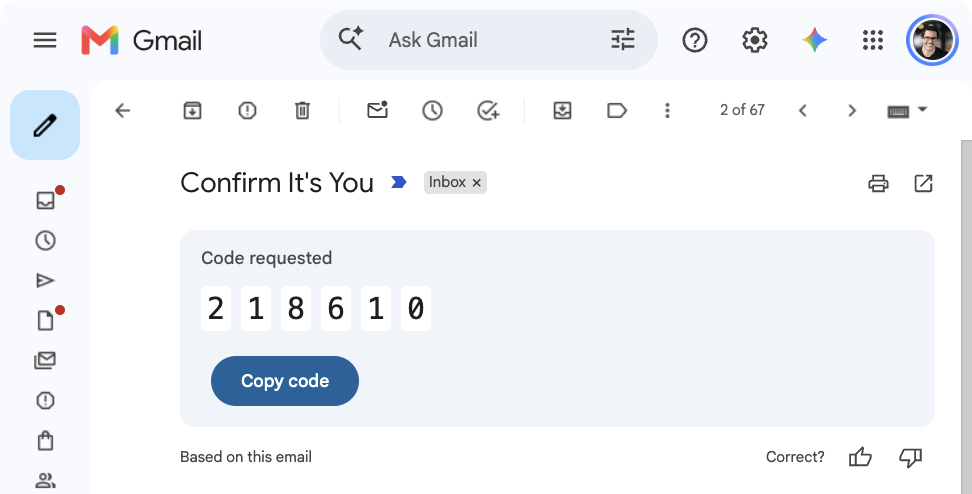
Making the code easier to copy is a start. If you want to build a more frictionless experience, there are two web APIs you're going to need to know: Email Verification and WebOTP.
2. Email Verification API spec
If a user is logged in to a webmail provider that supports the Email Verification API, in a browser that supports it, your app can verify their email address without sending a verification email.
The browser and the inbox provider create a signed token together and add it to a hidden input in your form:
<input name="email" type="email" autocomplete="email"><input type="hidden" name="token" autocomplete="email-verification-token" nonce={nonce}>
Your server can then validate the token, which verifies that the email address belongs to the user. The experience looks like this to the user:
Read the post on the Email Verification API for the details.
Email Verification API
A new proposal aims to enable email verification directly within the browser.
resend.com/blog/email-verification-api
This API is an experiment for now. Even if it becomes a standard, plenty of users don't use webmail and won't be logged in to their mail accounts in the browser. They might use a desktop or mobile email client like Outlook or Apple Mail instead.
Those users still need to verify their email addresses and will need to go through the one-time code process.
3. OTP Token spec
This is where the OTP-Token spec could come in, and we think it will be related to SMS and the existing WebOTP spec.
What is WebOTP?
WebOTP is a web platform API that extracts one-time codes from SMS messages. It lets developers automatically submit the OTP on behalf of the user with their permission.
WebOTP is supported in Google Chrome and other Chromium-based browsers and it looks like this in action.
Safari on iOS and macOS uses an alternative approach to WebOTP. The browser offers to autocomplete OTPs that have arrived by SMS when you add the autocomplete="one-time-code" attribute to the <input> element.
Both methods reduce the friction of filling in these codes.
To see why the OTP-Token email header fits well with WebOTP, let's take a look at how WebOTP works.
How WebOTP works
WebOTP is a two-step process:
- Your application sends an SMS message with an OTP formatted as an origin-bound one-time code.
- The JavaScript on the page requests the code as a credential from the Credential Management API.
An origin-bound one-time code requires the last line of the SMS message to include the domain the code is for and the code itself, for example:
Your Example sign-in code is 123456.
@example.com #123456
Build the verification form with an input that uses the one-time-code autocomplete value to enable the Safari autocomplete behavior.
<form><label for="code">Verification code:</label><inputtype="text"inputmode="numeric"autocomplete="one-time-code"maxlength="6"pattern="\d{6}"id="code"name="code"><button type="submit">Verify</button></form>
To retrieve the OTP from the SMS, you call navigator.credentials.get() with an object of options that includes an otp property. You can pass further options in an object on the otp property, like the transport from which you are requesting the OTP.
Currently, the only valid transport is "sms". Make the call before your server sends the SMS, because the browser only picks up messages that arrive after the request starts.
When the SMS arrives, Chrome asks the user for permission, then resolves the promise with an object that contains the code. You can use the code to fill in and automatically submit the form.
The entire process looks like this:
if ('OTPCredential' in window) {const input = document.querySelector('input[autocomplete="one-time-code"]');const form = input.closest('form');const controller = new AbortController();// Stop listening for an SMS if the user submits the form themselvesform.addEventListener('submit', () => controller.abort());try {const otp = await navigator.credentials.get({otp: { transport: ['sms'] },signal: controller.signal,});input.value = otp.code;form.requestSubmit();} catch (err) {console.log(err);}}
WebOTP even works across devices. Chrome on desktop can get the code from the Android phone that received the SMS, as long as both are signed in to the same Google account.
Crucially, the browser only does this if the domain in the message matches the site the user is on. A phishing site can't receive a code meant for your domain.
For an even easier implementation, there's also a <web-otp-input> web component that handles all of the above for you.
Where OTP-Token fits in
OTP-Token is a new header proposal for emails. It includes the code and the origin on which the code is valid.
OTP-Token: "123456"; origin="https://example.com"
You might notice that's the same information as the last line of a WebOTP SMS. With email, you can put machine-readable information in the headers rather than in the body of the message.
The draft spec actually describes itself as an email-based implementation of the SMS origin-bound format. The origin is included in the header in order to avoid phishing, just as it is in the body of the SMS.
Our guess is that email is going to join SMS as a transport option in WebOTP. Mail clients could then extract codes from the OTP-Token header and make them available to the browser, the same way that SMS applications do today.
In the future, you might be able to verify email addresses through WebOTP like this:
const otp = await navigator.credentials.get({otp: { transport: ['email'] },signal: controller.signal,});
A frictionless future
The one thing missing today is the integration between email clients and browsers. Hopefully they agree that it's worth improving the user experience and reducing the chance of phishing.
Browsers may then choose to implement this through the autocomplete attribute or WebOTP.
However, this is speculation for now. The OTP-Token header spec is an early draft and may never become an RFC. No email client reads this header yet. Gmail's code extraction and "Copy code" button appear to work based on heuristics.
Still, we like the direction, and it makes us hopeful.
Prepare your application
If you're sending OTPs over email and want to prepare, you can start sending the OTP-Token header with Resend like this:
import { Resend } from 'resend';const resend = new Resend('re_xxxxxxxxx');await resend.emails.send({from: 'Example <verifications@example.com>',to: ['delivered@resend.dev'],subject: 'Your Example verification code',text: 'Your Example verification code is 123456.',headers: {'OTP-Token': '"123456"; origin="https://example.com"',},});
In the meantime, read up on WebOTP, check out the Email Verification API, and support the spec as it moves through the standards process.