

Your domain keeps sending at all times while we verify the new DNS record, and
nothing else changes: your API calls, SMTP credentials, and webhooks all stay
the same.
Activate Resend Forge
Activating Forge requires one CNAME record for sending domains. In the case of receiving, you will need to update one MX record. No code changes are required in either case.1
Open the activation page
- Go to Domains and select your domain.
-
Under Configuration, click Activate Resend Forge.
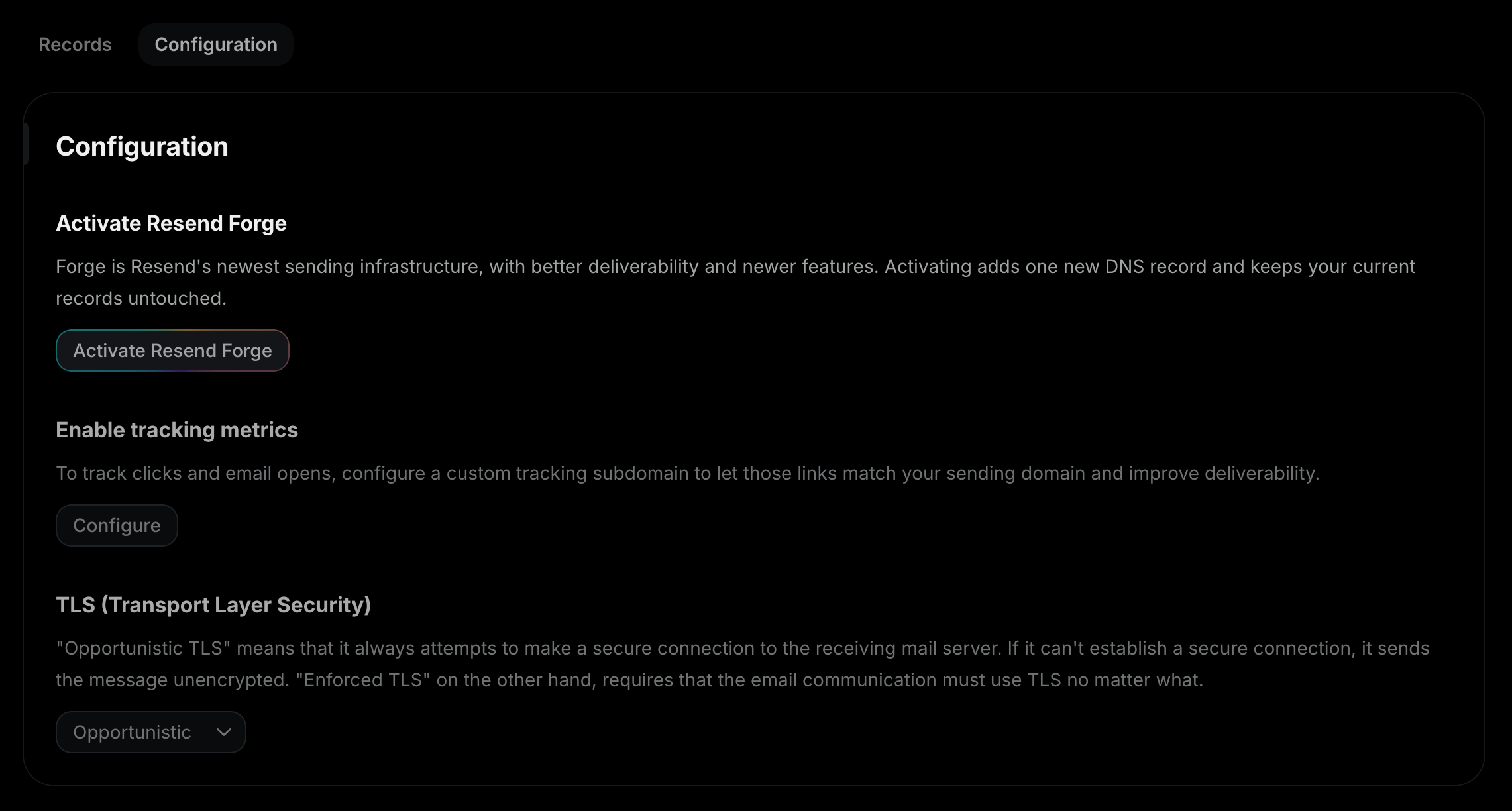
2
Choose the Return-Path
Receiving-only domains don’t need a Return-Path, so you will only see the
record updates your domain needs.
mail.yourdomain.com).
We suggest an available one by default. You can type a different one, and the
field checks that the subdomain is free before you continue.Click Activate Forge.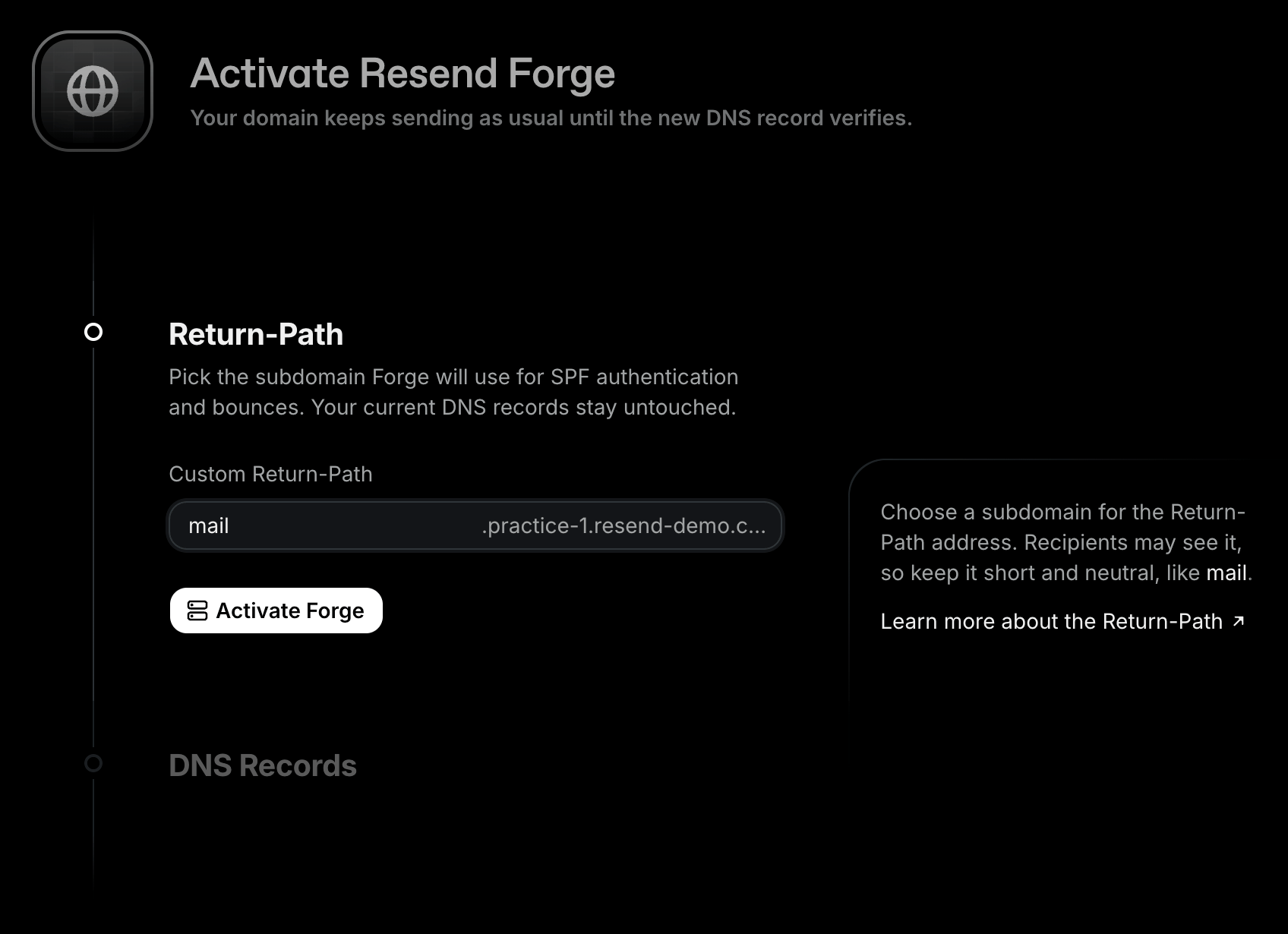
3
Add the CNAME record
If your DNS provider supports Domain Connect, click Auto
configure and authorize Resend to add the record for you. The domain
verifies on its own after that.Otherwise, click Manual setup and add the CNAME record shown on the page
at your DNS provider, then click I’ve added the records. Your existing
DNS records stay untouched. Don’t remove them.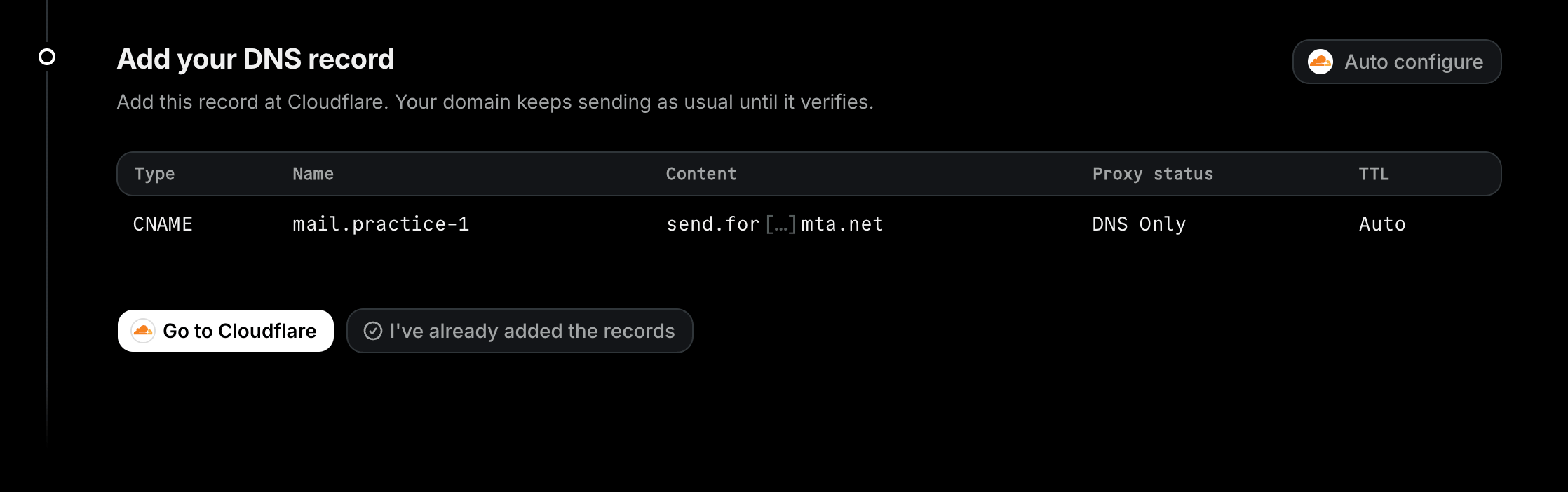
4
Verify
Once the record verifies, the Forge section of your domain’s page shows an
Enabled tag. From there, Resend gradually moves your sending onto Forge to
keep deliverability high, and the share of your email going through Forge
grows over time. Once your email is routing through Forge, the tag changes to
Active.
Domain Connect
Domain Connect lets Resend add the Forge records to your DNS for you. If your domain’s DNS provider supports it, the DNS Records step shows an Auto configure button.- Click Auto configure.
- Sign in to your DNS provider in the window that opens and authorize the change.
- Resend adds the CNAME record and starts verifying it. You’re sent back to your domain’s page.
Troubleshooting
If the Forge record doesn’t verify, these are some common troubleshooting methods.My DNS provider rejects the CNAME record.
My DNS provider rejects the CNAME record.
A CNAME can’t coexist with other records at the same name. If the subdomain
you chose already has records (e.g., an A, TXT, or MX record), pick a
different Return-Path: under Configuration, click Finish Forge
setup, then click Change next to the Return-Path and choose another
name.
I added the record but it never verifies.
I added the record but it never verifies.
DNS changes can take up to 72 hours to propagate, though they’re usually much
faster. Check that the record name and value match exactly what the Dashboard
shows, and rule out copy and paste errors. Some DNS providers auto-append
your domain name to record values; if the record value shows your domain
twice, add a trailing period to the value.If you use Cloudflare, check the record’s proxy status: it must be DNS
only, not proxied (the cloud icon is gray, not orange). Proxied records
don’t resolve as CNAMEs, so verification will fail.Also confirm you added the record at the DNS provider that actually controls
your domain’s DNS. If your DNS is managed in multiple places (e.g., your
registrar and Cloudflare), run a nameserver lookup with a tool like
dns.email to see which provider to use.
The record shows as failed. How do I restart verification?
The record shows as failed. How do I restart verification?
- Open your domain’s page. Under Configuration, click Finish Forge setup.
- The page shows your CNAME record again. Confirm it matches what’s in your DNS provider and click I’ve added the records to restart verification.
Requirements
- Domains on a Dedicated IP can’t activate Forge. Contact support@resend.com.
- Open and click tracking aren’t supported on Forge yet. You can activate Forge on a domain that has tracking turned on, but its email keeps going through the current infrastructure until you turn tracking off.
FAQ
What happens if Forge has an incident or can't deliver an email?
What happens if Forge has an incident or can't deliver an email?
Your email still goes out. If Forge can’t complete a delivery, we route it
through the engine Resend has used for years. The fallback is automatic and
you don’t need to do anything.
How long does Forge retry a delayed email?
How long does Forge retry a delayed email?
When the receiving server asks to try again later, for example with
greylisting or a temporary rate limit, Forge keeps retrying for up to 48
hours. Other temporary failures go back to the engine Resend has used for
years, which retries for up to 14 hours. An email that still isn’t accepted
when its retry window ends is marked as
bounced.Do I need to change my code, SMTP settings, or webhooks?
Do I need to change my code, SMTP settings, or webhooks?
No. Forge sits behind the same send path, so your API calls, SMTP
credentials, and webhook events keep working exactly as today.
Why does Forge need a new Return-Path subdomain?
Why does Forge need a new Return-Path subdomain?
The Return-Path is the address receivers use to return bounces and to check
SPF. Forge delivers from infrastructure Resend owns, so the CNAME points
that subdomain at Forge. This keeps SPF aligned with your domain and lets us
process bounces. Your existing DNS records stay as they are.
Which region does Forge send from and receive at?
Which region does Forge send from and receive at?
Forge runs only in North Virginia (
us-east-1). Data residency is the same
as for every other region. See Data
Residency for details.I have activated Forge but I'm still seeing the old headers
I have activated Forge but I'm still seeing the old headers
The Enabled tag means your domain is ready for Forge. Resend moves your
sending onto Forge gradually, so for a while part of your email still goes
out the usual way. You don’t need to do anything.