> ## Documentation Index
> Fetch the complete documentation index at: https://resend.com/docs/llms.txt
> Use this file to discover all available pages before exploring further.
# Why are my emails landing on the Suppression List?
> Learn why your emails land on the Suppression List and how to remove them.
When sending to an email address results in a hard bounce or spam complaint, Resend places this address on the Suppression List. Future emails to addresses on the list will be marked as `suppressed` and won't be delivered until the address is removed.
We place emails on the Suppression List to protect domain reputation, both
yours and ours. Sending an email to a known hard bounce recipient can damage
domain reputation and affect email deliverability.
## Reasons emails are placed on the Suppression List
Here are some possible reasons an email address is placed on the Suppression List:
* The recipient's email address **contains a typo**.
* The recipient's email address **doesn't exist**.
* The recipient's email server has **permanently blocked delivery**.
* The recipient has marked a previous delivery as spam.
## What happens when you send to an address on the Suppression List?
Whenever you send an email with Resend, we check if the recipient is on the suppression list. If they are, we'll [suppress](/dashboard/emails/email-suppressions) the delivery to prevent damaging your sender reputation and our infrastructure.
Suppressed emails will appear with a `suppressed` status in your [Emails](https://resend.com/emails) dashboard:
## View suppression details
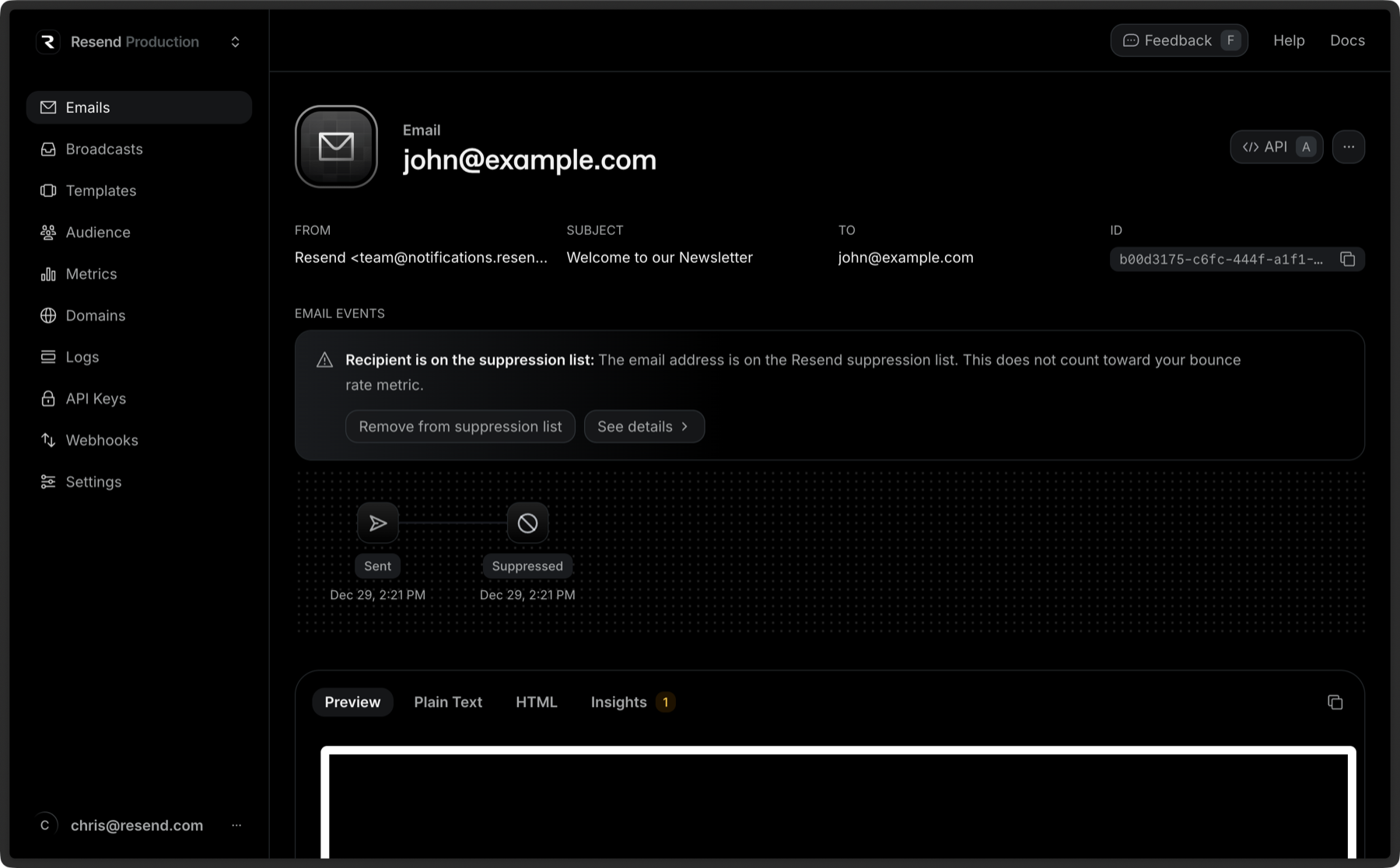
You can view the reason an email was suppressed on the [Emails](https://resend.com/emails) page:
1. Open the [Emails](https://resend.com/emails) page and search for the recipient's email address in question.
2. Click on the email to view its details.
3. The suppression details will show suggested fixes to help you resolve the issue.
## Removing an email address from the Suppression List
You may be able to send a message to the same recipient in the future if the issue that caused the original bounce or complaint is resolved and the email address is removed from the Suppression List.
Remember, if you do not address the issue that caused the email to bounce, the
email address will return to the Suppression List the next time you attempt to
send to it.
To remove your recipient from the Suppression List, click on the suppressed email in the [emails dashboard](https://resend.com/emails), and click **Remove from suppression list**.
 ## View suppression details
You can view the reason an email was suppressed on the [Emails](https://resend.com/emails) page:
1. Open the [Emails](https://resend.com/emails) page and search for the recipient's email address in question.
2. Click on the email to view its details.
3. The suppression details will show suggested fixes to help you resolve the issue.
## Removing an email address from the Suppression List
You may be able to send a message to the same recipient in the future if the issue that caused the original bounce or complaint is resolved and the email address is removed from the Suppression List.
## View suppression details
You can view the reason an email was suppressed on the [Emails](https://resend.com/emails) page:
1. Open the [Emails](https://resend.com/emails) page and search for the recipient's email address in question.
2. Click on the email to view its details.
3. The suppression details will show suggested fixes to help you resolve the issue.
## Removing an email address from the Suppression List
You may be able to send a message to the same recipient in the future if the issue that caused the original bounce or complaint is resolved and the email address is removed from the Suppression List.