> ## Documentation Index
> Fetch the complete documentation index at: https://resend.com/docs/llms.txt
> Use this file to discover all available pages before exploring further.
# How do I send with an avatar?
> Learn how to show your avatar in the inbox of your recipients.
[Recent studies](https://www.businesswire.com/news/home/20210720005361/en/Red-Sift-and-Entrust-Survey-Showing-a-Logo-Positively-Affects-Consumer-Interaction-With-Emails-Open-Rates-Buying-Behavior-Brand-Recall-and-Confidence) are showing meaningful benefits of displaying your logo in the inbox:
* Increases brand recall by 18%.
* Improves open rate by 21%.
* Boosts purchase likelihood by 34%.
* Reinforces confidence in email by 90%.
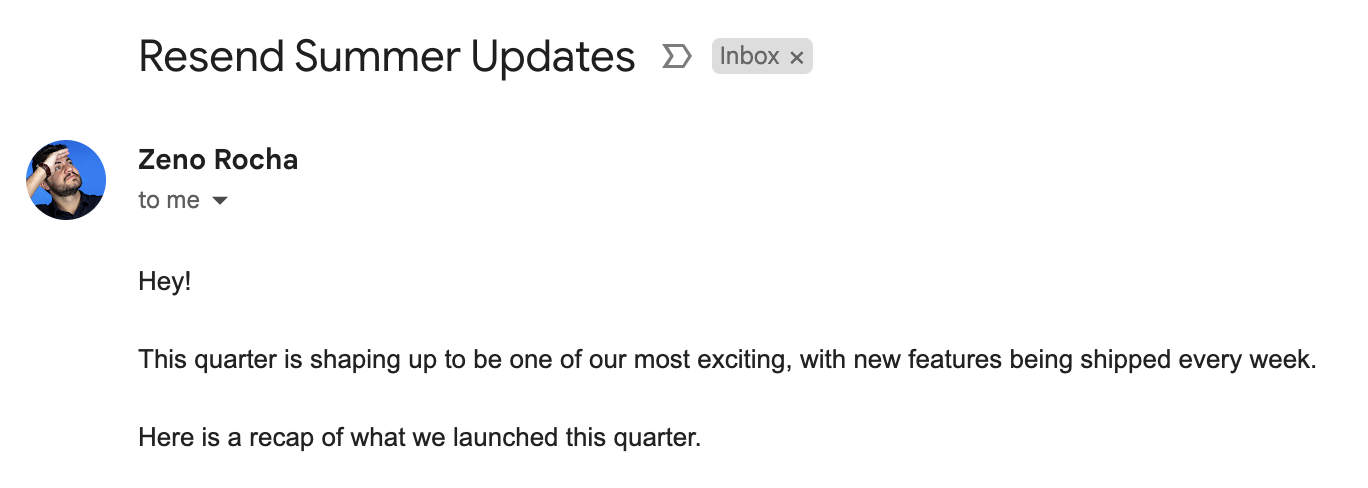 ## Gmail
Follow these steps to add an avatar to your Gmail inbox:
1. Go to your [Google Account Settings](https://myaccount.google.com/personal-info)
2. Upload a profile picture
Avatars in Gmail only display in the mobile app (including in push notifications) and inside opened emails on desktop.
## Outlook
Follow these steps to add an avatar to your Outlook inbox:
1. Go to your [Outlook Profile Settings](https://account.microsoft.com/profile/)
2. Upload a profile picture
Avatars in Outlook only display in the mobile app and inside opened emails on desktop.
## Yahoo
Follow these steps to add an avatar to your Yahoo inbox:
1. Go to your [Yahoo Account Setting](https://login.yahoo.com/account/personalinfo)
2. Upload a profile picture
Avatars in Yahoo only display in the mobile app and inside an opened email on desktop.
## Apple Mail
Apple Mail only shows avatars if recipients have added images to contacts. Alternatively, you can set up [Apple Branded Mail](/knowledge-base/how-do-i-set-up-apple-branded-mail), a proprietary Apple format introduced with iOS 18.2 that displays your logo as an avatar in the inbox of Apple Mail, or [set up BIMI](/dashboard/domains/bimi#what-is-bimi) with a Verified Mark Certificate.
## Using Gravatar
Some inbox service providers or email clients (e.g. Thunderbird, Airmail, and Postbox) rely on [Gravatar](https://gravatar.com/) to display an image.
You can set up a free Gravatar account, add your avatar, and verify your addresses you're sending from to that account to have your avatar displayed.
## Limitations
Almost every email provider has its own way of adding a profile picture to an inbox.
This means **you can only**:
1. Add your avatar to a real inbox, limiting it only to that provider
2. Send mail from the same address that you set the avatar on
The way around this is [BIMI (Brand Indicators for Message Identification)](/dashboard/domains/bimi). BIMI now supports Common Mark Certificates (CMC) in addition to Verified Mark Certificates (VMC), making it more accessible. It is supported by nearly all major providers and allows you to send from any address on that domain.
Need assistance setting up BIMI? [We can help](https://resend.com/help).
## Gmail
Follow these steps to add an avatar to your Gmail inbox:
1. Go to your [Google Account Settings](https://myaccount.google.com/personal-info)
2. Upload a profile picture
Avatars in Gmail only display in the mobile app (including in push notifications) and inside opened emails on desktop.
## Outlook
Follow these steps to add an avatar to your Outlook inbox:
1. Go to your [Outlook Profile Settings](https://account.microsoft.com/profile/)
2. Upload a profile picture
Avatars in Outlook only display in the mobile app and inside opened emails on desktop.
## Yahoo
Follow these steps to add an avatar to your Yahoo inbox:
1. Go to your [Yahoo Account Setting](https://login.yahoo.com/account/personalinfo)
2. Upload a profile picture
Avatars in Yahoo only display in the mobile app and inside an opened email on desktop.
## Apple Mail
Apple Mail only shows avatars if recipients have added images to contacts. Alternatively, you can set up [Apple Branded Mail](/knowledge-base/how-do-i-set-up-apple-branded-mail), a proprietary Apple format introduced with iOS 18.2 that displays your logo as an avatar in the inbox of Apple Mail, or [set up BIMI](/dashboard/domains/bimi#what-is-bimi) with a Verified Mark Certificate.
## Using Gravatar
Some inbox service providers or email clients (e.g. Thunderbird, Airmail, and Postbox) rely on [Gravatar](https://gravatar.com/) to display an image.
You can set up a free Gravatar account, add your avatar, and verify your addresses you're sending from to that account to have your avatar displayed.
## Limitations
Almost every email provider has its own way of adding a profile picture to an inbox.
This means **you can only**:
1. Add your avatar to a real inbox, limiting it only to that provider
2. Send mail from the same address that you set the avatar on
The way around this is [BIMI (Brand Indicators for Message Identification)](/dashboard/domains/bimi). BIMI now supports Common Mark Certificates (CMC) in addition to Verified Mark Certificates (VMC), making it more accessible. It is supported by nearly all major providers and allows you to send from any address on that domain.
Need assistance setting up BIMI? [We can help](https://resend.com/help).