> ## Documentation Index
> Fetch the complete documentation index at: https://resend.com/docs/llms.txt
> Use this file to discover all available pages before exploring further.
# Working with Variables
> How to work with custom variables in Templates.
Custom Template variables provide your team flexibility when sending emails. Define custom variables for your Template with optional fallback values which will be replaced with the actual values when sending the email.
## Create custom variables
Each Template may contain up to 50 variables.
To add a custom variable, select **Variable** in the commands palette or type `{{` in the editor. Define the `name`, `type`, and `fallback_value` (optional).
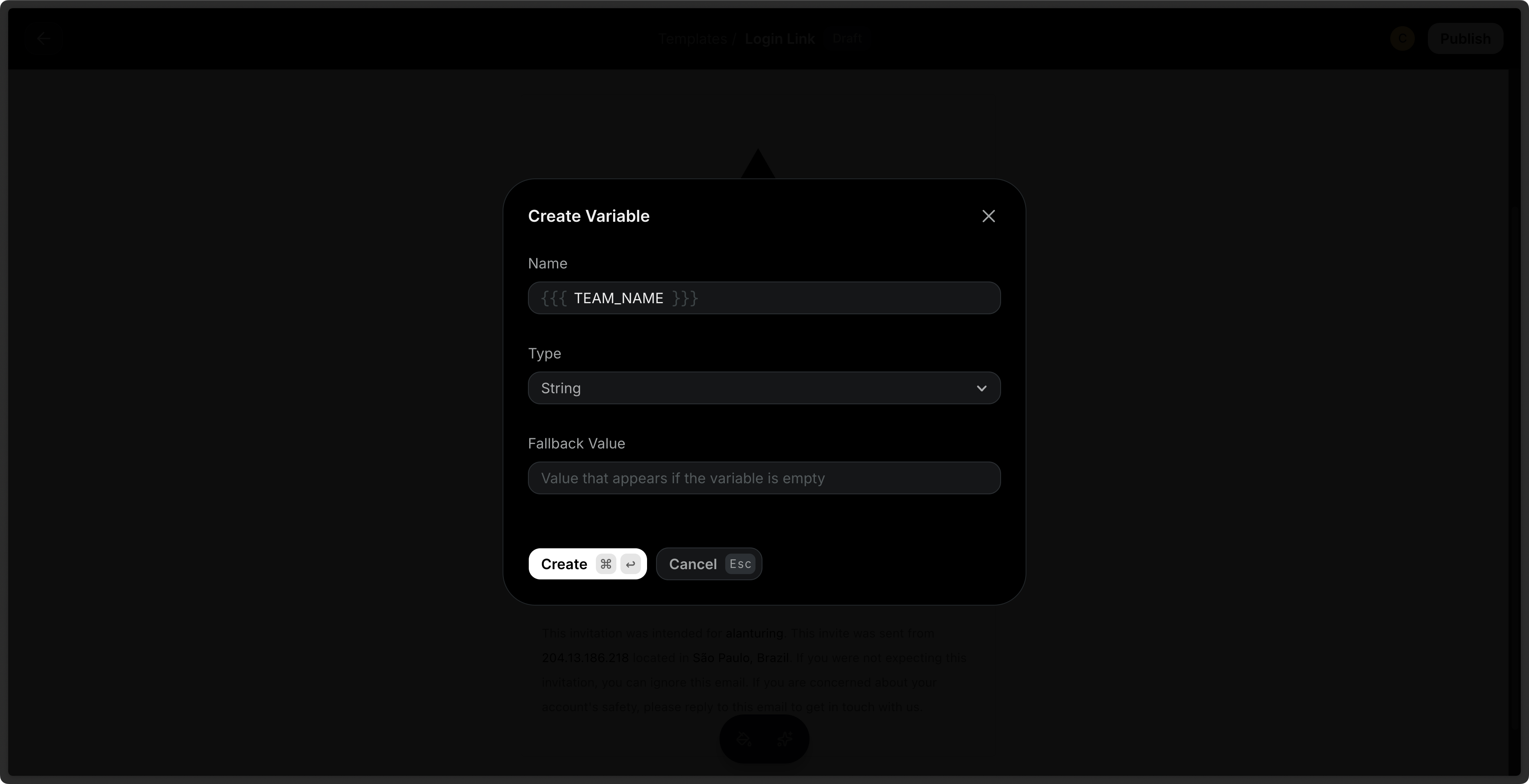
You can also define custom variables via the API. The payload can optionally
include variables to be used in the Template.
```ts Node.js theme={"theme":{"light":"github-light","dark":"vesper"}}
import { Resend } from 'resend';
const resend = new Resend('re_xxxxxxxxx');
await resend.templates.create({
name: 'order-confirmation',
html: 'Name: {{{PRODUCT}}}
Total: {{{PRICE}}}
',
variables: [
{
key: 'PRODUCT',
type: 'string',
fallbackValue: 'item',
},
{
key: 'PRICE',
type: 'number',
fallbackValue: 25,
},
],
});
```
```php PHP theme={"theme":{"light":"github-light","dark":"vesper"}}
$resend = Resend::client('re_xxxxxxxxx');
$resend->templates->create([
'name' => 'order-confirmation',
'html' => 'Name: {{{PRODUCT}}}
Total: {{{PRICE}}}
',
'variables' => [
[
'key' => 'PRODUCT',
'type' => 'string',
'fallback_value' => 'item',
],
[
'key' => 'PRICE',
'type' => 'number',
'fallback_value' => 25,
]
],
]);
```
```py Python theme={"theme":{"light":"github-light","dark":"vesper"}}
import resend
resend.api_key = "re_xxxxxxxxx"
resend.Templates.create({
"name": "order-confirmation",
"html": "Name: {{{PRODUCT}}}
Total: {{{PRICE}}}
",
"variables": [
{
"key": "PRODUCT",
"type": "string",
"fallback_value": "item",
},
{
"key": "PRICE",
"type": "number",
"fallback_value": 25,
}
],
})
```
```ruby Ruby theme={"theme":{"light":"github-light","dark":"vesper"}}
require "resend"
Resend.api_key = "re_xxxxxxxxx"
Resend::Templates.create(
name: "order-confirmation",
html: "Name: {{{PRODUCT}}}
Total: {{{PRICE}}}
",
variables: [
{
key: "PRODUCT",
type: "string",
fallback_value: "item"
},
{
key: "PRICE",
type: "number",
fallback_value: 25
}
]
)
```
```go Go theme={"theme":{"light":"github-light","dark":"vesper"}}
import (
"context"
"github.com/resend/resend-go/v3"
)
func main() {
client := resend.NewClient("re_xxxxxxxxx")
template, err := client.Templates.CreateWithContext(context.TODO(), &resend.CreateTemplateRequest{
Name: "order-confirmation",
Html: "Name: {{{PRODUCT}}}
Total: {{{PRICE}}}
",
Variables: []*resend.TemplateVariable{
{
Key: "PRODUCT",
Type: resend.VariableTypeString,
FallbackValue: "item",
},
{
Key: "PRICE",
Type: resend.VariableTypeNumber,
FallbackValue: 25,
}
},
})
}
```
```rust Rust theme={"theme":{"light":"github-light","dark":"vesper"}}
use resend_rs::{
types::{CreateTemplateOptions, Variable, VariableType},
Resend, Result,
};
#[tokio::main]
async fn main() -> Result<()> {
let resend = Resend::new("re_xxxxxxxxx");
let name = "order-confirmation";
let html = "Name: {{{PRODUCT}}}
Total: {{{PRICE}}}
";
let variables = [
Variable::new("PRODUCT", VariableType::String).with_fallback("item"),
Variable::new("PRICE", VariableType::Number).with_fallback(25)
];
let opts = CreateTemplateOptions::new(name, html).with_variables(&variables);
let template = resend.templates.create(opts).await?;
let _published = resend.templates.publish(&template.id).await?;
Ok(())
}
```
```java Java theme={"theme":{"light":"github-light","dark":"vesper"}}
import com.resend.*;
public class Main {
public static void main(String[] args) {
Resend resend = new Resend("re_xxxxxxxxx");
CreateTemplateOptions params = CreateTemplateOptions.builder()
.name("order-confirmation")
.html("Name: {{{PRODUCT}}}
Total: {{{PRICE}}}
")
.addVariable(new Variable("PRODUCT", VariableType.STRING, "item"))
.addVariable(new Variable("PRICE", VariableType.NUMBER, 25))
.build();
CreateTemplateResponseSuccess data = resend.templates().create(params);
}
}
```
```csharp .NET theme={"theme":{"light":"github-light","dark":"vesper"}}
using Resend;
IResend resend = ResendClient.Create("re_xxxxxxxxx");
var variables = new List()
{
new TemplateVariable() {
Key = "PRODUCT",
Type = TemplateVariableType.String,
Default = "item",
},
new TemplateVariable() {
Key = "PRICE",
Type = TemplateVariableType.Number,
Default = 25,
}
};
var resp = await resend.TemplateCreateAsync(
new TemplateData()
{
Name = "welcome-email",
HtmlBody = "Hey, {{{PRODUCT}}}, you are {{{PRICE}}} years old.",
Variables = variables,
}
);
Console.WriteLine($"Template Id={resp.Content}");
```
```bash cURL theme={"theme":{"light":"github-light","dark":"vesper"}}
curl -X POST 'https://api.resend.com/templates' \
-H 'Authorization: Bearer re_xxxxxxxxx' \
-H 'Content-Type: application/json' \
-d $'{
"name": "order-confirmation",
"html": "Name: {{{PRODUCT}}}
Total: {{{PRICE}}}
",
"variables": [
{
"key": "PRODUCT",
"type": "string",
"fallback_value": "item"
},
{
"key": "PRICE",
"type": "number",
"fallback_value": 25
}
]
}'
```
The following variable names are reserved and cannot be used: `FIRST_NAME`,
`LAST_NAME`, `EMAIL`, `UNSUBSCRIBE_URL`, `contact`,`this`.
Each variable is an object with the following properties:
* `key`: The key of the variable. We recommend capitalizing the key. (e.g. `PRODUCT_NAME`).
* `type`: The type of the variable (`'string'` or `'number'`).
* `fallback_value`: The fallback value of the variable. If no fallback value is provided, you must provide a value for the variable when sending an email using the template.
[See the API reference for more details](/api-reference/templates/create-template).
## Fallback values
When you define a variable, you can optionally define a fallback value. This value will be used when sending the email if you fail to provide a value in your call.
In the editor, if you fail to provide a fallback value, a warning sign will show for the variable. To edit a variable's fallback value, click on the variable chip in your template and use the Inspector sidebar on the right to update the fallback value.
[As shown above](#create-template-with-variables), you can also include fallback values when creating a Template via the API.
## Send Test Emails
You can send test emails to your inbox to preview your Template before sending it to your audience. Provide variable values to test the rendered Template in your inbox.
## Send a Template with Variables
When sending a transactional email, you can reference your Template and include your variables in the call. The Template variables will be replaced with the actual values.
* `id`: id of the published template
* `variables`: array of variable objects (if applicable)
Both the `/emails` and `/emails/batch` endpoints support Templates.
```ts Node.js theme={"theme":{"light":"github-light","dark":"vesper"}}
import { Resend } from 'resend';
const resend = new Resend('re_xxxxxxxxx');
const { data, error } = await resend.emails.send({
from: 'Acme ',
to: ['delivered@resend.dev'],
subject: 'hello world',
template: {
id: 'f3b9756c-f4f4-44da-bc00-9f7903c8a83f',
variables: {
PRODUCT: 'Laptop',
},
},
});
```
```php PHP theme={"theme":{"light":"github-light","dark":"vesper"}}
$resend = Resend::client('re_xxxxxxxxx');
$resend->emails->send([
'from' => 'Acme ',
'to' => ['delivered@resend.dev'],
'subject' => 'hello world',
'template'=> [
'id' => 'f3b9756c-f4f4-44da-bc00-9f7903c8a83f',
'variables' => [
'PRODUCT' => 'Laptop'
]
]
]);
```
```python Python theme={"theme":{"light":"github-light","dark":"vesper"}}
import resend
resend.api_key = "re_xxxxxxxxx"
params: resend.Emails.SendParams = {
"from": "Acme ",
"to": ["delivered@resend.dev"],
"subject": "hello world",
"template": {
"id": "f3b9756c-f4f4-44da-bc00-9f7903c8a83f",
"variables": {
"PRODUCT": "Laptop",
},
},
}
email = resend.Emails.send(params)
```
```ruby Ruby theme={"theme":{"light":"github-light","dark":"vesper"}}
require 'resend'
Resend.api_key = 're_xxxxxxxxx'
params = {
from: 'Acme ',
to: ['delivered@resend.dev'],
subject: 'hello world',
template: {
id: 'f3b9756c-f4f4-44da-bc00-9f7903c8a83f',
variables: {
'PRODUCT': 'Laptop'
}
}
}
email = Resend::Emails.send(params)
```
```go Go theme={"theme":{"light":"github-light","dark":"vesper"}}
import (
"context"
"github.com/resend/resend-go/v3"
)
func main() {
client := resend.NewClient("re_xxxxxxxxx")
params := &resend.SendEmailRequest{
From: "Acme ",
To: []string{"delivered@resend.dev"},
Subject: "hello world",
Template: &resend.EmailTemplate{
ID: "f3b9756c-f4f4-44da-bc00-9f7903c8a83f",
Variables: map[string]interface{}{
"PRODUCT": "Laptop",
},
},
}
sent, err := client.Emails.SendWithContext(context.TODO(), params)
}
```
```rust Rust theme={"theme":{"light":"github-light","dark":"vesper"}}
use resend_rs::{types::CreateEmailBaseOptions, Resend, Result};
use std::collections::HashMap;
#[tokio::main]
async fn main() -> Result<()> {
let resend = Resend::new("re_xxxxxxxxx");
let from = "Acme ";
let to = ["delivered@resend.dev"];
let subject = "hello world";
let mut variables = HashMap::new();
variables.insert("PRODUCT".to_string(), "Laptop".to_string());
let email = CreateEmailBaseOptions::new(from, to, subject)
.with_template("f3b9756c-f4f4-44da-bc00-9f7903c8a83f", variables);
let _email = resend.emails.send(email).await?;
Ok(())
}
```
```java Java theme={"theme":{"light":"github-light","dark":"vesper"}}
import com.resend.*;
import java.util.HashMap;
import java.util.Map;
public class Main {
public static void main(String[] args) {
Resend resend = new Resend("re_xxxxxxxxx");
Map variables = new HashMap<>();
variables.put("PRODUCT", "Laptop");
CreateEmailOptions params = CreateEmailOptions.builder()
.from("Acme ")
.to("delivered@resend.dev")
.subject("hello world")
.template("f3b9756c-f4f4-44da-bc00-9f7903c8a83f", variables)
.build();
CreateEmailResponse data = resend.emails().send(params);
}
}
```
```csharp .NET theme={"theme":{"light":"github-light","dark":"vesper"}}
using Resend;
IResend resend = ResendClient.Create( "re_xxxxxxxxx" ); // Or from DI
var resp = await resend.EmailSendAsync( new EmailMessage()
{
From = "Acme ",
To = "delivered@resend.dev",
Subject = "hello world",
Template = new EmailMessageTemplate() {
TemplateId = new Guid( "f3b9756c-f4f4-44da-bc00-9f7903c8a83f" ),
Variables = new Dictionary()
{
{ "PRODUCT", "Laptop" },
{ "PRICE", 1.23 }
}
}
} );
Console.WriteLine( "Email Id={0}", resp.Content );
```
```bash cURL theme={"theme":{"light":"github-light","dark":"vesper"}}
curl -X POST 'https://api.resend.com/emails' \
-H 'Authorization: Bearer re_xxxxxxxxx' \
-H 'Content-Type: application/json' \
-d $'{
"from": "Acme ",
"to": ["delivered@resend.dev"],
"subject": "hello world",
"template": {
"id": "f3b9756c-f4f4-44da-bc00-9f7903c8a83f",
"variables": {
"PRODUCT": "Laptop"
}
}
}'
```
If a `template` is provided, you cannot send `html`, `text`, or `react` in the payload, otherwise the API will return a validation error.
When sending a template, the payload for `from`, `subject`, and `reply_to` take precedence over the template's defaults for these fields. If the template does not provide a default value for these fields, you must provide them in the payload.
Learn more about [sending emails](/api-reference/emails/send-email) or sending [batch emails](/api-reference/emails/send-batch-emails) with Templates via the API.