> ## Documentation Index
> Fetch the complete documentation index at: https://resend.com/docs/llms.txt
> Use this file to discover all available pages before exploring further.
# Using Templates
> Learn how to use templates to send emails.
Templates are stored on Resend and can be referenced when you send transactional emails. With Templates, define the structure and layout of a message and optionally include custom variables which will be replaced with the actual values when sending the email.
Send only the Template `id` and `variables` (instead of sending the HTML), and Resend will render your final email and send it out.
```ts Node.js {8-14} theme={"theme":{"light":"github-light","dark":"vesper"}}
import { Resend } from 'resend';
const resend = new Resend('re_xxxxxxxxx');
await resend.emails.send({
from: 'Acme ',
to: 'delivered@resend.dev',
template: {
id: 'order-confirmation',
variables: {
PRODUCT: 'Vintage Macintosh',
PRICE: 499,
},
},
});
```
```php PHP {7-12} theme={"theme":{"light":"github-light","dark":"vesper"}}
$resend = Resend::client('re_xxxxxxxxx');
$resend->emails->send([
'from' => 'Acme ',
'to' => ['delivered@resend.dev'],
'subject' => 'hello world',
'template'=> [
'id' => 'f3b9756c-f4f4-44da-bc00-9f7903c8a83f',
'variables' => [
'PRODUCT' => 'Vintage Macintosh',
'PRICE' => 499,
]
]
]);
```
```python Python {8-14} theme={"theme":{"light":"github-light","dark":"vesper"}}
import resend
resend.api_key = "re_xxxxxxxxx"
resend.Emails.send({
"from": "Acme ",
"to": "delivered@resend.dev",
"template": {
"id": "order-confirmation",
"variables": {
"PRODUCT": "Vintage Macintosh",
"PRICE": 499
}
}
})
```
```ruby Ruby {8-14} theme={"theme":{"light":"github-light","dark":"vesper"}}
require "resend"
Resend.api_key = "re_xxxxxxxxx"
Resend::Emails.send({
from: "Acme ",
to: "delivered@resend.dev",
template: {
id: "order-confirmation",
variables: {
PRODUCT: "Vintage Macintosh",
PRICE: 499
}
}
})
```
```go Go {8-14} theme={"theme":{"light":"github-light","dark":"vesper"}}
import "github.com/resend/resend-go/v3"
client := resend.NewClient("re_xxxxxxxxx")
params := &resend.SendEmailRequest{
From: "Acme ",
To: []string{"delivered@resend.dev"},
Template: &resend.EmailTemplate{
Id: "order-confirmation",
Variables: map[string]interface{}{
"PRODUCT": "Vintage Macintosh",
"PRICE": 499,
},
},
}
email, err := client.Emails.Send(params)
```
```rust Rust {7-13} theme={"theme":{"light":"github-light","dark":"vesper"}}
use resend_rs::{types::SendEmailOptions, Resend, Result};
#[tokio::main]
async fn main() -> Result<()> {
let resend = Resend::new("re_xxxxxxxxx");
let variables = serde_json::json!({
"PRODUCT": "Vintage Macintosh",
"PRICE": 499
});
let opts = SendEmailOptions::new("Acme ", vec!["delivered@resend.dev"])
.with_template("order-confirmation", variables);
let _email = resend.emails.send(opts).await?;
Ok(())
}
```
```java Java {3-5,10-13} theme={"theme":{"light":"github-light","dark":"vesper"}}
Resend resend = new Resend("re_xxxxxxxxx");
Map variables = new HashMap<>();
variables.put("PRODUCT", "Vintage Macintosh");
variables.put("PRICE", 499);
SendEmailOptions params = SendEmailOptions.builder()
.from("Acme ")
.to(Arrays.asList("customer@email.com"))
.template(Template.builder()
.id("order-confirmation")
.variables(variables)
.build())
.build();
SendEmailResponseSuccess data = resend.emails().send(params);
```
```csharp .NET {5-9,17-20} theme={"theme":{"light":"github-light","dark":"vesper"}}
using Resend;
IResend resend = ResendClient.Create("re_xxxxxxxxx");
var variables = new Dictionary
{
{ "PRODUCT", "Vintage Macintosh" },
{ "PRICE", 499 }
};
var resp = await resend.EmailSendAsync(
new EmailMessage()
{
From = "Acme ",
To = new[] { "delivered@resend.dev" },
Template = new EmailMessageTemplate()
{
TemplateId = new Guid( "b6d24b8e-af0b-4c3c-be0c-359bbd97381e" ),
Variables = variables
}
}
);
Console.WriteLine($"Email Id={resp.Content}");
```
```bash cURL {7-13} theme={"theme":{"light":"github-light","dark":"vesper"}}
curl -X POST 'https://api.resend.com/emails' \
-H 'Authorization: Bearer re_xxxxxxxxx' \
-H 'Content-Type: application/json' \
-d $'{
"from": "Acme ",
"to": "delivered@resend.dev",
"template": {
"id": "order-confirmation",
"variables": {
"PRODUCT": "Vintage Macintosh",
"PRICE": 499
}
}
}'
```
Use Templates for transactional emails like:
* Login/Auth
* Onboarding
* Ecommerce
* Notifications
* Automations
## Add a Template
You can add a Template:
* [In the dashboard](#add-a-template-in-the-dashboard)
* [From an existing email](#add-a-template-from-an-existing-email)
* [Using the API](#create-a-template-by-using-the-api)
### Add a Template in the dashboard
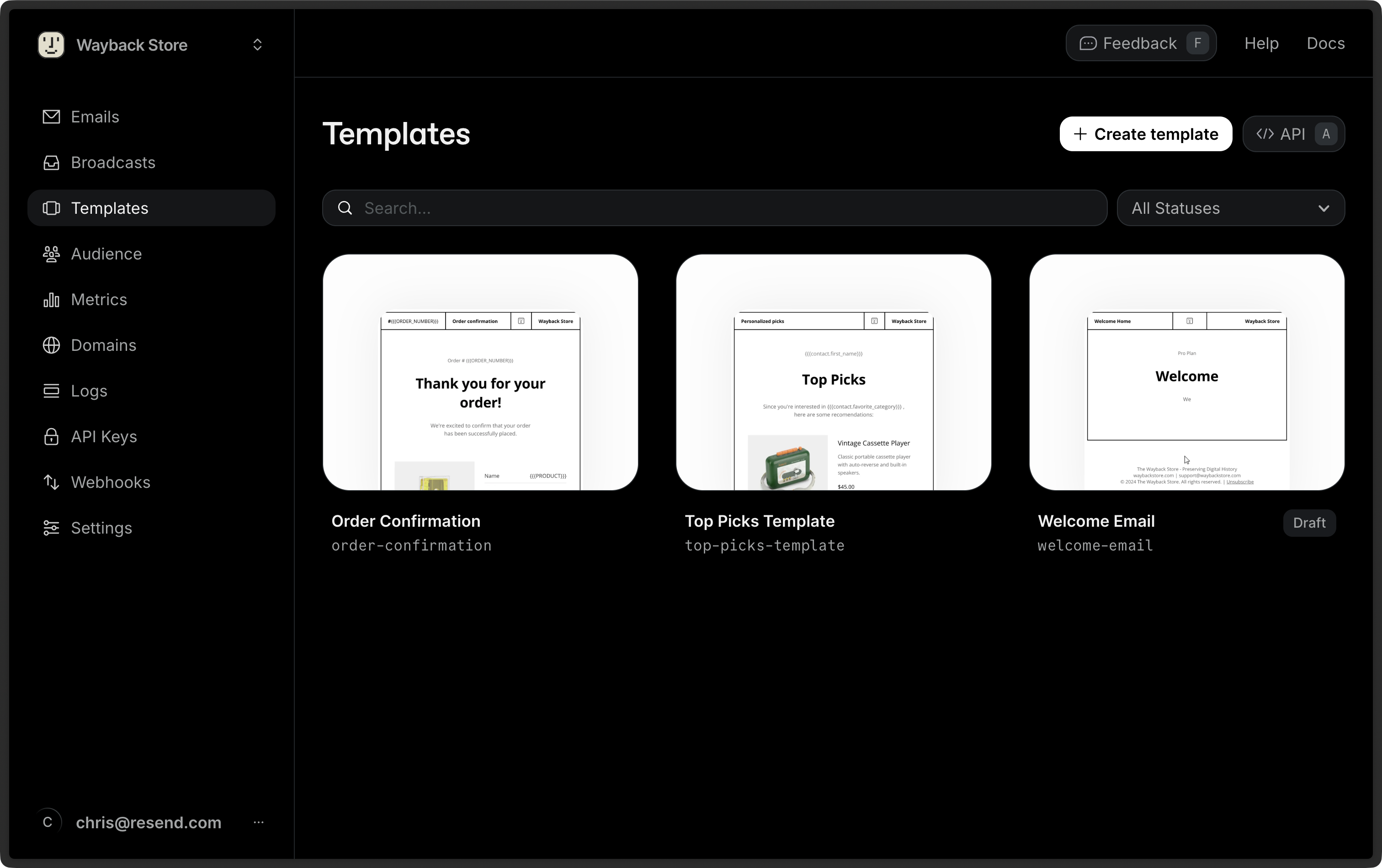
The [Templates dashboard](https://resend.com/templates) shows all existing templates. Click **Create template** to start a new Template.
 ### Add a Template from an existing email
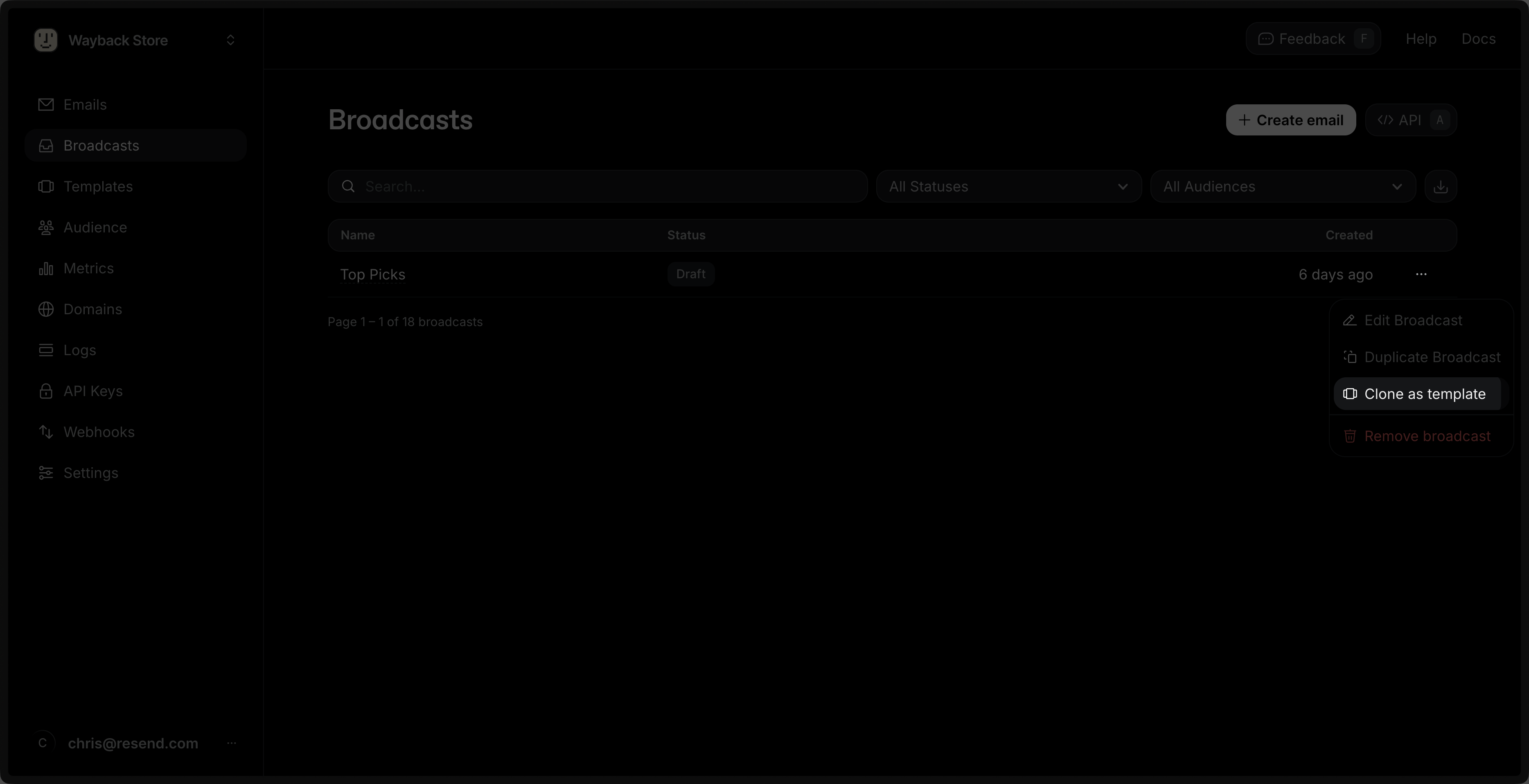
You can create a Template from an existing Broadcast. Locate your desired Broadcast in the [Broadcast dashboard](https://resend.com/broadcasts), click the more options button , and choose **Clone as template**.
### Add a Template from an existing email
You can create a Template from an existing Broadcast. Locate your desired Broadcast in the [Broadcast dashboard](https://resend.com/broadcasts), click the more options button , and choose **Clone as template**.
 You can also import an HTML or [React Email](https://react.email) file to create a Template from your existing code. Create a new Template, then paste or drag in your HTML or React Email content.
When pasting React Email code, only imports from `@react-email/components` and
`react` are supported. Local file imports (e.g., `./components/Logo`) and
other third-party packages are not supported in the editor.
### Create a Template by using the API
You can also programmatically create a Template by using the API. The payload can optionally include variables to be used in the Template.
```ts Node.js theme={"theme":{"light":"github-light","dark":"vesper"}}
import { Resend } from 'resend';
const resend = new Resend('re_xxxxxxxxx');
await resend.templates.create({
name: 'order-confirmation',
from: 'Resend Store ',
subject: 'Thanks for your order!',
html: '
You can also import an HTML or [React Email](https://react.email) file to create a Template from your existing code. Create a new Template, then paste or drag in your HTML or React Email content.
When pasting React Email code, only imports from `@react-email/components` and
`react` are supported. Local file imports (e.g., `./components/Logo`) and
other third-party packages are not supported in the editor.
### Create a Template by using the API
You can also programmatically create a Template by using the API. The payload can optionally include variables to be used in the Template.
```ts Node.js theme={"theme":{"light":"github-light","dark":"vesper"}}
import { Resend } from 'resend';
const resend = new Resend('re_xxxxxxxxx');
await resend.templates.create({
name: 'order-confirmation',
from: 'Resend Store ',
subject: 'Thanks for your order!',
html: 'Name: {{{PRODUCT}}}
Total: {{{PRICE}}}
',
variables: [
{
key: 'PRODUCT',
type: 'string',
fallbackValue: 'item',
},
{
key: 'PRICE',
type: 'number',
fallbackValue: 20,
},
],
});
```
```php PHP theme={"theme":{"light":"github-light","dark":"vesper"}}
$resend = Resend::client('re_xxxxxxxxx');
$resend->templates->create([
'name' => 'order-confirmation',
'from' => 'Resend Store ',
'subject' => 'Thanks for your order!',
'html' => 'Name: {{{PRODUCT}}}
Total: {{{PRICE}}}
',
'variables' => [
[
'key' => 'PRODUCT',
'type' => 'string',
'fallback_value' => 'item'
],
[
'key' => 'PRICE',
'type' => 'number',
'fallback_value' => 49.99
]
]
]);
```
```py Python theme={"theme":{"light":"github-light","dark":"vesper"}}
import resend
resend.api_key = "re_xxxxxxxxx"
params: resend.Templates.CreateParams = {
"name": "order-confirmation",
"from": "Resend Store ",
"subject": "Thanks for your order!",
"html": "Name: {{{PRODUCT}}}
Total: {{{PRICE}}}
",
"variables": [
{
"key": "PRODUCT",
"type": "string",
"fallback_value": "item",
},
{
"key": "PRICE",
"type": "number",
"fallback_value": 20,
},
],
}
resend.Templates.create(params)
```
```ruby Ruby theme={"theme":{"light":"github-light","dark":"vesper"}}
require "resend"
Resend.api_key = "re_xxxxxxxxx"
Resend::Templates.create(
name: "order-confirmation",
from: "Resend Store ",
subject: "Thanks for your order!",
html: "Name: {{{PRODUCT}}}
Total: {{{PRICE}}}
",
variables: [
{
key: "PRODUCT",
type: "string",
fallback_value: "item"
},
{
key: "PRICE",
type: "number",
fallback_value: 20
}
]
)
```
```go Go theme={"theme":{"light":"github-light","dark":"vesper"}}
import "github.com/resend/resend-go/v3"
client := resend.NewClient("re_xxxxxxxxx")
template, err := client.Templates.Create(&resend.CreateTemplateRequest{
Name: "order-confirmation",
From: "Resend Store ",
Subject: "Thanks for your order!",
Html: "Name: {{{PRODUCT}}}
Total: {{{PRICE}}}
",
Variables: []*resend.TemplateVariable{
{
Key: "PRODUCT",
Type: resend.VariableTypeString,
FallbackValue: "item",
},
{
Key: "PRICE",
Type: resend.VariableTypeNumber,
FallbackValue: 20,
},
},
})
```
```rust Rust theme={"theme":{"light":"github-light","dark":"vesper"}}
use resend_rs::{
types::{CreateTemplateOptions, Variable, VariableType},
Resend, Result,
};
#[tokio::main]
async fn main() -> Result<()> {
let resend = Resend::new("re_xxxxxxxxx");
let name = "order-confirmation";
let from = "Resend Store ";
let subject = "Thanks for your order!";
let html = "Name: {{{PRODUCT}}}
Total: {{{PRICE}}}
";
let variables = [
Variable::new("PRODUCT", VariableType::String).with_fallback("item"),
Variable::new("PRICE", VariableType::Number).with_fallback(20)
];
let opts = CreateTemplateOptions::new(name, from, subject)
.with_html(html)
.with_variables(&variables);
let template = resend.templates.create(opts).await?;
let _published = resend.templates.publish(&template.id).await?;
Ok(())
}
```
```java Java theme={"theme":{"light":"github-light","dark":"vesper"}}
import com.resend.*;
public class Main {
public static void main(String[] args) {
Resend resend = new Resend("re_xxxxxxxxx");
CreateTemplateOptions params = CreateTemplateOptions.builder()
.name("order-confirmation")
.from("Resend Store ")
.subject("Thanks for your order!")
.html("Name: {{{PRODUCT}}}
Total: {{{PRICE}}}
")
.addVariable(new Variable("PRODUCT", VariableType.STRING, "item"))
.addVariable(new Variable("PRICE", VariableType.NUMBER, 20))
.build();
CreateTemplateResponseSuccess data = resend.templates().create(params);
}
}
```
```csharp .NET theme={"theme":{"light":"github-light","dark":"vesper"}}
using Resend;
IResend resend = ResendClient.Create("re_xxxxxxxxx");
var variables = new List
{
new TemplateVariable() {
Key = "PRODUCT",
Type = TemplateVariableType.String,
Default = "item",
},
new TemplateVariable() {
Key = "PRICE",
Type = TemplateVariableType.Number,
Default = 20,
},
};
var resp = await resend.TemplateCreateAsync(
new TemplateData()
{
Name = "order-confirmation",
From = "Resend Store ",
Subject = "Thanks for your order!",
HtmlBody = "Name: {{{PRODUCT}}}
Total: {{{PRICE}}}
",
Variables = variables,
}
);
Console.WriteLine($"Template Id={resp.Content}");
```
```bash cURL theme={"theme":{"light":"github-light","dark":"vesper"}}
curl -X POST 'https://api.resend.com/templates' \
-H 'Authorization: Bearer re_xxxxxxxxx' \
-H 'Content-Type: application/json' \
-d $'{
"name": "order-confirmation",
"from": "Resend Store ",
"subject": "Thanks for your order!",
"html": "Name: {{{PRODUCT}}}
Total: {{{PRICE}}}
",
"variables": [
{
"key": "PRODUCT",
"type": "string",
"fallback_value": "item"
},
{
"key": "PRICE",
"type": "number",
"fallback_value": 20
}
]
}'
```
View the [API reference](/api-reference/templates/create-template) for more details.
## Add Variables
Each Template may contain up to 20 variables.
To add a custom variable, select **Variable** in the commands palette or type `{{` in the editor. Define the `name`, `type`, and `fallback_value` (optional).
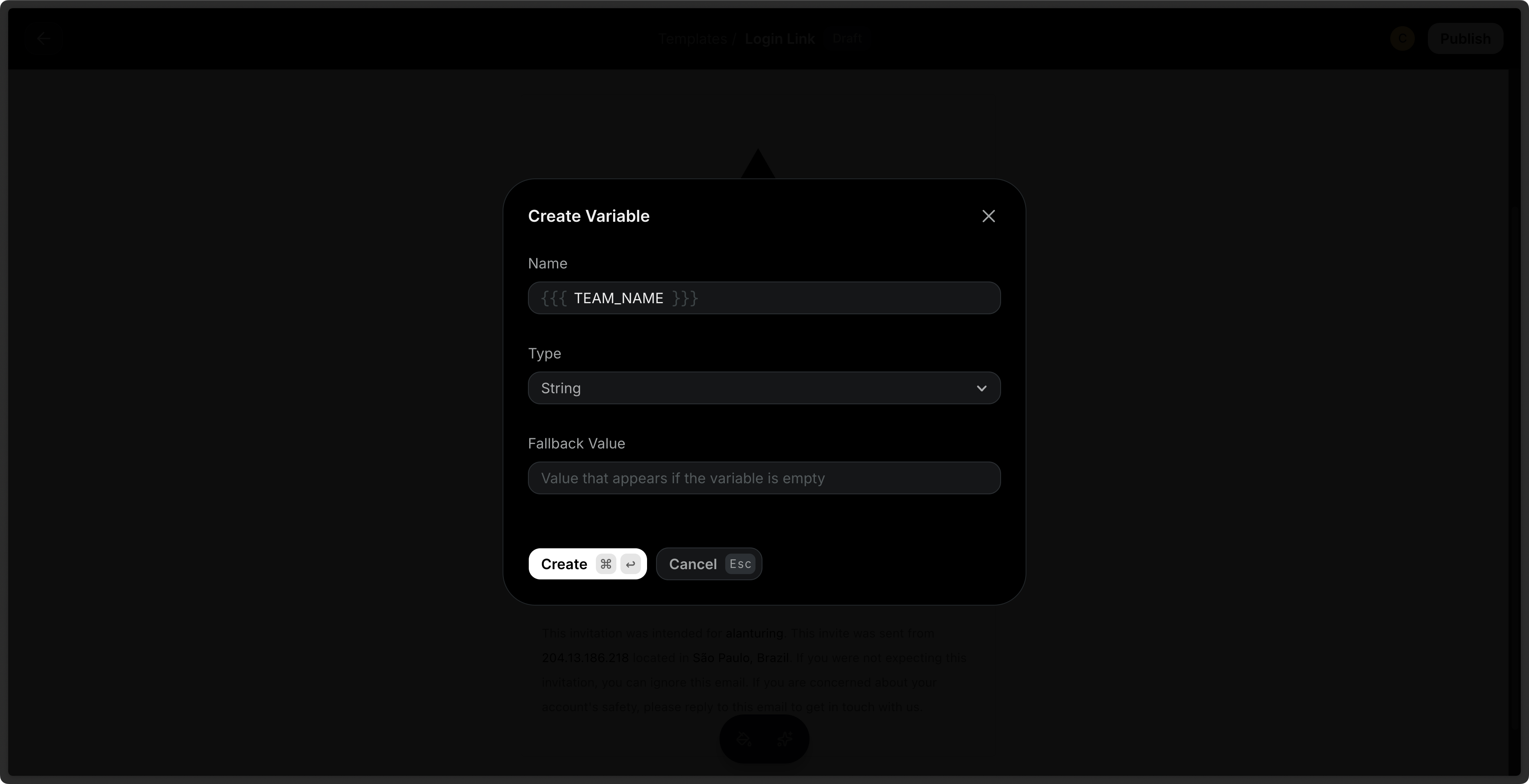 You can also define custom variables [via the API](/dashboard/templates/template-variables).
The following variable names are reserved and cannot be used: `FIRST_NAME`,
`LAST_NAME`, `EMAIL`, `RESEND_UNSUBSCRIBE_URL`, `contact`,`this`.
[Learn more about working with variables](/dashboard/templates/template-variables).
## Send Test Emails
You can send test emails to your inbox to preview your Template before sending it to your audience. Provide variable values to test the rendered Template in your inbox.
## Publish a Template
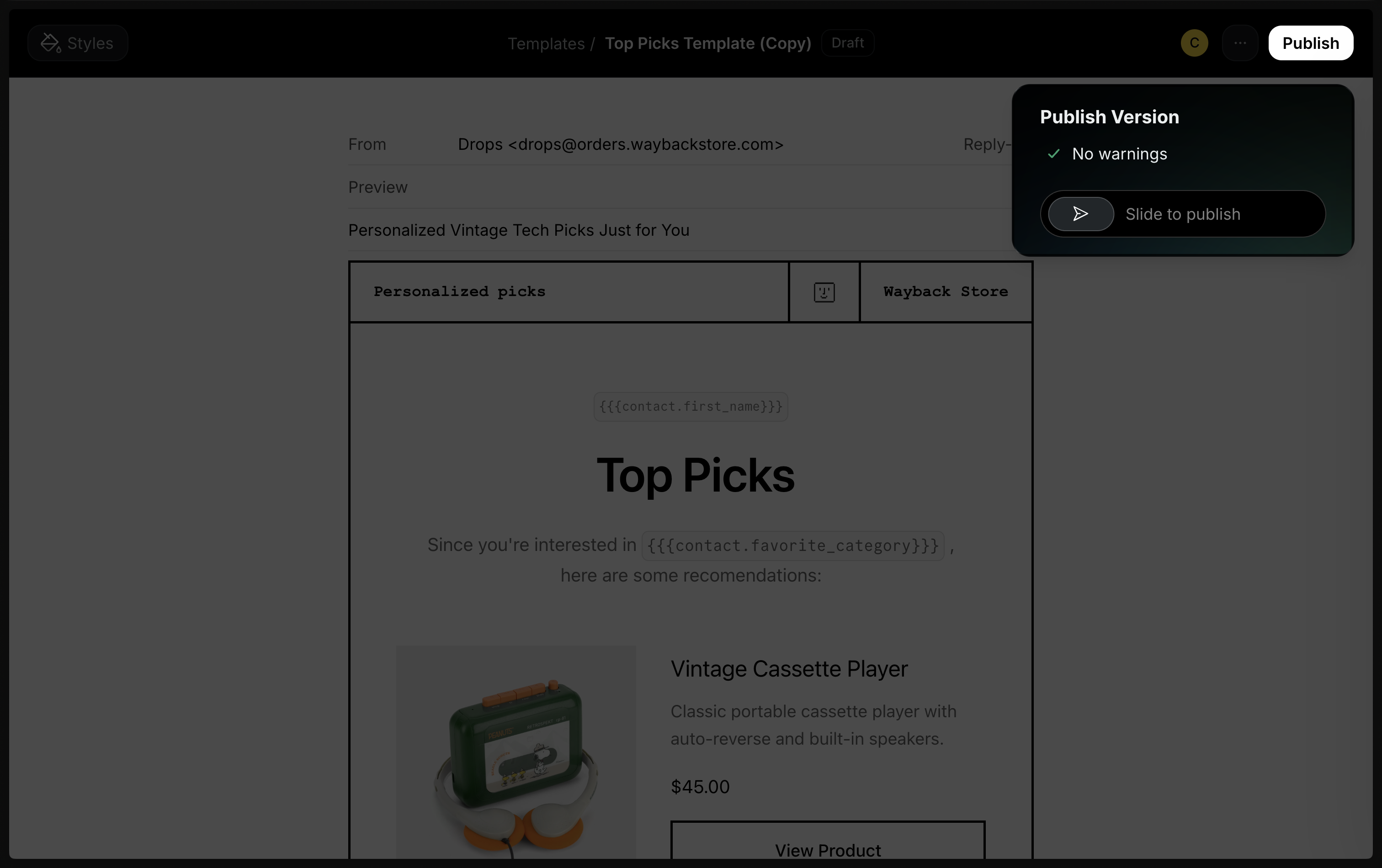
By default, Templates are in a **draft** state. To use a Template to send emails, you must first **publish** it via the dashboard or [via the API](/api-reference/templates/publish-template).
You can also define custom variables [via the API](/dashboard/templates/template-variables).
The following variable names are reserved and cannot be used: `FIRST_NAME`,
`LAST_NAME`, `EMAIL`, `RESEND_UNSUBSCRIBE_URL`, `contact`,`this`.
[Learn more about working with variables](/dashboard/templates/template-variables).
## Send Test Emails
You can send test emails to your inbox to preview your Template before sending it to your audience. Provide variable values to test the rendered Template in your inbox.
## Publish a Template
By default, Templates are in a **draft** state. To use a Template to send emails, you must first **publish** it via the dashboard or [via the API](/api-reference/templates/publish-template).
 For a more streamlined flow, create and publish a template in a single step.
```ts Node.js theme={"theme":{"light":"github-light","dark":"vesper"}}
await resend.templates.create({ ... }).publish();
```
Once a Template is published, you can continue to edit it without impacting existing emails sent using the Template. As you work, your changes are saved as a draft, although you can also manually save drafts by pressing Cmd + S (Mac) or Ctrl + S (Windows).
Only after publishing again will the changes be reflected in emails using the Template.
[Learn more about Template version history](/dashboard/templates/version-history).
## Send Emails with Templates
When sending a transactional email, you can reference your Template and include your variables in the call. The Template variables will be replaced with the actual values.
```ts Node.js {8-14} theme={"theme":{"light":"github-light","dark":"vesper"}}
import { Resend } from 'resend';
const resend = new Resend('re_xxxxxxxxx');
await resend.emails.send({
from: 'Acme ',
to: 'delivered@resend.dev',
template: {
id: 'order-confirmation',
variables: {
PRODUCT: 'Vintage Macintosh',
PRICE: 499,
},
},
});
```
```php PHP {7-12} theme={"theme":{"light":"github-light","dark":"vesper"}}
$resend = Resend::client('re_xxxxxxxxx');
$resend->emails->send([
'from' => 'Acme ',
'to' => ['delivered@resend.dev'],
'subject' => 'hello world',
'template'=> [
'id' => 'f3b9756c-f4f4-44da-bc00-9f7903c8a83f',
'variables' => [
'PRODUCT' => 'Vintage Macintosh',
'PRICE' => 499,
]
]
]);
```
```python Python {8-14} theme={"theme":{"light":"github-light","dark":"vesper"}}
import resend
resend.api_key = "re_xxxxxxxxx"
resend.Emails.send({
"from": "Acme ",
"to": "delivered@resend.dev",
"template": {
"id": "order-confirmation",
"variables": {
"PRODUCT": "Vintage Macintosh",
"PRICE": 499
}
}
})
```
```ruby Ruby {8-14} theme={"theme":{"light":"github-light","dark":"vesper"}}
require "resend"
Resend.api_key = "re_xxxxxxxxx"
Resend::Emails.send({
from: "Acme ",
to: "delivered@resend.dev",
template: {
id: "order-confirmation",
variables: {
PRODUCT: "Vintage Macintosh",
PRICE: 499
}
}
})
```
```go Go {8-14} theme={"theme":{"light":"github-light","dark":"vesper"}}
import "github.com/resend/resend-go/v3"
client := resend.NewClient("re_xxxxxxxxx")
params := &resend.SendEmailRequest{
From: "Acme ",
To: []string{"delivered@resend.dev"},
Template: &resend.EmailTemplate{
Id: "order-confirmation",
Variables: map[string]interface{}{
"PRODUCT": "Vintage Macintosh",
"PRICE": 499,
},
},
}
email, err := client.Emails.Send(params)
```
```rust Rust {7-13} theme={"theme":{"light":"github-light","dark":"vesper"}}
use resend_rs::{types::SendEmailOptions, Resend, Result};
#[tokio::main]
async fn main() -> Result<()> {
let resend = Resend::new("re_xxxxxxxxx");
let variables = serde_json::json!({
"PRODUCT": "Vintage Macintosh",
"PRICE": 499
});
let opts = SendEmailOptions::new("Acme ", vec!["delivered@resend.dev"])
.with_template("order-confirmation", variables);
let _email = resend.emails.send(opts).await?;
Ok(())
}
```
```java Java {3-5,10-13} theme={"theme":{"light":"github-light","dark":"vesper"}}
Resend resend = new Resend("re_xxxxxxxxx");
Map variables = new HashMap<>();
variables.put("PRODUCT", "Vintage Macintosh");
variables.put("PRICE", 499);
SendEmailOptions params = SendEmailOptions.builder()
.from("Acme ")
.to(Arrays.asList("customer@email.com"))
.template(Template.builder()
.id("order-confirmation")
.variables(variables)
.build())
.build();
SendEmailResponseSuccess data = resend.emails().send(params);
```
```csharp .NET {5-9,17-20} theme={"theme":{"light":"github-light","dark":"vesper"}}
using Resend;
IResend resend = ResendClient.Create("re_xxxxxxxxx");
var variables = new Dictionary
{
{ "PRODUCT", "Vintage Macintosh" },
{ "PRICE", 499 }
};
var resp = await resend.EmailSendAsync(
new EmailMessage()
{
From = "Acme ",
To = new[] { "delivered@resend.dev" },
Template = new EmailMessageTemplate()
{
TemplateId = new Guid( "b6d24b8e-af0b-4c3c-be0c-359bbd97381e" ),
Variables = variables,
}
}
);
Console.WriteLine($"Email Id={resp.Content}");
```
```bash cURL {7-13} theme={"theme":{"light":"github-light","dark":"vesper"}}
curl -X POST 'https://api.resend.com/emails' \
-H 'Authorization: Bearer re_xxxxxxxxx' \
-H 'Content-Type: application/json' \
-d $'{
"from": "Acme ",
"to": "delivered@resend.dev",
"template": {
"id": "order-confirmation",
"variables": {
"PRODUCT": "Vintage Macintosh",
"PRICE": 499
}
}
}'
```
Learn more about [sending emails](/api-reference/emails/send-email) or sending [batch emails](/api-reference/emails/send-batch-emails) with Templates via the API.
## Duplicate a Template
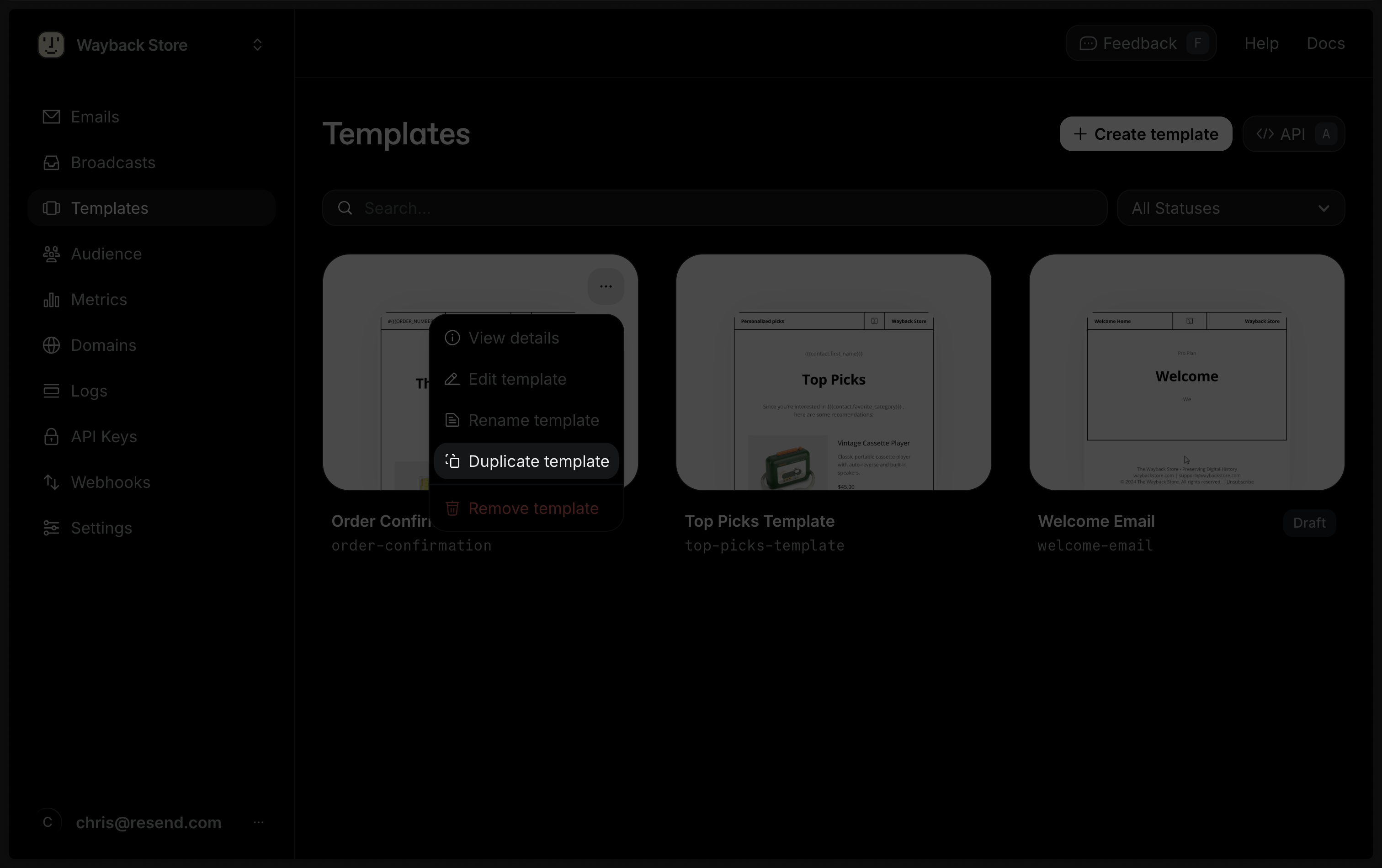
You can also duplicate an existing Template in the dashboard or [via the API](/api-reference/templates/duplicate-template).
For a more streamlined flow, create and publish a template in a single step.
```ts Node.js theme={"theme":{"light":"github-light","dark":"vesper"}}
await resend.templates.create({ ... }).publish();
```
Once a Template is published, you can continue to edit it without impacting existing emails sent using the Template. As you work, your changes are saved as a draft, although you can also manually save drafts by pressing Cmd + S (Mac) or Ctrl + S (Windows).
Only after publishing again will the changes be reflected in emails using the Template.
[Learn more about Template version history](/dashboard/templates/version-history).
## Send Emails with Templates
When sending a transactional email, you can reference your Template and include your variables in the call. The Template variables will be replaced with the actual values.
```ts Node.js {8-14} theme={"theme":{"light":"github-light","dark":"vesper"}}
import { Resend } from 'resend';
const resend = new Resend('re_xxxxxxxxx');
await resend.emails.send({
from: 'Acme ',
to: 'delivered@resend.dev',
template: {
id: 'order-confirmation',
variables: {
PRODUCT: 'Vintage Macintosh',
PRICE: 499,
},
},
});
```
```php PHP {7-12} theme={"theme":{"light":"github-light","dark":"vesper"}}
$resend = Resend::client('re_xxxxxxxxx');
$resend->emails->send([
'from' => 'Acme ',
'to' => ['delivered@resend.dev'],
'subject' => 'hello world',
'template'=> [
'id' => 'f3b9756c-f4f4-44da-bc00-9f7903c8a83f',
'variables' => [
'PRODUCT' => 'Vintage Macintosh',
'PRICE' => 499,
]
]
]);
```
```python Python {8-14} theme={"theme":{"light":"github-light","dark":"vesper"}}
import resend
resend.api_key = "re_xxxxxxxxx"
resend.Emails.send({
"from": "Acme ",
"to": "delivered@resend.dev",
"template": {
"id": "order-confirmation",
"variables": {
"PRODUCT": "Vintage Macintosh",
"PRICE": 499
}
}
})
```
```ruby Ruby {8-14} theme={"theme":{"light":"github-light","dark":"vesper"}}
require "resend"
Resend.api_key = "re_xxxxxxxxx"
Resend::Emails.send({
from: "Acme ",
to: "delivered@resend.dev",
template: {
id: "order-confirmation",
variables: {
PRODUCT: "Vintage Macintosh",
PRICE: 499
}
}
})
```
```go Go {8-14} theme={"theme":{"light":"github-light","dark":"vesper"}}
import "github.com/resend/resend-go/v3"
client := resend.NewClient("re_xxxxxxxxx")
params := &resend.SendEmailRequest{
From: "Acme ",
To: []string{"delivered@resend.dev"},
Template: &resend.EmailTemplate{
Id: "order-confirmation",
Variables: map[string]interface{}{
"PRODUCT": "Vintage Macintosh",
"PRICE": 499,
},
},
}
email, err := client.Emails.Send(params)
```
```rust Rust {7-13} theme={"theme":{"light":"github-light","dark":"vesper"}}
use resend_rs::{types::SendEmailOptions, Resend, Result};
#[tokio::main]
async fn main() -> Result<()> {
let resend = Resend::new("re_xxxxxxxxx");
let variables = serde_json::json!({
"PRODUCT": "Vintage Macintosh",
"PRICE": 499
});
let opts = SendEmailOptions::new("Acme ", vec!["delivered@resend.dev"])
.with_template("order-confirmation", variables);
let _email = resend.emails.send(opts).await?;
Ok(())
}
```
```java Java {3-5,10-13} theme={"theme":{"light":"github-light","dark":"vesper"}}
Resend resend = new Resend("re_xxxxxxxxx");
Map variables = new HashMap<>();
variables.put("PRODUCT", "Vintage Macintosh");
variables.put("PRICE", 499);
SendEmailOptions params = SendEmailOptions.builder()
.from("Acme ")
.to(Arrays.asList("customer@email.com"))
.template(Template.builder()
.id("order-confirmation")
.variables(variables)
.build())
.build();
SendEmailResponseSuccess data = resend.emails().send(params);
```
```csharp .NET {5-9,17-20} theme={"theme":{"light":"github-light","dark":"vesper"}}
using Resend;
IResend resend = ResendClient.Create("re_xxxxxxxxx");
var variables = new Dictionary
{
{ "PRODUCT", "Vintage Macintosh" },
{ "PRICE", 499 }
};
var resp = await resend.EmailSendAsync(
new EmailMessage()
{
From = "Acme ",
To = new[] { "delivered@resend.dev" },
Template = new EmailMessageTemplate()
{
TemplateId = new Guid( "b6d24b8e-af0b-4c3c-be0c-359bbd97381e" ),
Variables = variables,
}
}
);
Console.WriteLine($"Email Id={resp.Content}");
```
```bash cURL {7-13} theme={"theme":{"light":"github-light","dark":"vesper"}}
curl -X POST 'https://api.resend.com/emails' \
-H 'Authorization: Bearer re_xxxxxxxxx' \
-H 'Content-Type: application/json' \
-d $'{
"from": "Acme ",
"to": "delivered@resend.dev",
"template": {
"id": "order-confirmation",
"variables": {
"PRODUCT": "Vintage Macintosh",
"PRICE": 499
}
}
}'
```
Learn more about [sending emails](/api-reference/emails/send-email) or sending [batch emails](/api-reference/emails/send-batch-emails) with Templates via the API.
## Duplicate a Template
You can also duplicate an existing Template in the dashboard or [via the API](/api-reference/templates/duplicate-template).
You can create a Template from an existing Broadcast. Locate your desired
Broadcast in the [Broadcast dashboard](https://resend.com/broadcasts), click
the more options button{' '}
, and choose **Clone as template**.
## Delete a Template
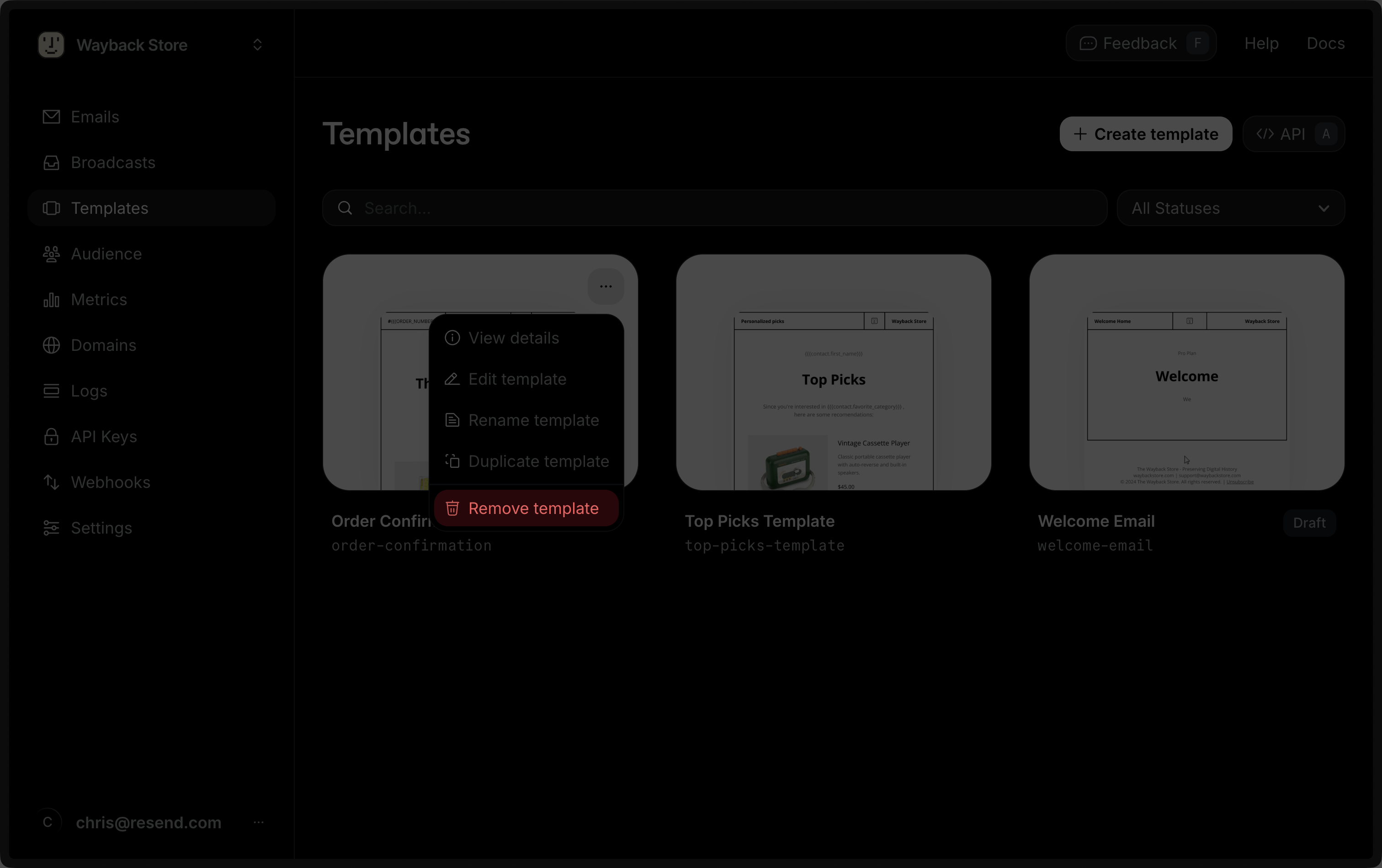
You can delete a Template via the dashboard by clicking on the **Delete** button or [via the API](/api-reference/templates/delete-template).
 ## Validation errors
When sending an email using a Template, the Template variables will be replaced with the actual values. If a variable is not provided, the fallback value will be used. If no fallback value is provided, the email will not be sent and a validation error will be returned.
[See the API reference for more details](/api-reference/templates/create-template) or the [errors reference](/api-reference/errors).
## Validation errors
When sending an email using a Template, the Template variables will be replaced with the actual values. If a variable is not provided, the fallback value will be used. If no fallback value is provided, the email will not be sent and a validation error will be returned.
[See the API reference for more details](/api-reference/templates/create-template) or the [errors reference](/api-reference/errors).