> ## Documentation Index
> Fetch the complete documentation index at: https://resend.com/docs/llms.txt
> Use this file to discover all available pages before exploring further.
# Managing Domains
> Visualize all the domains on the Resend Dashboard.
Resend sends emails using a domain you own (i.e., not a shared or public domain). You must [add and verify at least one domain](/add-a-domain) to send and receive emails with Resend.
Domain not verifying? [Try
this](/knowledge-base/what-if-my-domain-is-not-verifying).
## Domain management
You can view and manage your domains from the [Domains Dashboard](https://resend.com/domains). You can also manage your sending and receiving domains using the [API](/api-reference/domains/create-domain), the [CLI](/cli#domains), or the [MCP server](/mcp-server).
We recommend sending your emails from one or more subdomains (e.g., `updates.example.com`) instead of your root domain to isolate your sending reputation and to clearly communicate your intent to your recipients.
Each individual subdomain must be added and verified independently, and they will each be listed separately in your Dashboard.
Learn more about [the benefits of sending emails from a subdomain](/knowledge-base/is-it-better-to-send-emails-from-a-subdomain-or-the-root-domain).
## View domain details
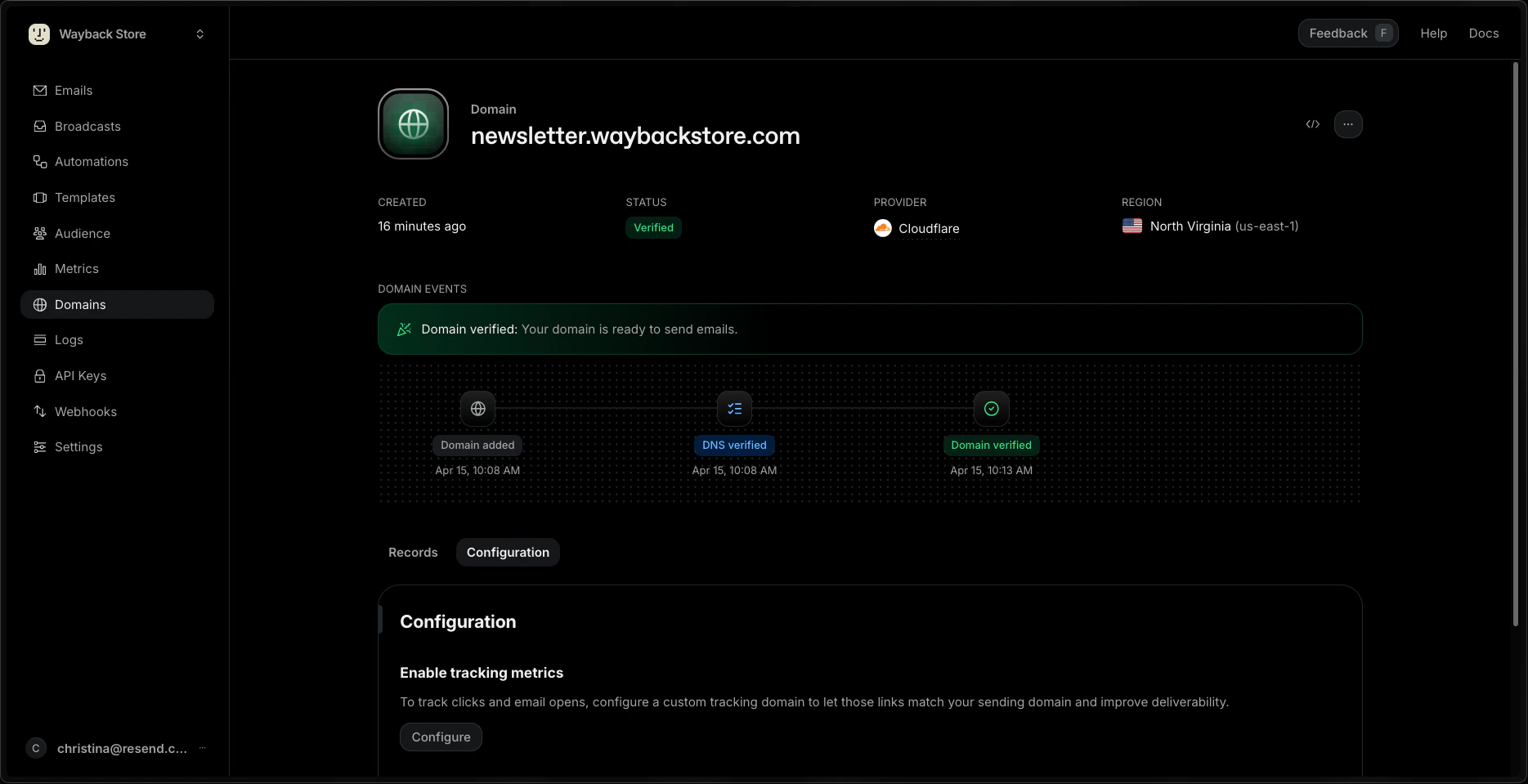
The [Domains dashboard](https://resend.com/domains) shows information about your domain name, its verification status, and history.
## Understand a domain status
Domains can have different statuses, including:
* `not_started`: You've added a domain to Resend, but you haven't clicked on `Verify DNS Records` yet.
* `pending`: Resend is still trying to verify the domain.
* `verified`: Your domain is successfully verified for sending in Resend.
* `partially_verified`: One capability (send or receive) is verified while the other is still pending verification.
* `partially_failed`: The domain is verified but one of the features (send or receive) is not verified.
* `failed`: Resend was unable to detect the DNS records within 72 hours.
* `temporary_failure`: For a previously verified domain, Resend will periodically check for the DNS record required for verification. If at some point, Resend is unable to detect the record, the status would change to "Temporary Failure". Resend will recheck for the DNS record for 72 hours, and if it's unable to detect the record, the domain status would change to "Failure". If it's able to detect the record, the domain status would change to "Verified".
## View DNS records
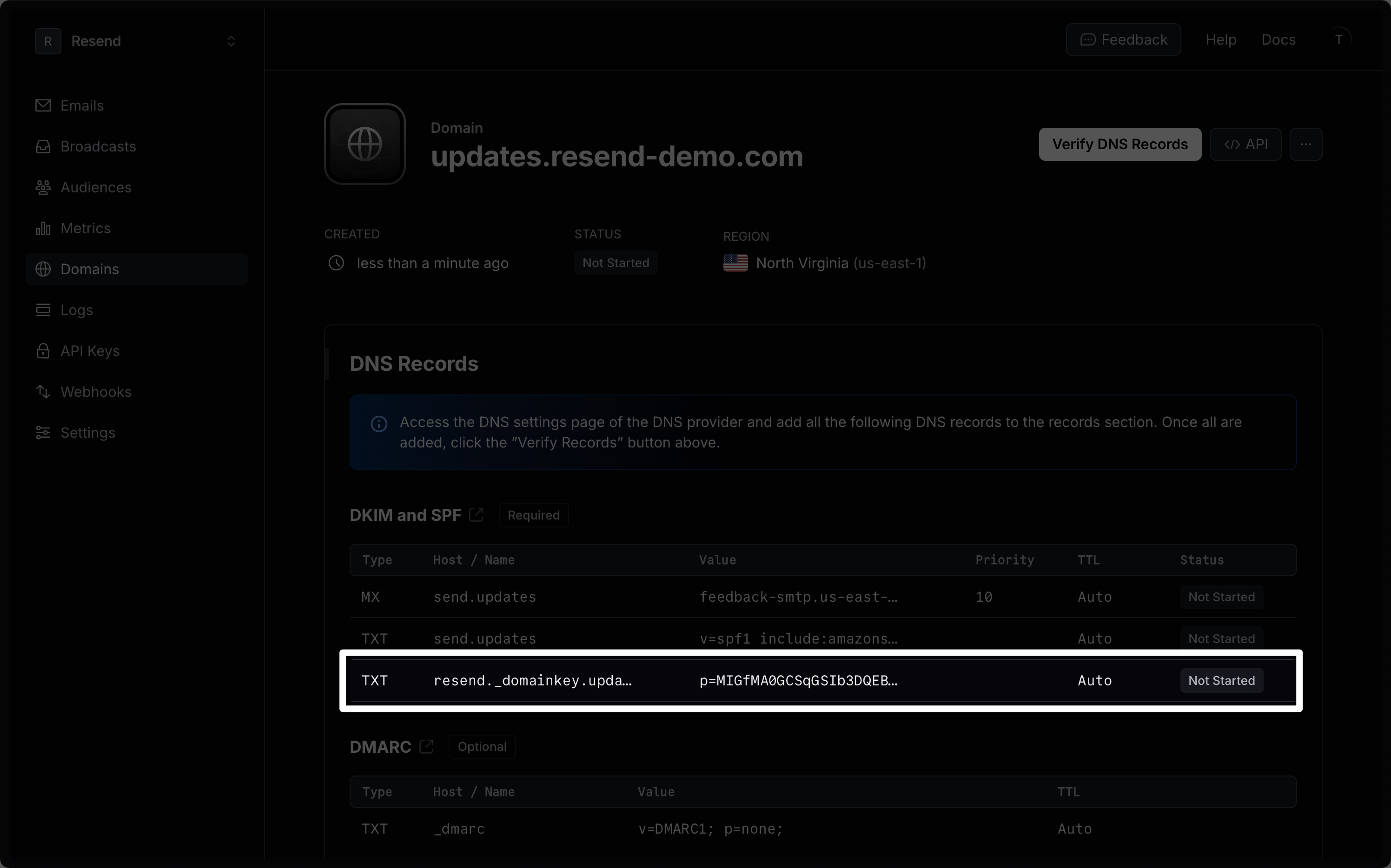
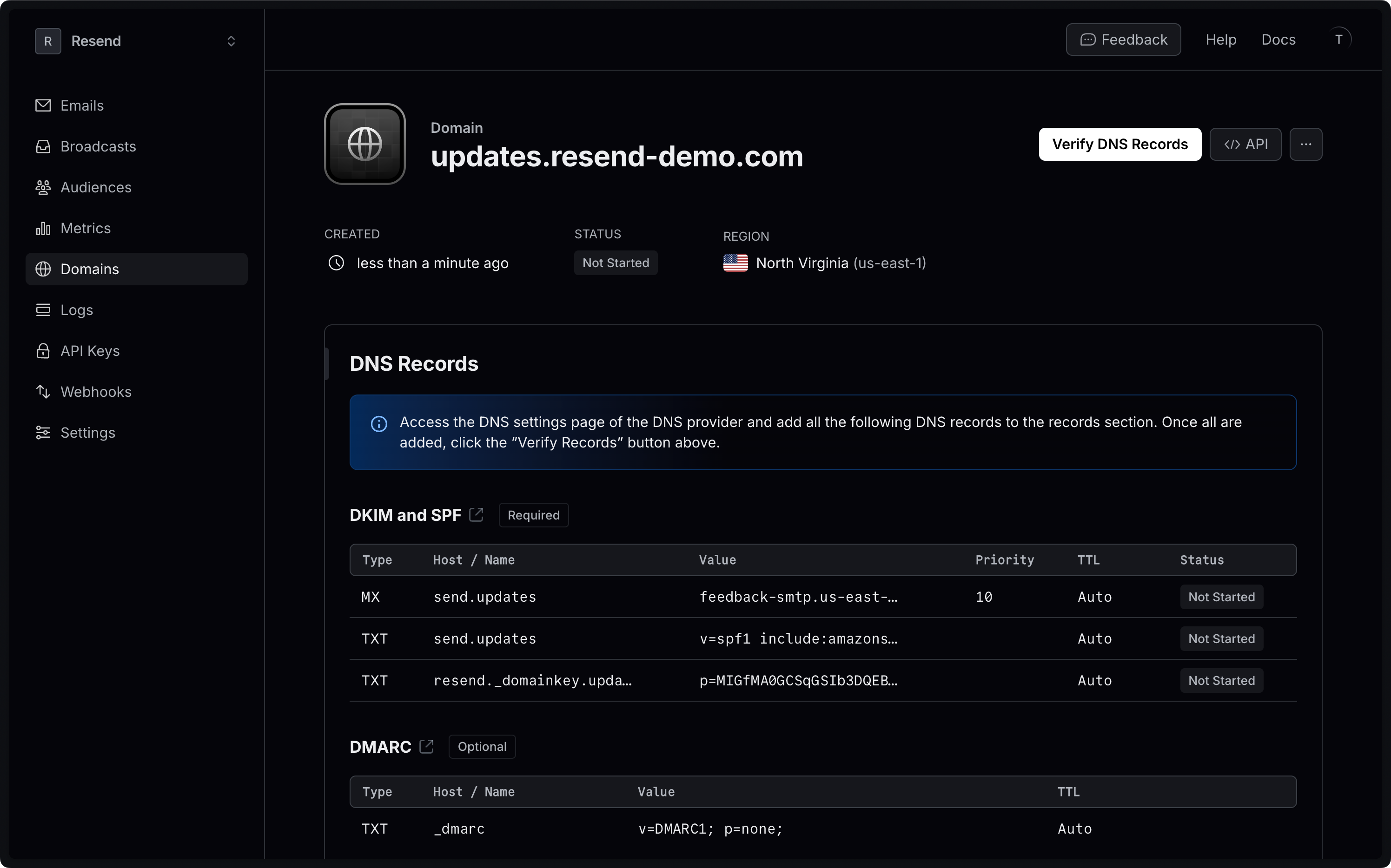
For each domain you have added, you can view the [DKIM](#what-are-dkim-records) and [SPF](#what-are-spf-records) configurations generated by Resend, as well as [DMARC protocol parameters](/dashboard/domains/dmarc) under the **Records** tab.
 Need specific help adding your records to a DNS provider? View our [knowledge
base DNS Guides](/knowledge-base).
## Configure open and click tracking
Open and click tracking is disabled by default for all domains.
You can enable it in the Resend Dashboard under the **Configuration** tab or programmatically.
Need specific help adding your records to a DNS provider? View our [knowledge
base DNS Guides](/knowledge-base).
## Configure open and click tracking
Open and click tracking is disabled by default for all domains.
You can enable it in the Resend Dashboard under the **Configuration** tab or programmatically.
 Learn more about [open and click tracking](/dashboard/domains/tracking).
## Configure Enforced Transport Layer Security (TLS)
Resend supports TLS 1.2, TLS 1.1 and TLS 1.0 for TLS connections, but only requires TLS for sending when Enforced TLS is configured.
By default, Resend will attempt to make a secure connection, but will fall back to sending messages unencrypted when the receiving server does not support TLS.
You can configure Enforced TLS in the Resend Dashboard under the **Configuration** tab or programmatically. This means that if the receiving server does not support TLS, your email will not be sent.
Learn more about [Opportunistic TLS vs Enforced TLS](/knowledge-base/whats-the-difference-between-opportunistic-tls-vs-enforced-tls).
## Custom Return Path
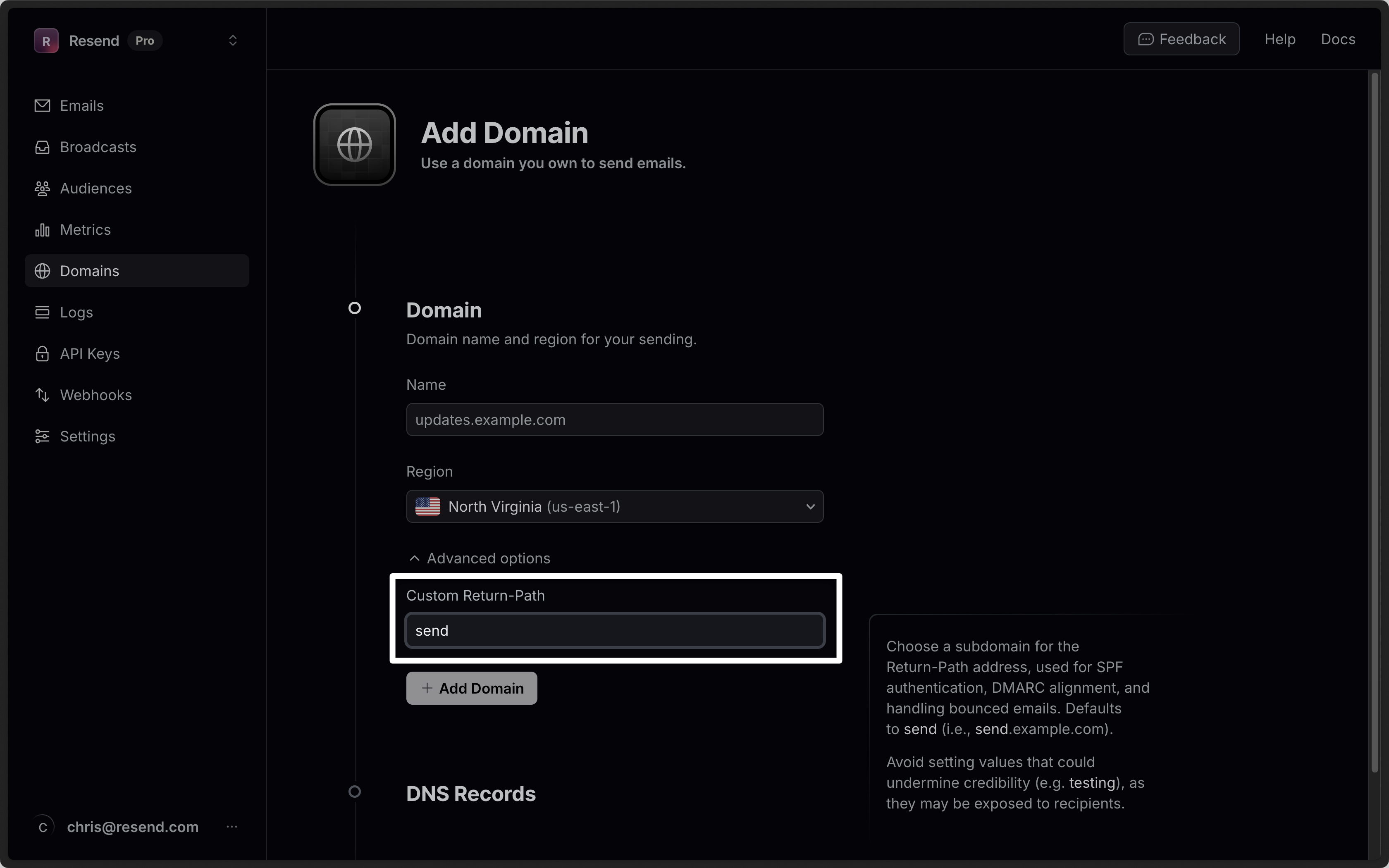
By default, Resend will use the `send` subdomain for the Return-Path address. You can change this by setting the optional `custom_return_path` parameter when [creating a domain](/api-reference/domains/create-domain) via the API or under **Advanced options** in the dashboard.
Learn more about [open and click tracking](/dashboard/domains/tracking).
## Configure Enforced Transport Layer Security (TLS)
Resend supports TLS 1.2, TLS 1.1 and TLS 1.0 for TLS connections, but only requires TLS for sending when Enforced TLS is configured.
By default, Resend will attempt to make a secure connection, but will fall back to sending messages unencrypted when the receiving server does not support TLS.
You can configure Enforced TLS in the Resend Dashboard under the **Configuration** tab or programmatically. This means that if the receiving server does not support TLS, your email will not be sent.
Learn more about [Opportunistic TLS vs Enforced TLS](/knowledge-base/whats-the-difference-between-opportunistic-tls-vs-enforced-tls).
## Custom Return Path
By default, Resend will use the `send` subdomain for the Return-Path address. You can change this by setting the optional `custom_return_path` parameter when [creating a domain](/api-reference/domains/create-domain) via the API or under **Advanced options** in the dashboard.
 For the API, optionally pass the custom return path parameter.
```ts Node.js theme={"theme":{"light":"github-light","dark":"vesper"}}
import { Resend } from 'resend';
const resend = new Resend('re_xxxxxxxxx');
resend.domains.create({ name: 'example.com', customReturnPath: 'outbound' });
```
```php PHP theme={"theme":{"light":"github-light","dark":"vesper"}}
$resend = Resend::client('re_xxxxxxxxx');
$resend->domains->create([
'name' => 'example.com',
'custom_return_path' => 'outbound'
]);
```
```python Python theme={"theme":{"light":"github-light","dark":"vesper"}}
import resend
resend.api_key = "re_xxxxxxxxx"
params: resend.Domains.CreateParams = {
"name": "example.com",
"custom_return_path": "outbound"
}
resend.Domains.create(params)
```
```ruby Ruby theme={"theme":{"light":"github-light","dark":"vesper"}}
Resend.api_key = ENV["RESEND_API_KEY"]
params = {
name: "example.com",
custom_return_path: "outbound"
}
domain = Resend::Domains.create(params)
puts domain
```
```go Go theme={"theme":{"light":"github-light","dark":"vesper"}}
package main
import "github.com/resend/resend-go/v3"
func main() {
client := resend.NewClient("re_xxxxxxxxx")
params := &resend.CreateDomainRequest{
Name: "example.com",
CustomReturnPath: "outbound",
}
domain, err := client.Domains.Create(params)
}
```
```rust Rust theme={"theme":{"light":"github-light","dark":"vesper"}}
use resend_rs::{types::CreateDomainOptions, Resend, Result};
#[tokio::main]
async fn main() -> Result<()> {
let resend = Resend::new("re_xxxxxxxxx");
let _domain = resend
.domains
.add(CreateDomainOptions::new("example.com").with_custom_return_path("outbound"))
.await?;
Ok(())
}
```
```java Java theme={"theme":{"light":"github-light","dark":"vesper"}}
import com.resend.*;
public class Main {
public static void main(String[] args) {
Resend resend = new Resend("re_xxxxxxxxx");
CreateDomainOptions params = CreateDomainOptions
.builder()
.name("example.com")
.customReturnPath("outbound")
.build();
CreateDomainResponse domain = resend.domains().create(params);
}
}
```
```csharp .NET theme={"theme":{"light":"github-light","dark":"vesper"}}
using Resend;
IResend resend = ResendClient.Create( "re_xxxxxxxxx" ); // Or from DI
var resp = await resend.DomainAddAsync( new DomainAddData {
DomainName = "example.com",
CustomReturnPath = "outbound"
} );
Console.WriteLine( "Domain Id={0}", resp.Content.Id );
```
```bash cURL theme={"theme":{"light":"github-light","dark":"vesper"}}
curl -X POST 'https://api.resend.com/domains' \
-H 'Authorization: Bearer re_xxxxxxxxx' \
-H 'Content-Type: application/json' \
-d $'{
"name": "example.com",
"custom_return_path": "outbound"
}'
```
Custom return paths must adhere to the following rules:
* Must be 63 characters or less
* Must start with a letter, end with a letter or number, and contain only letters, numbers, and hyphens
Avoid setting values that could undermine credibility (e.g. `testing`), as they may be exposed to recipients in some email clients.
## Export your data
Admins can download your data in CSV format for the following resources:
* Emails
* Broadcasts
* Contacts
* Segments
* Domains
* Logs
* API keys
Currently, exports are limited to admin users of your team.
To start, apply filters to your data and click on the "Export" button. Confirm your filters before exporting your data.
If your exported data includes 1,000 items or less, the export will download immediately. For larger exports, you'll receive an email with a link to download your data.
All admins on your team can securely access the export for 7 days. Unavailable exports are marked as "Expired."
All exports your team creates are listed in the
[Exports](https://resend.com/exports) page under **Settings** > **Team** >
**Exports**. Select any export to view its details page. All members of your
team can view your exports, but only admins can download the data.
## What are SPF records
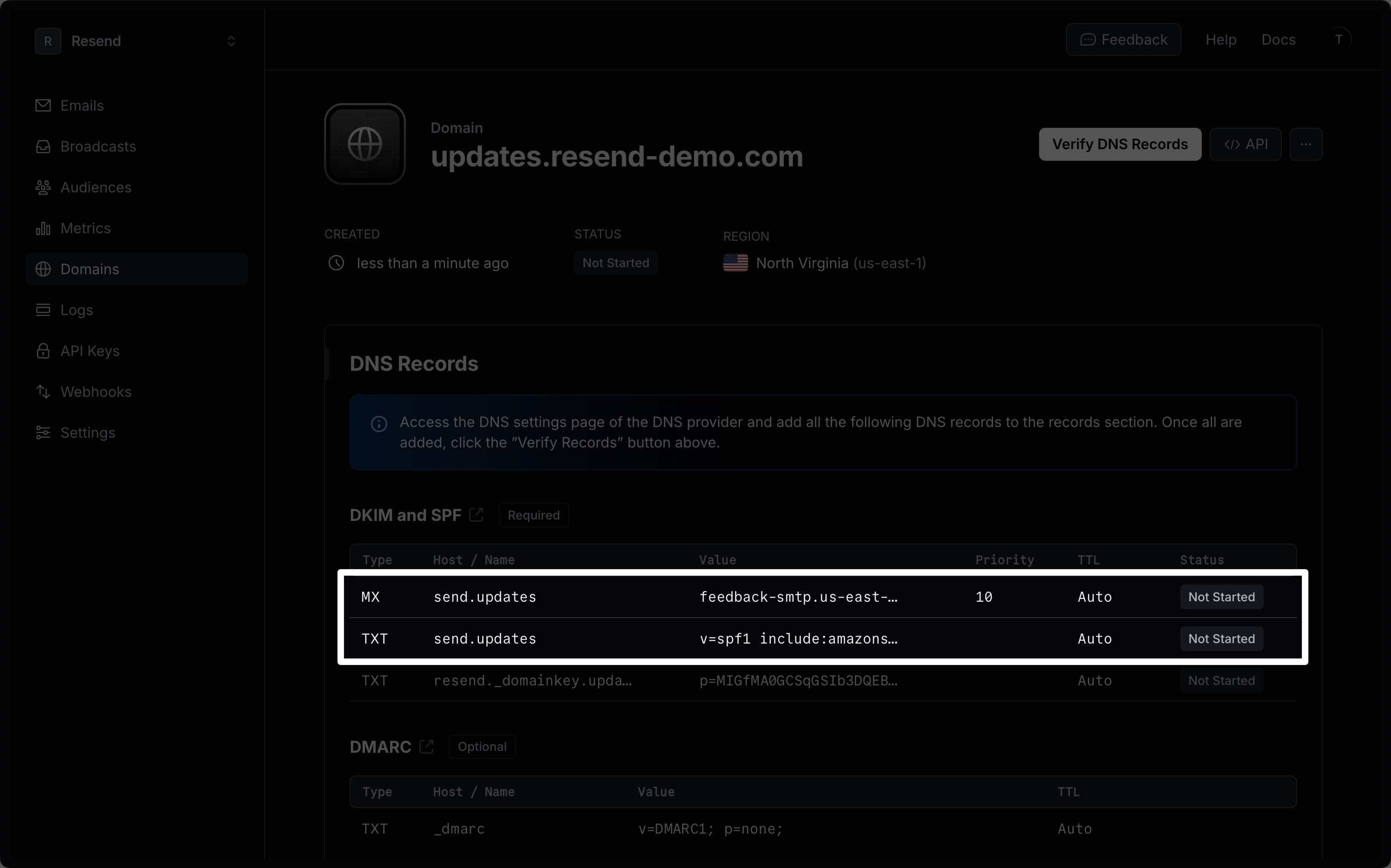
Sender Policy Framework (SPF) is an email authentication standard that includes all the IP addresses authorized to send email on behalf of your domain.
The SPF configuration is made of a TXT DNS record that lists the IP addresses approved by the domain owner. It also includes an MX record that allows the recipient to send bounce and complaint feedback to your domain.
For the API, optionally pass the custom return path parameter.
```ts Node.js theme={"theme":{"light":"github-light","dark":"vesper"}}
import { Resend } from 'resend';
const resend = new Resend('re_xxxxxxxxx');
resend.domains.create({ name: 'example.com', customReturnPath: 'outbound' });
```
```php PHP theme={"theme":{"light":"github-light","dark":"vesper"}}
$resend = Resend::client('re_xxxxxxxxx');
$resend->domains->create([
'name' => 'example.com',
'custom_return_path' => 'outbound'
]);
```
```python Python theme={"theme":{"light":"github-light","dark":"vesper"}}
import resend
resend.api_key = "re_xxxxxxxxx"
params: resend.Domains.CreateParams = {
"name": "example.com",
"custom_return_path": "outbound"
}
resend.Domains.create(params)
```
```ruby Ruby theme={"theme":{"light":"github-light","dark":"vesper"}}
Resend.api_key = ENV["RESEND_API_KEY"]
params = {
name: "example.com",
custom_return_path: "outbound"
}
domain = Resend::Domains.create(params)
puts domain
```
```go Go theme={"theme":{"light":"github-light","dark":"vesper"}}
package main
import "github.com/resend/resend-go/v3"
func main() {
client := resend.NewClient("re_xxxxxxxxx")
params := &resend.CreateDomainRequest{
Name: "example.com",
CustomReturnPath: "outbound",
}
domain, err := client.Domains.Create(params)
}
```
```rust Rust theme={"theme":{"light":"github-light","dark":"vesper"}}
use resend_rs::{types::CreateDomainOptions, Resend, Result};
#[tokio::main]
async fn main() -> Result<()> {
let resend = Resend::new("re_xxxxxxxxx");
let _domain = resend
.domains
.add(CreateDomainOptions::new("example.com").with_custom_return_path("outbound"))
.await?;
Ok(())
}
```
```java Java theme={"theme":{"light":"github-light","dark":"vesper"}}
import com.resend.*;
public class Main {
public static void main(String[] args) {
Resend resend = new Resend("re_xxxxxxxxx");
CreateDomainOptions params = CreateDomainOptions
.builder()
.name("example.com")
.customReturnPath("outbound")
.build();
CreateDomainResponse domain = resend.domains().create(params);
}
}
```
```csharp .NET theme={"theme":{"light":"github-light","dark":"vesper"}}
using Resend;
IResend resend = ResendClient.Create( "re_xxxxxxxxx" ); // Or from DI
var resp = await resend.DomainAddAsync( new DomainAddData {
DomainName = "example.com",
CustomReturnPath = "outbound"
} );
Console.WriteLine( "Domain Id={0}", resp.Content.Id );
```
```bash cURL theme={"theme":{"light":"github-light","dark":"vesper"}}
curl -X POST 'https://api.resend.com/domains' \
-H 'Authorization: Bearer re_xxxxxxxxx' \
-H 'Content-Type: application/json' \
-d $'{
"name": "example.com",
"custom_return_path": "outbound"
}'
```
Custom return paths must adhere to the following rules:
* Must be 63 characters or less
* Must start with a letter, end with a letter or number, and contain only letters, numbers, and hyphens
Avoid setting values that could undermine credibility (e.g. `testing`), as they may be exposed to recipients in some email clients.
## Export your data
Admins can download your data in CSV format for the following resources:
* Emails
* Broadcasts
* Contacts
* Segments
* Domains
* Logs
* API keys
Currently, exports are limited to admin users of your team.
To start, apply filters to your data and click on the "Export" button. Confirm your filters before exporting your data.
If your exported data includes 1,000 items or less, the export will download immediately. For larger exports, you'll receive an email with a link to download your data.
All admins on your team can securely access the export for 7 days. Unavailable exports are marked as "Expired."
All exports your team creates are listed in the
[Exports](https://resend.com/exports) page under **Settings** > **Team** >
**Exports**. Select any export to view its details page. All members of your
team can view your exports, but only admins can download the data.
## What are SPF records
Sender Policy Framework (SPF) is an email authentication standard that includes all the IP addresses authorized to send email on behalf of your domain.
The SPF configuration is made of a TXT DNS record that lists the IP addresses approved by the domain owner. It also includes an MX record that allows the recipient to send bounce and complaint feedback to your domain.
 ## What are DKIM records
DomainKeys Identified Mail (DKIM) is an email security standard designed to make sure that an email that claims to come from a specific domain was authorized by the owner of that domain.
The DKIM configuration is stored as a TXT DNS record that contains a public key used to verify the authenticity of the email.
## What are DKIM records
DomainKeys Identified Mail (DKIM) is an email security standard designed to make sure that an email that claims to come from a specific domain was authorized by the owner of that domain.
The DKIM configuration is stored as a TXT DNS record that contains a public key used to verify the authenticity of the email.