> ## Documentation Index
> Fetch the complete documentation index at: https://resend.com/docs/llms.txt
> Use this file to discover all available pages before exploring further.
# Managing Contacts
> Learn how to view, update, and delete your Contacts with Resend.
All members of your team can view and manage existing Contact details directly in the [Dashboard](https://resend.com/audience). You can also perform bulk actions (update Segments, subscribe to Topics) by selecting multiple Contacts.
To manage your Broadcast subscribers directly from your application, you can use the [Contacts API](/docs/api-reference/contacts/create-contact) to list, retrieve, update, and delete Contacts.
You can also manage Contacts using [Resend CLI commands](/docs/cli#contacts) and [MCP](/docs/mcp-server).
If you previously used our Audience model, learn how to [migrate to the new
Contacts model](/docs/dashboard/contacts/migrating-from-audiences-to-segments).
## Dashboard Views
The Resend Dashboard includes four different views of your Contacts:
* [Contacts](https://resend.com/audience/): individual email addresses
* [Properties](https://resend.com/audience/properties): custom properties for your Contacts
* [Segments](https://resend.com/audience/segments): groups of Contacts for your organization
* [Topics](https://resend.com/audience/topics): user-facing tools for managing email preferences
These areas provide different views of your marketing Contacts, and allow you to manage their properties and the emails they receive. You can also filter your list and perform bulk actions on multiple Contacts.
## View Contacts
See the name, Segments, status, and added date of all your Contacts from the [**Contacts** Dashboard view](https://resend.com/audience). You can additionally see filtered views of your Contacts by Segment and Topic, and manage your custom properties.
Each Contact includes the metadata associated with the Contact, as well as a full history of all marketing interactions with the Contact.
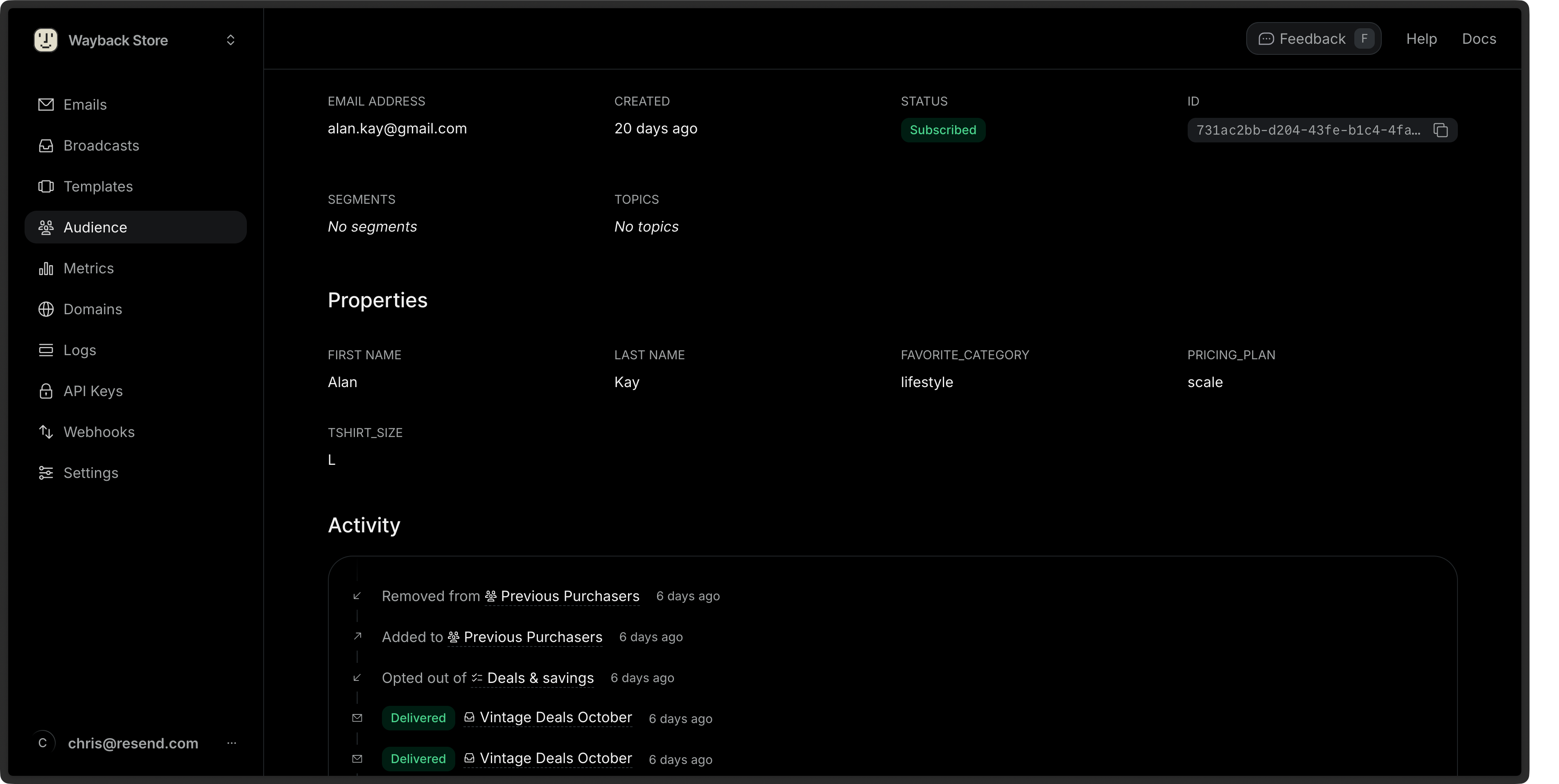 You can also [retrieve a single Contact](/docs/api-reference/contacts/get-contact) or [list all Contacts](/docs/api-reference/contacts/list-contacts) via the API or SDKs, or use [CLI commands to view your Contacts](/docs/cli#contacts).
## Edit Contacts
You can edit any Contact property (excluding the email address), assign the Contact to a [Segment](/docs/dashboard/contacts/introduction#segments) or [Topic](/docs/dashboard/contacts/introduction#topics), or unsubscribe the Contact from all Broadcasts.
You can also [update a Contact via the API or SDKs](/docs/api-reference/contacts/update-contact) or with [CLI commands to update your Contacts](/docs/cli#contacts) using the `id` or `email` of the Contact.
```ts Node.js theme={"theme":{"light":"github-light","dark":"vesper"}}
import { Resend } from 'resend';
const resend = new Resend('re_xxxxxxxxx');
const { data, error } = await resend.contacts.update({
id: 'e169aa45-1ecf-4183-9955-b1499d5701d3',
// or: email: 'acme@example.com',
unsubscribed: true,
});
```
```php PHP theme={"theme":{"light":"github-light","dark":"vesper"}}
$resend = Resend::client('re_xxxxxxxxx');
// Update by contact id
$resend->contacts->update(
idOrEmail: 'e169aa45-1ecf-4183-9955-b1499d5701d3',
parameters: [
'unsubscribed' => true
]
);
// Update by contact email
$resend->contacts->update(
idOrEmail: 'acme@example.com',
parameters: [
'unsubscribed' => true
]
);
```
```python Python theme={"theme":{"light":"github-light","dark":"vesper"}}
import resend
resend.api_key = "re_xxxxxxxxx"
# Update by contact id
params: resend.Contacts.UpdateParams = {
"id": "e169aa45-1ecf-4183-9955-b1499d5701d3",
"unsubscribed": True,
}
resend.Contacts.update(params)
# Update by contact email
params: resend.Contacts.UpdateParams = {
"email": "acme@example.com",
"unsubscribed": True,
}
resend.Contacts.update(params)
```
```ruby Ruby theme={"theme":{"light":"github-light","dark":"vesper"}}
require "resend"
Resend.api_key = "re_xxxxxxxxx"
# Update by contact id
params = {
"id": "e169aa45-1ecf-4183-9955-b1499d5701d3",
"unsubscribed": true,
}
Resend::Contacts.update(params)
# Update by contact email
params = {
"email": "acme@example.com",
"unsubscribed": true,
}
Resend::Contacts.update(params)
```
```go Go theme={"theme":{"light":"github-light","dark":"vesper"}}
import "github.com/resend/resend-go/v4"
client := resend.NewClient("re_xxxxxxxxx")
// Update by contact id
params := &resend.UpdateContactRequest{
Id: "e169aa45-1ecf-4183-9955-b1499d5701d3",
Unsubscribed: true,
}
params.SetUnsubscribed(true)
client.Contacts.Update(params)
// Update by contact email
params = &resend.UpdateContactRequest{
Email: "acme@example.com",
Unsubscribed: true,
}
params.SetUnsubscribed(true)
client.Contacts.Update(params)
```
```rust Rust theme={"theme":{"light":"github-light","dark":"vesper"}}
use resend_rs::{types::ContactChanges, Resend, Result};
#[tokio::main]
async fn main() -> Result<()> {
let resend = Resend::new("re_xxxxxxxxx");
let changes = ContactChanges::new().with_unsubscribed(true);
// Update by contact id
let _contact = resend
.contacts
.update("e169aa45-1ecf-4183-9955-b1499d5701d3", changes.clone())
.await?;
// Update by contact email
let _contact = resend
.contacts
.update("acme@example.com", changes)
.await?;
Ok(())
}
```
```java Java theme={"theme":{"light":"github-light","dark":"vesper"}}
import com.resend.*;
import com.resend.core.exception.ResendException;
import com.resend.services.contacts.model.UpdateContactOptions;
import com.resend.services.contacts.model.UpdateContactResponseSuccess;
public class Main {
public static void main(String[] args) throws ResendException {
Resend resend = new Resend("re_xxxxxxxxx");
UpdateContactOptions params = UpdateContactOptions.builder()
.id("e169aa45-1ecf-4183-9955-b1499d5701d3") // or: .email("acme@example.com")
.unsubscribed(true)
.build();
UpdateContactResponseSuccess data = resend.contacts().update(params);
}
}
```
```csharp .NET theme={"theme":{"light":"github-light","dark":"vesper"}}
using Resend;
IResend resend = ResendClient.Create( "re_xxxxxxxxx" ); // Or from DI
// By Id
await resend.ContactUpdateAsync(
contactId: new Guid( "e169aa45-1ecf-4183-9955-b1499d5701d3" ),
new ContactData()
{
FirstName = "Stevie",
LastName = "Wozniaks",
IsUnsubscribed = true,
}
);
// By Email
await resend.ContactUpdateByEmailAsync(
"acme@example.com",
new ContactData()
{
FirstName = "Stevie",
LastName = "Wozniaks",
IsUnsubscribed = true,
}
);
```
```bash cURL theme={"theme":{"light":"github-light","dark":"vesper"}}
# Update by contact id
curl -X PATCH 'https://api.resend.com/contacts/520784e2-887d-4c25-b53c-4ad46ad38100' \
-H 'Authorization: Bearer re_xxxxxxxxx' \
-H 'Content-Type: application/json' \
-d $'{
"unsubscribed": true
}'
# Update by contact email
curl -X PATCH 'https://api.resend.com/contacts/acme@example.com' \
-H 'Authorization: Bearer re_xxxxxxxxx' \
-H 'Content-Type: application/json' \
-d $'{
"unsubscribed": true
}'
```
## Bulk Actions
You can perform actions on multiple Contacts at once in the Dashboard by selecting them from the [**Contacts** view](https://resend.com/audience).
You can also delete multiple Contacts at once by clicking the **Delete** button in the bulk actions bar.
## Delete Contacts
You can also [delete a Contact](/docs/api-reference/contacts/delete-contact) via the API, SDKs, or CLI.
```ts Node.js theme={"theme":{"light":"github-light","dark":"vesper"}}
import { Resend } from 'resend';
const resend = new Resend('re_xxxxxxxxx');
const { data, error } = await resend.contacts.remove({
id: '520784e2-887d-4c25-b53c-4ad46ad38100',
// or: email: 'acme@example.com',
});
```
```php PHP theme={"theme":{"light":"github-light","dark":"vesper"}}
$resend = Resend::client('re_xxxxxxxxx');
// Delete by contact id
$resend->contacts->remove(
idOrEmail: '520784e2-887d-4c25-b53c-4ad46ad38100'
);
// Delete by contact email
$resend->contacts->remove(
idOrEmail: 'acme@example.com'
);
```
```python Python theme={"theme":{"light":"github-light","dark":"vesper"}}
import resend
resend.api_key = "re_xxxxxxxxx"
# Delete by contact id
resend.Contacts.remove(
id="520784e2-887d-4c25-b53c-4ad46ad38100"
)
# Delete by contact email
resend.Contacts.remove(
email="acme@example.com"
)
```
```ruby Ruby theme={"theme":{"light":"github-light","dark":"vesper"}}
require "resend"
Resend.api_key = "re_xxxxxxxxx"
# Delete by contact id
Resend::Contacts.remove(
id: "520784e2-887d-4c25-b53c-4ad46ad38100"
)
# Delete by contact email
Resend::Contacts.remove(
email: "acme@example.com",
)
```
```go Go theme={"theme":{"light":"github-light","dark":"vesper"}}
import "github.com/resend/resend-go/v4"
client := resend.NewClient("re_xxxxxxxxx")
// Delete by contact id
client.Contacts.Remove(&resend.RemoveContactOptions{
Id: "520784e2-887d-4c25-b53c-4ad46ad38100",
})
// Delete by contact email
client.Contacts.Remove(&resend.RemoveContactOptions{
Id: "acme@example.com",
})
```
```rust Rust theme={"theme":{"light":"github-light","dark":"vesper"}}
use resend_rs::{Resend, Result};
#[tokio::main]
async fn main() -> Result<()> {
let resend = Resend::new("re_xxxxxxxxx");
// Delete by contact id
let _deleted = resend
.contacts
.delete("520784e2-887d-4c25-b53c-4ad46ad38100")
.await?;
// Delete by contact email
let _deleted = resend
.contacts
.delete("acme@example.com")
.await?;
Ok(())
}
```
```java Java theme={"theme":{"light":"github-light","dark":"vesper"}}
import com.resend.*;
import com.resend.core.exception.ResendException;
import com.resend.services.contacts.model.RemoveContactOptions;
public class Main {
public static void main(String[] args) throws ResendException {
Resend resend = new Resend("re_xxxxxxxxx");
// Delete by contact id
resend.contacts().remove(RemoveContactOptions.builder()
.id("520784e2-887d-4c25-b53c-4ad46ad38100")
.build());
// Delete by contact email
resend.contacts().remove(RemoveContactOptions.builder()
.email("acme@example.com")
.build());
}
}
```
```csharp .NET theme={"theme":{"light":"github-light","dark":"vesper"}}
using Resend;
IResend resend = ResendClient.Create( "re_xxxxxxxxx" ); // Or from DI
// By Id
await resend.ContactDeleteAsync(
contactId: new Guid( "520784e2-887d-4c25-b53c-4ad46ad38100" )
);
// By Email
await resend.ContactDeleteByEmailAsync(
"acme@example.com"
);
```
```bash cURL theme={"theme":{"light":"github-light","dark":"vesper"}}
# Delete by contact id
curl -X DELETE 'https://api.resend.com/contacts/520784e2-887d-4c25-b53c-4ad46ad38100' \
-H 'Authorization: Bearer re_xxxxxxxxx'
# Delete by contact email
curl -X DELETE 'https://api.resend.com/contacts/acme@example.com' \
-H 'Authorization: Bearer re_xxxxxxxxx'
```
## API Reference
For complete API documentation, see the [Contacts API reference](/docs/api-reference/contacts/create-contact).
You can also [retrieve a single Contact](/docs/api-reference/contacts/get-contact) or [list all Contacts](/docs/api-reference/contacts/list-contacts) via the API or SDKs, or use [CLI commands to view your Contacts](/docs/cli#contacts).
## Edit Contacts
You can edit any Contact property (excluding the email address), assign the Contact to a [Segment](/docs/dashboard/contacts/introduction#segments) or [Topic](/docs/dashboard/contacts/introduction#topics), or unsubscribe the Contact from all Broadcasts.
You can also [update a Contact via the API or SDKs](/docs/api-reference/contacts/update-contact) or with [CLI commands to update your Contacts](/docs/cli#contacts) using the `id` or `email` of the Contact.
```ts Node.js theme={"theme":{"light":"github-light","dark":"vesper"}}
import { Resend } from 'resend';
const resend = new Resend('re_xxxxxxxxx');
const { data, error } = await resend.contacts.update({
id: 'e169aa45-1ecf-4183-9955-b1499d5701d3',
// or: email: 'acme@example.com',
unsubscribed: true,
});
```
```php PHP theme={"theme":{"light":"github-light","dark":"vesper"}}
$resend = Resend::client('re_xxxxxxxxx');
// Update by contact id
$resend->contacts->update(
idOrEmail: 'e169aa45-1ecf-4183-9955-b1499d5701d3',
parameters: [
'unsubscribed' => true
]
);
// Update by contact email
$resend->contacts->update(
idOrEmail: 'acme@example.com',
parameters: [
'unsubscribed' => true
]
);
```
```python Python theme={"theme":{"light":"github-light","dark":"vesper"}}
import resend
resend.api_key = "re_xxxxxxxxx"
# Update by contact id
params: resend.Contacts.UpdateParams = {
"id": "e169aa45-1ecf-4183-9955-b1499d5701d3",
"unsubscribed": True,
}
resend.Contacts.update(params)
# Update by contact email
params: resend.Contacts.UpdateParams = {
"email": "acme@example.com",
"unsubscribed": True,
}
resend.Contacts.update(params)
```
```ruby Ruby theme={"theme":{"light":"github-light","dark":"vesper"}}
require "resend"
Resend.api_key = "re_xxxxxxxxx"
# Update by contact id
params = {
"id": "e169aa45-1ecf-4183-9955-b1499d5701d3",
"unsubscribed": true,
}
Resend::Contacts.update(params)
# Update by contact email
params = {
"email": "acme@example.com",
"unsubscribed": true,
}
Resend::Contacts.update(params)
```
```go Go theme={"theme":{"light":"github-light","dark":"vesper"}}
import "github.com/resend/resend-go/v4"
client := resend.NewClient("re_xxxxxxxxx")
// Update by contact id
params := &resend.UpdateContactRequest{
Id: "e169aa45-1ecf-4183-9955-b1499d5701d3",
Unsubscribed: true,
}
params.SetUnsubscribed(true)
client.Contacts.Update(params)
// Update by contact email
params = &resend.UpdateContactRequest{
Email: "acme@example.com",
Unsubscribed: true,
}
params.SetUnsubscribed(true)
client.Contacts.Update(params)
```
```rust Rust theme={"theme":{"light":"github-light","dark":"vesper"}}
use resend_rs::{types::ContactChanges, Resend, Result};
#[tokio::main]
async fn main() -> Result<()> {
let resend = Resend::new("re_xxxxxxxxx");
let changes = ContactChanges::new().with_unsubscribed(true);
// Update by contact id
let _contact = resend
.contacts
.update("e169aa45-1ecf-4183-9955-b1499d5701d3", changes.clone())
.await?;
// Update by contact email
let _contact = resend
.contacts
.update("acme@example.com", changes)
.await?;
Ok(())
}
```
```java Java theme={"theme":{"light":"github-light","dark":"vesper"}}
import com.resend.*;
import com.resend.core.exception.ResendException;
import com.resend.services.contacts.model.UpdateContactOptions;
import com.resend.services.contacts.model.UpdateContactResponseSuccess;
public class Main {
public static void main(String[] args) throws ResendException {
Resend resend = new Resend("re_xxxxxxxxx");
UpdateContactOptions params = UpdateContactOptions.builder()
.id("e169aa45-1ecf-4183-9955-b1499d5701d3") // or: .email("acme@example.com")
.unsubscribed(true)
.build();
UpdateContactResponseSuccess data = resend.contacts().update(params);
}
}
```
```csharp .NET theme={"theme":{"light":"github-light","dark":"vesper"}}
using Resend;
IResend resend = ResendClient.Create( "re_xxxxxxxxx" ); // Or from DI
// By Id
await resend.ContactUpdateAsync(
contactId: new Guid( "e169aa45-1ecf-4183-9955-b1499d5701d3" ),
new ContactData()
{
FirstName = "Stevie",
LastName = "Wozniaks",
IsUnsubscribed = true,
}
);
// By Email
await resend.ContactUpdateByEmailAsync(
"acme@example.com",
new ContactData()
{
FirstName = "Stevie",
LastName = "Wozniaks",
IsUnsubscribed = true,
}
);
```
```bash cURL theme={"theme":{"light":"github-light","dark":"vesper"}}
# Update by contact id
curl -X PATCH 'https://api.resend.com/contacts/520784e2-887d-4c25-b53c-4ad46ad38100' \
-H 'Authorization: Bearer re_xxxxxxxxx' \
-H 'Content-Type: application/json' \
-d $'{
"unsubscribed": true
}'
# Update by contact email
curl -X PATCH 'https://api.resend.com/contacts/acme@example.com' \
-H 'Authorization: Bearer re_xxxxxxxxx' \
-H 'Content-Type: application/json' \
-d $'{
"unsubscribed": true
}'
```
## Bulk Actions
You can perform actions on multiple Contacts at once in the Dashboard by selecting them from the [**Contacts** view](https://resend.com/audience).
You can also delete multiple Contacts at once by clicking the **Delete** button in the bulk actions bar.
## Delete Contacts
You can also [delete a Contact](/docs/api-reference/contacts/delete-contact) via the API, SDKs, or CLI.
```ts Node.js theme={"theme":{"light":"github-light","dark":"vesper"}}
import { Resend } from 'resend';
const resend = new Resend('re_xxxxxxxxx');
const { data, error } = await resend.contacts.remove({
id: '520784e2-887d-4c25-b53c-4ad46ad38100',
// or: email: 'acme@example.com',
});
```
```php PHP theme={"theme":{"light":"github-light","dark":"vesper"}}
$resend = Resend::client('re_xxxxxxxxx');
// Delete by contact id
$resend->contacts->remove(
idOrEmail: '520784e2-887d-4c25-b53c-4ad46ad38100'
);
// Delete by contact email
$resend->contacts->remove(
idOrEmail: 'acme@example.com'
);
```
```python Python theme={"theme":{"light":"github-light","dark":"vesper"}}
import resend
resend.api_key = "re_xxxxxxxxx"
# Delete by contact id
resend.Contacts.remove(
id="520784e2-887d-4c25-b53c-4ad46ad38100"
)
# Delete by contact email
resend.Contacts.remove(
email="acme@example.com"
)
```
```ruby Ruby theme={"theme":{"light":"github-light","dark":"vesper"}}
require "resend"
Resend.api_key = "re_xxxxxxxxx"
# Delete by contact id
Resend::Contacts.remove(
id: "520784e2-887d-4c25-b53c-4ad46ad38100"
)
# Delete by contact email
Resend::Contacts.remove(
email: "acme@example.com",
)
```
```go Go theme={"theme":{"light":"github-light","dark":"vesper"}}
import "github.com/resend/resend-go/v4"
client := resend.NewClient("re_xxxxxxxxx")
// Delete by contact id
client.Contacts.Remove(&resend.RemoveContactOptions{
Id: "520784e2-887d-4c25-b53c-4ad46ad38100",
})
// Delete by contact email
client.Contacts.Remove(&resend.RemoveContactOptions{
Id: "acme@example.com",
})
```
```rust Rust theme={"theme":{"light":"github-light","dark":"vesper"}}
use resend_rs::{Resend, Result};
#[tokio::main]
async fn main() -> Result<()> {
let resend = Resend::new("re_xxxxxxxxx");
// Delete by contact id
let _deleted = resend
.contacts
.delete("520784e2-887d-4c25-b53c-4ad46ad38100")
.await?;
// Delete by contact email
let _deleted = resend
.contacts
.delete("acme@example.com")
.await?;
Ok(())
}
```
```java Java theme={"theme":{"light":"github-light","dark":"vesper"}}
import com.resend.*;
import com.resend.core.exception.ResendException;
import com.resend.services.contacts.model.RemoveContactOptions;
public class Main {
public static void main(String[] args) throws ResendException {
Resend resend = new Resend("re_xxxxxxxxx");
// Delete by contact id
resend.contacts().remove(RemoveContactOptions.builder()
.id("520784e2-887d-4c25-b53c-4ad46ad38100")
.build());
// Delete by contact email
resend.contacts().remove(RemoveContactOptions.builder()
.email("acme@example.com")
.build());
}
}
```
```csharp .NET theme={"theme":{"light":"github-light","dark":"vesper"}}
using Resend;
IResend resend = ResendClient.Create( "re_xxxxxxxxx" ); // Or from DI
// By Id
await resend.ContactDeleteAsync(
contactId: new Guid( "520784e2-887d-4c25-b53c-4ad46ad38100" )
);
// By Email
await resend.ContactDeleteByEmailAsync(
"acme@example.com"
);
```
```bash cURL theme={"theme":{"light":"github-light","dark":"vesper"}}
# Delete by contact id
curl -X DELETE 'https://api.resend.com/contacts/520784e2-887d-4c25-b53c-4ad46ad38100' \
-H 'Authorization: Bearer re_xxxxxxxxx'
# Delete by contact email
curl -X DELETE 'https://api.resend.com/contacts/acme@example.com' \
-H 'Authorization: Bearer re_xxxxxxxxx'
```
## API Reference
For complete API documentation, see the [Contacts API reference](/docs/api-reference/contacts/create-contact).
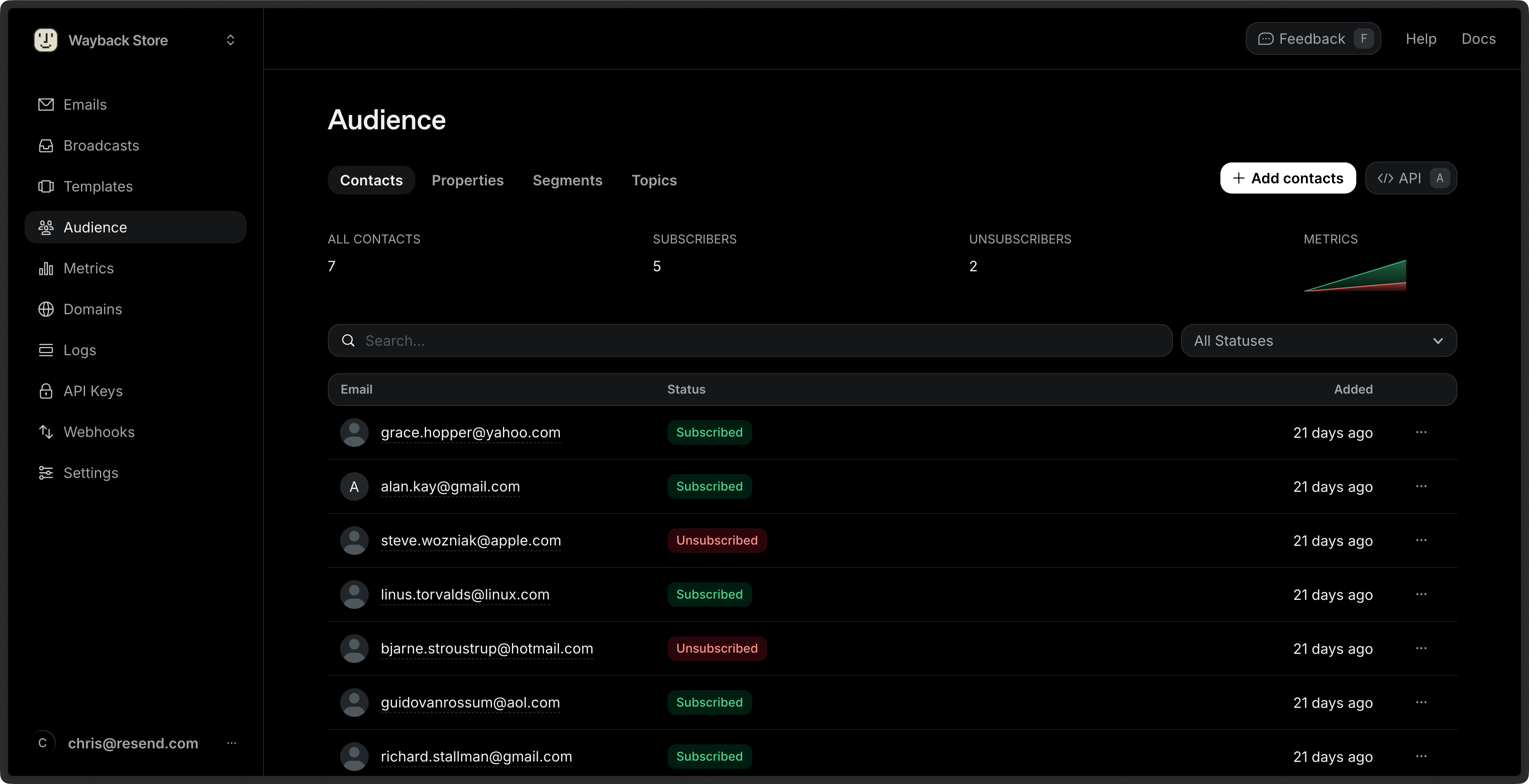 These areas provide different views of your marketing Contacts, and allow you to manage their properties and the emails they receive. You can also filter your list and perform bulk actions on multiple Contacts.
## View Contacts
See the name, Segments, status, and added date of all your Contacts from the [**Contacts** Dashboard view](https://resend.com/audience). You can additionally see filtered views of your Contacts by Segment and Topic, and manage your custom properties.
These areas provide different views of your marketing Contacts, and allow you to manage their properties and the emails they receive. You can also filter your list and perform bulk actions on multiple Contacts.
## View Contacts
See the name, Segments, status, and added date of all your Contacts from the [**Contacts** Dashboard view](https://resend.com/audience). You can additionally see filtered views of your Contacts by Segment and Topic, and manage your custom properties.