> ## Documentation Index
> Fetch the complete documentation index at: https://resend.com/docs/llms.txt
> Use this file to discover all available pages before exploring further.
# Wait for Event
> Hold your Automations until a specific event is received.
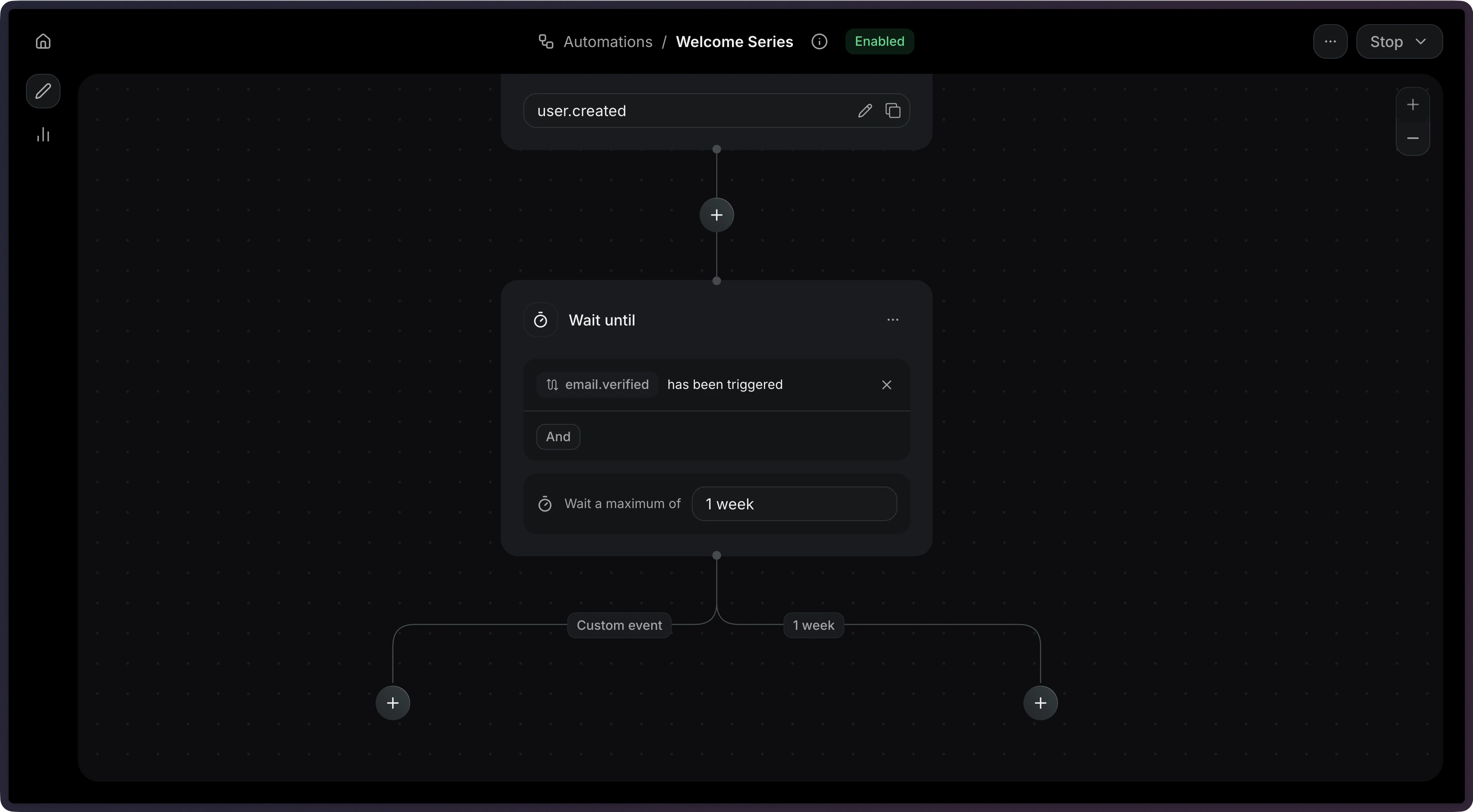
A wait-until step holds the Automation until a specific event is received.
Unlike a delay, which resumes after a fixed time, this step resumes when something happens in your application.
Common use cases:
* **Payment**: Wait for a payment to succeed before sending a receipt.
* **Adoption**: Wait for a user to complete an action to unlock a feature.
* **Verification**: Wait for the user to verify their email before continuing.
## How it works
Add a **Wait for event** step and configure the event to wait for.
 Add a `wait_for_event` step to your Automation's `steps` array.
```ts Node.js {13-20} theme={"theme":{"light":"github-light","dark":"vesper"}}
import { Resend } from 'resend';
const resend = new Resend('re_xxxxxxxxx');
const { data, error } = await resend.automations.create({
name: 'Verification Reminder',
steps: [
{
key: 'start',
type: 'trigger',
config: { eventName: 'user.created' },
},
{
key: 'verification',
type: 'wait_for_event',
config: {
eventName: 'email.verified',
timeout: '1 day',
},
},
],
connections: [{ from: 'start', to: 'verification', type: 'default' }],
});
```
```php PHP {11-18} theme={"theme":{"light":"github-light","dark":"vesper"}}
$resend = Resend::client('re_xxxxxxxxx');
$resend->automations->create([
'name' => 'Verification Reminder',
'steps' => [
[
'key' => 'start',
'type' => 'trigger',
'config' => ['event_name' => 'user.created'],
],
[
'key' => 'verification',
'type' => 'wait_for_event',
'config' => [
'event_name' => 'email.verified',
'timeout' => '24 hours',
],
],
],
'connections' => [['from' => 'start', 'to' => 'verification', 'type' => 'default']],
]);
```
```python Python {13-20} theme={"theme":{"light":"github-light","dark":"vesper"}}
import resend
resend.api_key = "re_xxxxxxxxx"
params: resend.Automations.CreateParams = {
"name": "Verification Reminder",
"steps": [
{
"key": "start",
"type": "trigger",
"config": {"event_name": "user.created"},
},
{
"key": "verification",
"type": "wait_for_event",
"config": {
"event_name": "email.verified",
"timeout": "24 hours",
},
},
],
"connections": [{"from": "start", "to": "verification", "type": "default"}],
}
resend.Automations.create(params)
```
```ruby Ruby {13-20} theme={"theme":{"light":"github-light","dark":"vesper"}}
require "resend"
Resend.api_key = "re_xxxxxxxxx"
params = {
name: "Verification Reminder",
steps: [
{
key: "start",
type: "trigger",
config: { event_name: "user.created" },
},
{
key: "verification",
type: "wait_for_event",
config: {
event_name: "email.verified",
timeout: "24 hours",
},
},
],
connections: [{ from: "start", to: "verification", type: "default" }],
}
Resend::Automations.create(params)
```
```go Go {18-25} theme={"theme":{"light":"github-light","dark":"vesper"}}
package main
import "github.com/resend/resend-go/v3"
func main() {
client := resend.NewClient("re_xxxxxxxxx")
params := &resend.CreateAutomationRequest{
Name: "Verification Reminder",
Steps: []resend.AutomationStep{
{
Key: "start",
Type: resend.AutomationStepTypeTrigger,
Config: map[string]any{
"event_name": "user.created",
},
},
{
Key: "verification",
Type: resend.AutomationStepTypeWaitForEvent,
Config: map[string]any{
"event_name": "email.verified",
"timeout": "24 hours",
},
},
},
Connections: []resend.AutomationConnection{
{From: "start", To: "verification", Type: resend.AutomationConnectionTypeDefault},
},
}
client.Automations.Create(params)
}
```
```rust Rust {22-29} theme={"theme":{"light":"github-light","dark":"vesper"}}
use resend_rs::{
types::{
AutomationStatus, Connection, ConnectionType, CreateAutomationOptions, Step, TriggerStepConfig,
WaitForEventStepConfig,
},
Resend, Result,
};
#[tokio::main]
async fn main() -> Result<()> {
let resend = Resend::new("re_xxxxxxxxx");
let opts = CreateAutomationOptions {
name: "Verification Reminder".to_owned(),
steps: vec![
Step::Trigger {
key: "start".to_owned(),
config: TriggerStepConfig {
event_name: "user.created".to_owned(),
},
},
Step::WaitForEvent {
key: "verification".to_owned(),
config: WaitForEventStepConfig {
event_name: "email.verified".to_owned(),
timeout: Some("24 hours".to_owned()),
filter_rule: None,
},
},
],
connections: vec![Connection::new("start", "verification").with_type(ConnectionType::Default)],
status: AutomationStatus::Disabled,
};
let _automation = resend.automations.create(opts).await?;
Ok(())
}
```
```java Java {14-19} theme={"theme":{"light":"github-light","dark":"vesper"}}
import com.resend.*;
public class Main {
public static void main(String[] args) {
Resend resend = new Resend("re_xxxxxxxxx");
CreateAutomationOptions options = CreateAutomationOptions.builder()
.name("Verification Reminder")
.steps(
AutomationStep.trigger("start")
.eventName("user.created")
.build(),
AutomationStep.waitForEvent("verification")
.eventName("email.verified")
.timeoutSeconds(86400)
.build()
)
.connections(
AutomationConnection.builder()
.from("start")
.to("verification")
.type(ConnectionType.DEFAULT)
.build()
)
.build();
CreateAutomationResponseSuccess data = resend.automations().create(options);
}
}
```
```csharp .NET {7-11,19} theme={"theme":{"light":"github-light","dark":"vesper"}}
using Resend;
using System.Text.Json;
IResend resend = ResendClient.Create( "re_xxxxxxxxx" );
var startConfig = JsonSerializer.SerializeToElement( new { event_name = "user.created" } );
var waitConfig = JsonSerializer.SerializeToElement( new
{
event_name = "email.verified",
timeout = "1 day",
} );
var resp = await resend.AutomationCreateAsync( new AutomationCreateData()
{
Name = "Verification Reminder",
Steps = new List
{
new AutomationStepData { Ref = "start", Type = "trigger", Config = startConfig },
new AutomationStepData { Ref = "verification", Type = "wait_for_event", Config = waitConfig },
},
Connections = new List
{
new AutomationEdge { From = "start", To = "verification", EdgeType = "default" },
},
} );
```
```bash cURL {10-16} theme={"theme":{"light":"github-light","dark":"vesper"}}
curl -X POST 'https://api.resend.com/automations' \
-H 'Authorization: Bearer re_xxxxxxxxx' \
-H 'Content-Type: application/json' \
-d '{
"name": "Verification Reminder",
"steps": [{
"key": "start",
"type": "trigger",
"config": { "event_name": "user.created" }
}, {
"key": "verification",
"type": "wait_for_event",
"config": {
"event_name": "email.verified"
}
}],
"connections": [
{ "from": "start", "to": "verification", "type": "default" }
]
}'
```
```bash CLI theme={"theme":{"light":"github-light","dark":"vesper"}}
resend automations create --name "Verification Reminder" --file ./automation.json
```
## Timeouts
When you set a `timeout`, the step will stop waiting after that duration. This prevents Automations from waiting indefinitely.
When a wait-until step times out, it produces two possible connection types:
| Connection type | When it's used |
| ---------------- | ----------------------------------------------- |
| `event_received` | The event arrived before the timeout |
| `timeout` | The timeout elapsed without receiving the event |
You can create different paths depending on whether the user took action within an given time period.
```json {6} theme={"theme":{"light":"github-light","dark":"vesper"}}
{
"key": "payment",
"type": "wait_for_event",
"config": {
"event_name": "payment.completed",
"timeout": "3 days"
}
}
```
The maximum timeout is 30 days.
## Filter rules
Use `filter_rule` to match events that meet only specific criteria. This is useful when the same event name might be sent with different payloads.
For example, to wait specifically for a successful payment:
```json {6-10} theme={"theme":{"light":"github-light","dark":"vesper"}}
{
"key": "payment",
"type": "wait_for_event",
"config": {
"event_name": "payment.completed",
"filter_rule": {
"field": "event.status",
"operator": "eq",
"value": "succeeded"
}
}
}
```
The filter rule supports the same [operators](/dashboard/automations/condition#configuration) as condition steps.
## Configuration
The name of the event to wait for.
The maximum time to wait before timing out (e.g. `"3 days"`, `"1 hour"`).
Maximum: 30 days.
An optional rule object to filter incoming events.
```json Example theme={"theme":{"light":"github-light","dark":"vesper"}}
{
"key": "wait_for_purchase",
"type": "wait_for_event",
"config": {
"event_name": "purchase.completed",
"timeout": "3 days"
}
}
```
Add a `wait_for_event` step to your Automation's `steps` array.
```ts Node.js {13-20} theme={"theme":{"light":"github-light","dark":"vesper"}}
import { Resend } from 'resend';
const resend = new Resend('re_xxxxxxxxx');
const { data, error } = await resend.automations.create({
name: 'Verification Reminder',
steps: [
{
key: 'start',
type: 'trigger',
config: { eventName: 'user.created' },
},
{
key: 'verification',
type: 'wait_for_event',
config: {
eventName: 'email.verified',
timeout: '1 day',
},
},
],
connections: [{ from: 'start', to: 'verification', type: 'default' }],
});
```
```php PHP {11-18} theme={"theme":{"light":"github-light","dark":"vesper"}}
$resend = Resend::client('re_xxxxxxxxx');
$resend->automations->create([
'name' => 'Verification Reminder',
'steps' => [
[
'key' => 'start',
'type' => 'trigger',
'config' => ['event_name' => 'user.created'],
],
[
'key' => 'verification',
'type' => 'wait_for_event',
'config' => [
'event_name' => 'email.verified',
'timeout' => '24 hours',
],
],
],
'connections' => [['from' => 'start', 'to' => 'verification', 'type' => 'default']],
]);
```
```python Python {13-20} theme={"theme":{"light":"github-light","dark":"vesper"}}
import resend
resend.api_key = "re_xxxxxxxxx"
params: resend.Automations.CreateParams = {
"name": "Verification Reminder",
"steps": [
{
"key": "start",
"type": "trigger",
"config": {"event_name": "user.created"},
},
{
"key": "verification",
"type": "wait_for_event",
"config": {
"event_name": "email.verified",
"timeout": "24 hours",
},
},
],
"connections": [{"from": "start", "to": "verification", "type": "default"}],
}
resend.Automations.create(params)
```
```ruby Ruby {13-20} theme={"theme":{"light":"github-light","dark":"vesper"}}
require "resend"
Resend.api_key = "re_xxxxxxxxx"
params = {
name: "Verification Reminder",
steps: [
{
key: "start",
type: "trigger",
config: { event_name: "user.created" },
},
{
key: "verification",
type: "wait_for_event",
config: {
event_name: "email.verified",
timeout: "24 hours",
},
},
],
connections: [{ from: "start", to: "verification", type: "default" }],
}
Resend::Automations.create(params)
```
```go Go {18-25} theme={"theme":{"light":"github-light","dark":"vesper"}}
package main
import "github.com/resend/resend-go/v3"
func main() {
client := resend.NewClient("re_xxxxxxxxx")
params := &resend.CreateAutomationRequest{
Name: "Verification Reminder",
Steps: []resend.AutomationStep{
{
Key: "start",
Type: resend.AutomationStepTypeTrigger,
Config: map[string]any{
"event_name": "user.created",
},
},
{
Key: "verification",
Type: resend.AutomationStepTypeWaitForEvent,
Config: map[string]any{
"event_name": "email.verified",
"timeout": "24 hours",
},
},
},
Connections: []resend.AutomationConnection{
{From: "start", To: "verification", Type: resend.AutomationConnectionTypeDefault},
},
}
client.Automations.Create(params)
}
```
```rust Rust {22-29} theme={"theme":{"light":"github-light","dark":"vesper"}}
use resend_rs::{
types::{
AutomationStatus, Connection, ConnectionType, CreateAutomationOptions, Step, TriggerStepConfig,
WaitForEventStepConfig,
},
Resend, Result,
};
#[tokio::main]
async fn main() -> Result<()> {
let resend = Resend::new("re_xxxxxxxxx");
let opts = CreateAutomationOptions {
name: "Verification Reminder".to_owned(),
steps: vec![
Step::Trigger {
key: "start".to_owned(),
config: TriggerStepConfig {
event_name: "user.created".to_owned(),
},
},
Step::WaitForEvent {
key: "verification".to_owned(),
config: WaitForEventStepConfig {
event_name: "email.verified".to_owned(),
timeout: Some("24 hours".to_owned()),
filter_rule: None,
},
},
],
connections: vec![Connection::new("start", "verification").with_type(ConnectionType::Default)],
status: AutomationStatus::Disabled,
};
let _automation = resend.automations.create(opts).await?;
Ok(())
}
```
```java Java {14-19} theme={"theme":{"light":"github-light","dark":"vesper"}}
import com.resend.*;
public class Main {
public static void main(String[] args) {
Resend resend = new Resend("re_xxxxxxxxx");
CreateAutomationOptions options = CreateAutomationOptions.builder()
.name("Verification Reminder")
.steps(
AutomationStep.trigger("start")
.eventName("user.created")
.build(),
AutomationStep.waitForEvent("verification")
.eventName("email.verified")
.timeoutSeconds(86400)
.build()
)
.connections(
AutomationConnection.builder()
.from("start")
.to("verification")
.type(ConnectionType.DEFAULT)
.build()
)
.build();
CreateAutomationResponseSuccess data = resend.automations().create(options);
}
}
```
```csharp .NET {7-11,19} theme={"theme":{"light":"github-light","dark":"vesper"}}
using Resend;
using System.Text.Json;
IResend resend = ResendClient.Create( "re_xxxxxxxxx" );
var startConfig = JsonSerializer.SerializeToElement( new { event_name = "user.created" } );
var waitConfig = JsonSerializer.SerializeToElement( new
{
event_name = "email.verified",
timeout = "1 day",
} );
var resp = await resend.AutomationCreateAsync( new AutomationCreateData()
{
Name = "Verification Reminder",
Steps = new List
{
new AutomationStepData { Ref = "start", Type = "trigger", Config = startConfig },
new AutomationStepData { Ref = "verification", Type = "wait_for_event", Config = waitConfig },
},
Connections = new List
{
new AutomationEdge { From = "start", To = "verification", EdgeType = "default" },
},
} );
```
```bash cURL {10-16} theme={"theme":{"light":"github-light","dark":"vesper"}}
curl -X POST 'https://api.resend.com/automations' \
-H 'Authorization: Bearer re_xxxxxxxxx' \
-H 'Content-Type: application/json' \
-d '{
"name": "Verification Reminder",
"steps": [{
"key": "start",
"type": "trigger",
"config": { "event_name": "user.created" }
}, {
"key": "verification",
"type": "wait_for_event",
"config": {
"event_name": "email.verified"
}
}],
"connections": [
{ "from": "start", "to": "verification", "type": "default" }
]
}'
```
```bash CLI theme={"theme":{"light":"github-light","dark":"vesper"}}
resend automations create --name "Verification Reminder" --file ./automation.json
```
## Timeouts
When you set a `timeout`, the step will stop waiting after that duration. This prevents Automations from waiting indefinitely.
When a wait-until step times out, it produces two possible connection types:
| Connection type | When it's used |
| ---------------- | ----------------------------------------------- |
| `event_received` | The event arrived before the timeout |
| `timeout` | The timeout elapsed without receiving the event |
You can create different paths depending on whether the user took action within an given time period.
```json {6} theme={"theme":{"light":"github-light","dark":"vesper"}}
{
"key": "payment",
"type": "wait_for_event",
"config": {
"event_name": "payment.completed",
"timeout": "3 days"
}
}
```
The maximum timeout is 30 days.
## Filter rules
Use `filter_rule` to match events that meet only specific criteria. This is useful when the same event name might be sent with different payloads.
For example, to wait specifically for a successful payment:
```json {6-10} theme={"theme":{"light":"github-light","dark":"vesper"}}
{
"key": "payment",
"type": "wait_for_event",
"config": {
"event_name": "payment.completed",
"filter_rule": {
"field": "event.status",
"operator": "eq",
"value": "succeeded"
}
}
}
```
The filter rule supports the same [operators](/dashboard/automations/condition#configuration) as condition steps.
## Configuration
The name of the event to wait for.
The maximum time to wait before timing out (e.g. `"3 days"`, `"1 hour"`).
Maximum: 30 days.
An optional rule object to filter incoming events.
```json Example theme={"theme":{"light":"github-light","dark":"vesper"}}
{
"key": "wait_for_purchase",
"type": "wait_for_event",
"config": {
"event_name": "purchase.completed",
"timeout": "3 days"
}
}
```