> ## Documentation Index
> Fetch the complete documentation index at: https://resend.com/docs/llms.txt
> Use this file to discover all available pages before exploring further.
# Trigger
> Start your Automations based on custom events.
A trigger is the first step in every Automation. It defines which event will start the Automation when received.
When your application sends an event to Resend, every active Automation with a matching trigger will execute its workflow for that contact.
## How it works
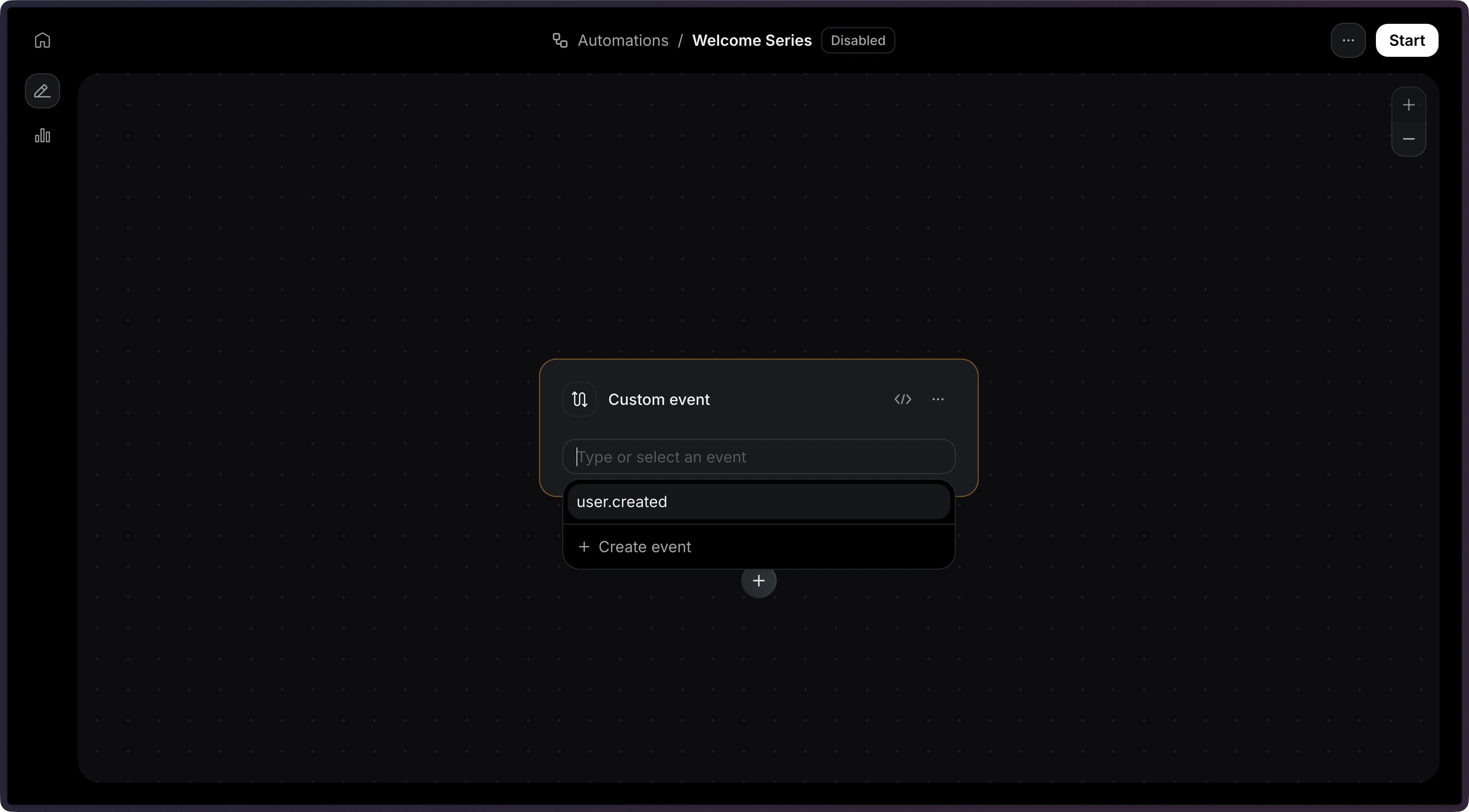
The trigger is the first node in the editor.
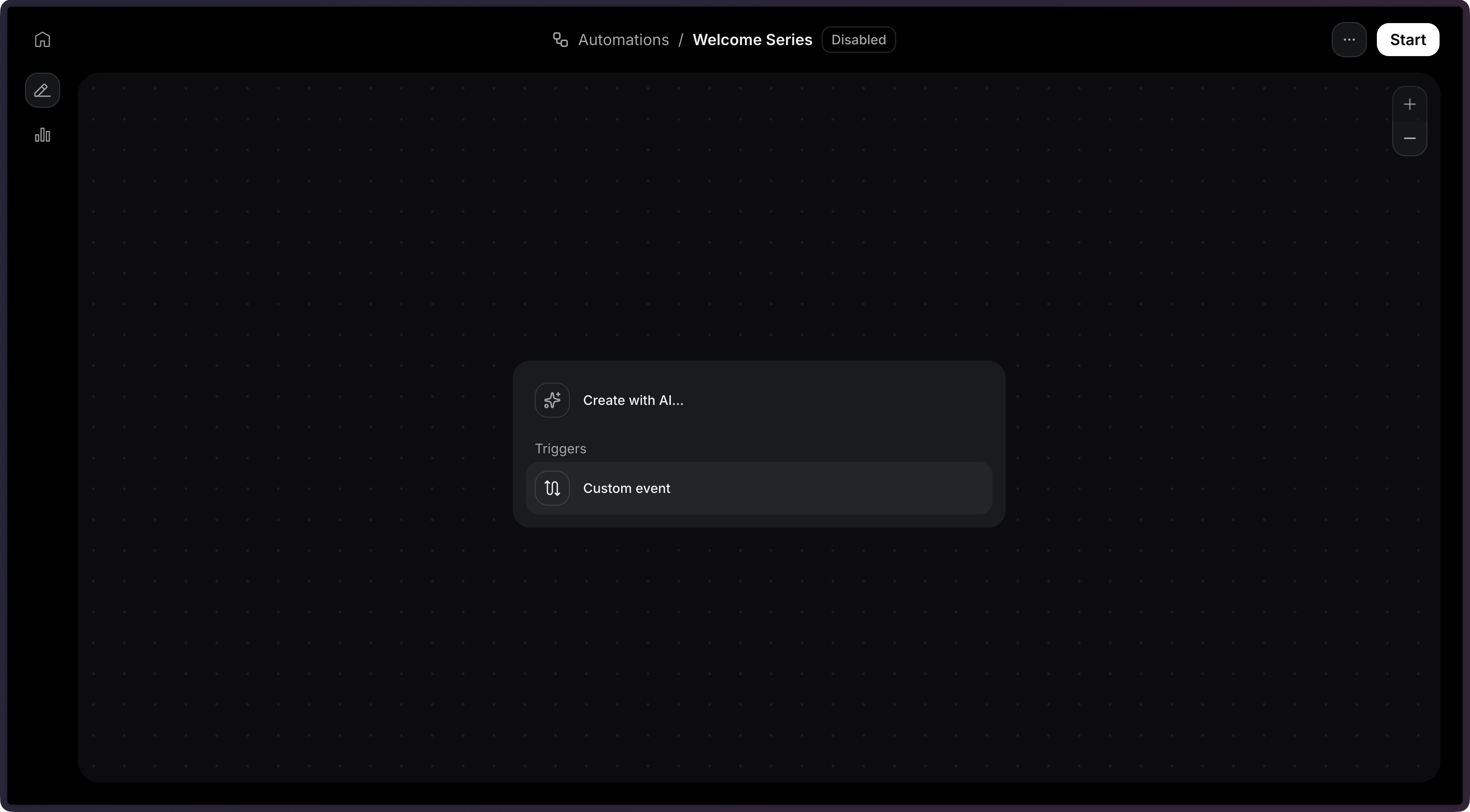 Choose an existing [custom event](/dashboard/automations/custom-events) or type a new event name.
 When creating an Automation via the API, the trigger is defined as the first item in the `steps` array with `type: 'trigger'`.
```ts Node.js {8-12} theme={"theme":{"light":"github-light","dark":"vesper"}}
import { Resend } from 'resend';
const resend = new Resend('re_xxxxxxxxx');
const { data, error } = await resend.automations.create({
name: 'Welcome series',
steps: [
{
key: 'start',
type: 'trigger',
config: { eventName: 'user.created' },
},
],
connections: [],
});
```
```php PHP {6-10} theme={"theme":{"light":"github-light","dark":"vesper"}}
$resend = Resend::client('re_xxxxxxxxx');
$resend->automations->create([
'name' => 'Welcome series',
'steps' => [
[
'key' => 'start',
'type' => 'trigger',
'config' => ['event_name' => 'user.created'],
],
],
'connections' => [],
]);
```
```python Python {8-12} theme={"theme":{"light":"github-light","dark":"vesper"}}
import resend
resend.api_key = "re_xxxxxxxxx"
params: resend.Automations.CreateParams = {
"name": "Welcome series",
"steps": [
{
"key": "start",
"type": "trigger",
"config": {"event_name": "user.created"},
},
],
"connections": [],
}
resend.Automations.create(params)
```
```ruby Ruby {8-12} theme={"theme":{"light":"github-light","dark":"vesper"}}
require "resend"
Resend.api_key = "re_xxxxxxxxx"
params = {
name: "Welcome series",
steps: [
{
key: "start",
type: "trigger",
config: { event_name: "user.created" },
},
],
connections: [],
}
Resend::Automations.create(params)
```
```go Go {11-17} theme={"theme":{"light":"github-light","dark":"vesper"}}
package main
import "github.com/resend/resend-go/v3"
func main() {
client := resend.NewClient("re_xxxxxxxxx")
params := &resend.CreateAutomationRequest{
Name: "Welcome series",
Steps: []resend.AutomationStep{
{
Key: "start",
Type: resend.AutomationStepTypeTrigger,
Config: map[string]any{
"event_name": "user.created",
},
},
},
Connections: []resend.AutomationConnection{},
}
client.Automations.Create(params)
}
```
```rust Rust {11-16} theme={"theme":{"light":"github-light","dark":"vesper"}}
use resend_rs::{
types::{AutomationStatus, CreateAutomationOptions, Step, TriggerStepConfig},
Resend, Result,
};
#[tokio::main]
async fn main() -> Result<()> {
let resend = Resend::new("re_xxxxxxxxx");
let opts = CreateAutomationOptions {
name: "Welcome series".to_owned(),
steps: vec![Step::Trigger {
key: "start".to_owned(),
config: TriggerStepConfig {
event_name: "user.created".to_owned(),
},
}],
connections: vec![],
status: AutomationStatus::Disabled,
};
let _automation = resend.automations.create(opts).await?;
Ok(())
}
```
```java Java {9-13} theme={"theme":{"light":"github-light","dark":"vesper"}}
import com.resend.*;
public class Main {
public static void main(String[] args) {
Resend resend = new Resend("re_xxxxxxxxx");
CreateAutomationOptions options = CreateAutomationOptions.builder()
.name("Welcome series")
.steps(
AutomationStep.trigger("start")
.eventName("user.created")
.build()
)
.build();
CreateAutomationResponseSuccess data = resend.automations().create(options);
}
}
```
```csharp .NET {6,13} theme={"theme":{"light":"github-light","dark":"vesper"}}
using Resend;
using System.Text.Json;
IResend resend = ResendClient.Create( "re_xxxxxxxxx" );
var startConfig = JsonSerializer.SerializeToElement( new { event_name = "user.created" } );
var resp = await resend.AutomationCreateAsync( new AutomationCreateData()
{
Name = "Welcome series",
Steps = new List
{
new AutomationStepData { Ref = "start", Type = "trigger", Config = startConfig },
},
Connections = new List(),
} );
```
```bash cURL {6-10} theme={"theme":{"light":"github-light","dark":"vesper"}}
curl -X POST 'https://api.resend.com/automations' \
-H 'Authorization: Bearer re_xxxxxxxxx' \
-H 'Content-Type: application/json' \
-d '{
"name": "Welcome series",
"steps": [{
"key": "start",
"type": "trigger",
"config": { "event_name": "user.created" }
}],
"connections": []
}'
```
```bash CLI theme={"theme":{"light":"github-light","dark":"vesper"}}
resend automations create --name "Welcome series" --file ./automation.json
```
Event names cannot start with the `resend:` prefix, which is reserved for
system events.
## Identifying contacts
When sending an event to trigger an Automation, you must identify the contact using either a `contact_id` or an `email` address.
Use a contact ID when you already have the contact stored in your [Audience](/dashboard/audiences/introduction):
```ts Node.js {7} theme={"theme":{"light":"github-light","dark":"vesper"}}
import { Resend } from 'resend';
const resend = new Resend('re_xxxxxxxxx');
const { data, error } = await resend.events.send({
event: 'user.created',
contactId: '26e2b838-bf6d-4515-b6a7-17525b12b05a',
payload: {
plan: 'pro',
},
});
```
```php PHP {5} theme={"theme":{"light":"github-light","dark":"vesper"}}
$resend = Resend::client('re_xxxxxxxxx');
$resend->events->send([
'event' => 'user.created',
'contact_id' => '26e2b838-bf6d-4515-b6a7-17525b12b05a',
'payload' => ['plan' => 'pro'],
]);
```
```python Python {7} theme={"theme":{"light":"github-light","dark":"vesper"}}
import resend
resend.api_key = "re_xxxxxxxxx"
params: resend.Events.SendParams = {
"event": "user.created",
"contact_id": "26e2b838-bf6d-4515-b6a7-17525b12b05a",
"payload": {"plan": "pro"},
}
resend.Events.send(params)
```
```ruby Ruby {7} theme={"theme":{"light":"github-light","dark":"vesper"}}
require "resend"
Resend.api_key = "re_xxxxxxxxx"
params = {
event: "user.created",
contact_id: "26e2b838-bf6d-4515-b6a7-17525b12b05a",
payload: { plan: "pro" },
}
Resend::Events.send(params)
```
```go Go {10} theme={"theme":{"light":"github-light","dark":"vesper"}}
package main
import "github.com/resend/resend-go/v3"
func main() {
client := resend.NewClient("re_xxxxxxxxx")
client.Events.Send(&resend.SendEventRequest{
Event: "user.created",
ContactId: "26e2b838-bf6d-4515-b6a7-17525b12b05a",
Payload: map[string]any{
"plan": "pro",
},
})
}
```
```rust Rust {15-17} theme={"theme":{"light":"github-light","dark":"vesper"}}
use resend_rs::{
json,
types::{ContactIdOrEmail, SendEventOptions},
Resend, Result,
};
#[tokio::main]
async fn main() -> Result<()> {
let resend = Resend::new("re_xxxxxxxxx");
let _event = resend
.events
.send(SendEventOptions {
event: "user.created".to_owned(),
contact_id_or_email: ContactIdOrEmail::ContactId(
"26e2b838-bf6d-4515-b6a7-17525b12b05a".to_owned(),
),
payload: json!({ "plan": "pro" }),
})
.await?;
Ok(())
}
```
```java Java {9} theme={"theme":{"light":"github-light","dark":"vesper"}}
import com.resend.*;
import com.resend.services.events.model.*;
public class Main {
public static void main(String[] args) {
Resend resend = new Resend("re_xxxxxxxxx");
SendEventOptions params = SendEventOptions.builder()
.event("user.created")
.contactId("26e2b838-bf6d-4515-b6a7-17525b12b05a")
.addPayload("plan", "pro")
.build();
SendEventResponseSuccess data = resend.events().send(params);
}
}
```
```csharp .NET {11} theme={"theme":{"light":"github-light","dark":"vesper"}}
using Resend;
using System.Text.Json;
IResend resend = ResendClient.Create( "re_xxxxxxxxx" );
var payload = JsonSerializer.SerializeToElement( new { plan = "pro" } );
var resp = await resend.EventSendAsync( new EventSendData()
{
Event = "user.created",
ContactId = new Guid( "26e2b838-bf6d-4515-b6a7-17525b12b05a" ),
Payload = payload,
} );
```
```bash cURL {6} theme={"theme":{"light":"github-light","dark":"vesper"}}
curl -X POST 'https://api.resend.com/events/send' \
-H 'Authorization: Bearer re_xxxxxxxxx' \
-H 'Content-Type: application/json' \
-d '{
"event": "user.created",
"contact_id": "26e2b838-bf6d-4515-b6a7-17525b12b05a",
"payload": {
"plan": "pro"
}
}'
```
```bash CLI theme={"theme":{"light":"github-light","dark":"vesper"}}
resend events send \
--event user.created \
--contact-id 26e2b838-bf6d-4515-b6a7-17525b12b05a \
--payload '{"plan":"pro"}'
```
Use an email address to trigger the Automation. If no contact with the provided email exists in your Audience, Resend will automatically create one when the run starts.
```ts Node.js {7} theme={"theme":{"light":"github-light","dark":"vesper"}}
import { Resend } from 'resend';
const resend = new Resend('re_xxxxxxxxx');
const { data, error } = await resend.events.send({
event: 'user.created',
email: 'user@example.com',
payload: {
plan: 'pro',
},
});
```
```php PHP {5} theme={"theme":{"light":"github-light","dark":"vesper"}}
$resend = Resend::client('re_xxxxxxxxx');
$resend->events->send([
'event' => 'user.created',
'email' => 'user@example.com',
'payload' => ['plan' => 'pro'],
]);
```
```python Python {7} theme={"theme":{"light":"github-light","dark":"vesper"}}
import resend
resend.api_key = "re_xxxxxxxxx"
params: resend.Events.SendParams = {
"event": "user.created",
"email": "user@example.com",
"payload": {"plan": "pro"},
}
resend.Events.send(params)
```
```ruby Ruby {7} theme={"theme":{"light":"github-light","dark":"vesper"}}
require "resend"
Resend.api_key = "re_xxxxxxxxx"
params = {
event: "user.created",
email: "user@example.com",
payload: { plan: "pro" },
}
Resend::Events.send(params)
```
```go Go {10} theme={"theme":{"light":"github-light","dark":"vesper"}}
package main
import "github.com/resend/resend-go/v3"
func main() {
client := resend.NewClient("re_xxxxxxxxx")
client.Events.Send(&resend.SendEventRequest{
Event: "user.created",
Email: "user@example.com",
Payload: map[string]any{
"plan": "pro",
},
})
}
```
```rust Rust {15} theme={"theme":{"light":"github-light","dark":"vesper"}}
use resend_rs::{
json,
types::{ContactIdOrEmail, SendEventOptions},
Resend, Result,
};
#[tokio::main]
async fn main() -> Result<()> {
let resend = Resend::new("re_xxxxxxxxx");
let _event = resend
.events
.send(SendEventOptions {
event: "user.created".to_owned(),
contact_id_or_email: ContactIdOrEmail::Email("user@example.com".to_owned()),
payload: json!({ "plan": "pro" }),
})
.await?;
Ok(())
}
```
```java Java {9} theme={"theme":{"light":"github-light","dark":"vesper"}}
import com.resend.*;
import com.resend.services.events.model.*;
public class Main {
public static void main(String[] args) {
Resend resend = new Resend("re_xxxxxxxxx");
SendEventOptions params = SendEventOptions.builder()
.event("user.created")
.email("user@example.com")
.addPayload("plan", "pro")
.build();
SendEventResponseSuccess data = resend.events().send(params);
}
}
```
```csharp .NET {11} theme={"theme":{"light":"github-light","dark":"vesper"}}
using Resend;
using System.Text.Json;
IResend resend = ResendClient.Create( "re_xxxxxxxxx" );
var payload = JsonSerializer.SerializeToElement( new { plan = "pro" } );
var resp = await resend.EventSendAsync( new EventSendData()
{
Event = "user.created",
Email = "user@example.com",
Payload = payload,
} );
```
```bash cURL {6} theme={"theme":{"light":"github-light","dark":"vesper"}}
curl -X POST 'https://api.resend.com/events/send' \
-H 'Authorization: Bearer re_xxxxxxxxx' \
-H 'Content-Type: application/json' \
-d '{
"event": "user.created",
"email": "user@example.com",
"payload": {
"plan": "pro"
}
}'
```
```bash CLI theme={"theme":{"light":"github-light","dark":"vesper"}}
resend events send \
--event user.created \
--email user@example.com \
--payload '{"plan":"pro"}'
```
## Event payload
You can include a `payload` object with your event to pass data into the Automation. This data becomes available as variables in subsequent steps in the Automation using the `event.*` namespace.
```ts Node.js {8-12} theme={"theme":{"light":"github-light","dark":"vesper"}}
import { Resend } from 'resend';
const resend = new Resend('re_xxxxxxxxx');
const { data, error } = await resend.events.send({
event: 'payment.failed',
contactId: 'e169aa45-1ecf-4183-9955-b1499d5701d3',
payload: {
amount: 49.99,
currency: 'USD',
retryDate: '2026-11-01',
},
});
```
```php PHP {6-10} theme={"theme":{"light":"github-light","dark":"vesper"}}
$resend = Resend::client('re_xxxxxxxxx');
$resend->events->send([
'event' => 'payment.failed',
'contact_id' => 'e169aa45-1ecf-4183-9955-b1499d5701d3',
'payload' => [
'amount' => 49.99,
'currency' => 'USD',
'retryDate' => '2026-11-01',
],
]);
```
```python Python {8-12} theme={"theme":{"light":"github-light","dark":"vesper"}}
import resend
resend.api_key = "re_xxxxxxxxx"
params: resend.Events.SendParams = {
"event": "payment.failed",
"contact_id": "e169aa45-1ecf-4183-9955-b1499d5701d3",
"payload": {
"amount": 49.99,
"currency": "USD",
"retryDate": "2026-11-01",
},
}
resend.Events.send(params)
```
```ruby Ruby {8-12} theme={"theme":{"light":"github-light","dark":"vesper"}}
require "resend"
Resend.api_key = "re_xxxxxxxxx"
params = {
event: "payment.failed",
contact_id: "e169aa45-1ecf-4183-9955-b1499d5701d3",
payload: {
amount: 49.99,
currency: "USD",
retryDate: "2026-11-01",
},
}
Resend::Events.send(params)
```
```go Go {11-15} theme={"theme":{"light":"github-light","dark":"vesper"}}
package main
import "github.com/resend/resend-go/v3"
func main() {
client := resend.NewClient("re_xxxxxxxxx")
client.Events.Send(&resend.SendEventRequest{
Event: "payment.failed",
ContactId: "e169aa45-1ecf-4183-9955-b1499d5701d3",
Payload: map[string]any{
"amount": 49.99,
"currency": "USD",
"retryDate": "2026-11-01",
},
})
}
```
```rust Rust {18-22} theme={"theme":{"light":"github-light","dark":"vesper"}}
use resend_rs::{
json,
types::{ContactIdOrEmail, SendEventOptions},
Resend, Result,
};
#[tokio::main]
async fn main() -> Result<()> {
let resend = Resend::new("re_xxxxxxxxx");
let _event = resend
.events
.send(SendEventOptions {
event: "payment.failed".to_owned(),
contact_id_or_email: ContactIdOrEmail::ContactId(
"e169aa45-1ecf-4183-9955-b1499d5701d3".to_owned(),
),
payload: json!({
"amount": 49.99,
"currency": "USD",
"retryDate": "2026-11-01"
}),
})
.await?;
Ok(())
}
```
```java Java {10-12} theme={"theme":{"light":"github-light","dark":"vesper"}}
import com.resend.*;
import com.resend.services.events.model.*;
public class Main {
public static void main(String[] args) {
Resend resend = new Resend("re_xxxxxxxxx");
SendEventOptions params = SendEventOptions.builder()
.event("payment.failed")
.contactId("e169aa45-1ecf-4183-9955-b1499d5701d3")
.addPayload("amount", 49.99)
.addPayload("currency", "USD")
.addPayload("retryDate", "2026-11-01")
.build();
SendEventResponseSuccess data = resend.events().send(params);
}
}
```
```csharp .NET {6-11} theme={"theme":{"light":"github-light","dark":"vesper"}}
using Resend;
using System.Text.Json;
IResend resend = ResendClient.Create( "re_xxxxxxxxx" );
var payload = JsonSerializer.SerializeToElement( new
{
amount = 49.99,
currency = "USD",
retryDate = "2026-11-01",
} );
var resp = await resend.EventSendAsync( new EventSendData()
{
Event = "payment.failed",
ContactId = new Guid( "e169aa45-1ecf-4183-9955-b1499d5701d3" ),
Payload = payload,
} );
```
```bash cURL {7-11} theme={"theme":{"light":"github-light","dark":"vesper"}}
curl -X POST 'https://api.resend.com/events/send' \
-H 'Authorization: Bearer re_xxxxxxxxx' \
-H 'Content-Type: application/json' \
-d '{
"event": "payment.failed",
"contact_id": "xxxxxxxx-xxxx-xxxx-xxxx-xxxxxxxxxxxx",
"payload": {
"amount": 49.99,
"currency": "USD",
"retryDate": "2026-11-01"
}
}'
```
```bash CLI theme={"theme":{"light":"github-light","dark":"vesper"}}
resend events send \
--event payment.failed \
--contact-id e169aa45-1ecf-4183-9955-b1499d5701d3 \
--payload '{"amount":49.99,"currency":"USD","retryDate":"2026-11-01"}'
```
In this example, `event.amount`, `event.currency`, and `event.retryDate` would be available in email templates, [conditions](/dashboard/automations/condition), and other steps.
View the [Send Event API reference](/api-reference/events/send-event) for the full endpoint specification.
## Configuration
The name of the event that triggers the automation.
```json theme={"theme":{"light":"github-light","dark":"vesper"}}
{
"key": "start",
"type": "trigger",
"config": {
"event_name": "user.created"
}
}
```
When creating an Automation via the API, the trigger is defined as the first item in the `steps` array with `type: 'trigger'`.
```ts Node.js {8-12} theme={"theme":{"light":"github-light","dark":"vesper"}}
import { Resend } from 'resend';
const resend = new Resend('re_xxxxxxxxx');
const { data, error } = await resend.automations.create({
name: 'Welcome series',
steps: [
{
key: 'start',
type: 'trigger',
config: { eventName: 'user.created' },
},
],
connections: [],
});
```
```php PHP {6-10} theme={"theme":{"light":"github-light","dark":"vesper"}}
$resend = Resend::client('re_xxxxxxxxx');
$resend->automations->create([
'name' => 'Welcome series',
'steps' => [
[
'key' => 'start',
'type' => 'trigger',
'config' => ['event_name' => 'user.created'],
],
],
'connections' => [],
]);
```
```python Python {8-12} theme={"theme":{"light":"github-light","dark":"vesper"}}
import resend
resend.api_key = "re_xxxxxxxxx"
params: resend.Automations.CreateParams = {
"name": "Welcome series",
"steps": [
{
"key": "start",
"type": "trigger",
"config": {"event_name": "user.created"},
},
],
"connections": [],
}
resend.Automations.create(params)
```
```ruby Ruby {8-12} theme={"theme":{"light":"github-light","dark":"vesper"}}
require "resend"
Resend.api_key = "re_xxxxxxxxx"
params = {
name: "Welcome series",
steps: [
{
key: "start",
type: "trigger",
config: { event_name: "user.created" },
},
],
connections: [],
}
Resend::Automations.create(params)
```
```go Go {11-17} theme={"theme":{"light":"github-light","dark":"vesper"}}
package main
import "github.com/resend/resend-go/v3"
func main() {
client := resend.NewClient("re_xxxxxxxxx")
params := &resend.CreateAutomationRequest{
Name: "Welcome series",
Steps: []resend.AutomationStep{
{
Key: "start",
Type: resend.AutomationStepTypeTrigger,
Config: map[string]any{
"event_name": "user.created",
},
},
},
Connections: []resend.AutomationConnection{},
}
client.Automations.Create(params)
}
```
```rust Rust {11-16} theme={"theme":{"light":"github-light","dark":"vesper"}}
use resend_rs::{
types::{AutomationStatus, CreateAutomationOptions, Step, TriggerStepConfig},
Resend, Result,
};
#[tokio::main]
async fn main() -> Result<()> {
let resend = Resend::new("re_xxxxxxxxx");
let opts = CreateAutomationOptions {
name: "Welcome series".to_owned(),
steps: vec![Step::Trigger {
key: "start".to_owned(),
config: TriggerStepConfig {
event_name: "user.created".to_owned(),
},
}],
connections: vec![],
status: AutomationStatus::Disabled,
};
let _automation = resend.automations.create(opts).await?;
Ok(())
}
```
```java Java {9-13} theme={"theme":{"light":"github-light","dark":"vesper"}}
import com.resend.*;
public class Main {
public static void main(String[] args) {
Resend resend = new Resend("re_xxxxxxxxx");
CreateAutomationOptions options = CreateAutomationOptions.builder()
.name("Welcome series")
.steps(
AutomationStep.trigger("start")
.eventName("user.created")
.build()
)
.build();
CreateAutomationResponseSuccess data = resend.automations().create(options);
}
}
```
```csharp .NET {6,13} theme={"theme":{"light":"github-light","dark":"vesper"}}
using Resend;
using System.Text.Json;
IResend resend = ResendClient.Create( "re_xxxxxxxxx" );
var startConfig = JsonSerializer.SerializeToElement( new { event_name = "user.created" } );
var resp = await resend.AutomationCreateAsync( new AutomationCreateData()
{
Name = "Welcome series",
Steps = new List
{
new AutomationStepData { Ref = "start", Type = "trigger", Config = startConfig },
},
Connections = new List(),
} );
```
```bash cURL {6-10} theme={"theme":{"light":"github-light","dark":"vesper"}}
curl -X POST 'https://api.resend.com/automations' \
-H 'Authorization: Bearer re_xxxxxxxxx' \
-H 'Content-Type: application/json' \
-d '{
"name": "Welcome series",
"steps": [{
"key": "start",
"type": "trigger",
"config": { "event_name": "user.created" }
}],
"connections": []
}'
```
```bash CLI theme={"theme":{"light":"github-light","dark":"vesper"}}
resend automations create --name "Welcome series" --file ./automation.json
```
Event names cannot start with the `resend:` prefix, which is reserved for
system events.
## Identifying contacts
When sending an event to trigger an Automation, you must identify the contact using either a `contact_id` or an `email` address.
Use a contact ID when you already have the contact stored in your [Audience](/dashboard/audiences/introduction):
```ts Node.js {7} theme={"theme":{"light":"github-light","dark":"vesper"}}
import { Resend } from 'resend';
const resend = new Resend('re_xxxxxxxxx');
const { data, error } = await resend.events.send({
event: 'user.created',
contactId: '26e2b838-bf6d-4515-b6a7-17525b12b05a',
payload: {
plan: 'pro',
},
});
```
```php PHP {5} theme={"theme":{"light":"github-light","dark":"vesper"}}
$resend = Resend::client('re_xxxxxxxxx');
$resend->events->send([
'event' => 'user.created',
'contact_id' => '26e2b838-bf6d-4515-b6a7-17525b12b05a',
'payload' => ['plan' => 'pro'],
]);
```
```python Python {7} theme={"theme":{"light":"github-light","dark":"vesper"}}
import resend
resend.api_key = "re_xxxxxxxxx"
params: resend.Events.SendParams = {
"event": "user.created",
"contact_id": "26e2b838-bf6d-4515-b6a7-17525b12b05a",
"payload": {"plan": "pro"},
}
resend.Events.send(params)
```
```ruby Ruby {7} theme={"theme":{"light":"github-light","dark":"vesper"}}
require "resend"
Resend.api_key = "re_xxxxxxxxx"
params = {
event: "user.created",
contact_id: "26e2b838-bf6d-4515-b6a7-17525b12b05a",
payload: { plan: "pro" },
}
Resend::Events.send(params)
```
```go Go {10} theme={"theme":{"light":"github-light","dark":"vesper"}}
package main
import "github.com/resend/resend-go/v3"
func main() {
client := resend.NewClient("re_xxxxxxxxx")
client.Events.Send(&resend.SendEventRequest{
Event: "user.created",
ContactId: "26e2b838-bf6d-4515-b6a7-17525b12b05a",
Payload: map[string]any{
"plan": "pro",
},
})
}
```
```rust Rust {15-17} theme={"theme":{"light":"github-light","dark":"vesper"}}
use resend_rs::{
json,
types::{ContactIdOrEmail, SendEventOptions},
Resend, Result,
};
#[tokio::main]
async fn main() -> Result<()> {
let resend = Resend::new("re_xxxxxxxxx");
let _event = resend
.events
.send(SendEventOptions {
event: "user.created".to_owned(),
contact_id_or_email: ContactIdOrEmail::ContactId(
"26e2b838-bf6d-4515-b6a7-17525b12b05a".to_owned(),
),
payload: json!({ "plan": "pro" }),
})
.await?;
Ok(())
}
```
```java Java {9} theme={"theme":{"light":"github-light","dark":"vesper"}}
import com.resend.*;
import com.resend.services.events.model.*;
public class Main {
public static void main(String[] args) {
Resend resend = new Resend("re_xxxxxxxxx");
SendEventOptions params = SendEventOptions.builder()
.event("user.created")
.contactId("26e2b838-bf6d-4515-b6a7-17525b12b05a")
.addPayload("plan", "pro")
.build();
SendEventResponseSuccess data = resend.events().send(params);
}
}
```
```csharp .NET {11} theme={"theme":{"light":"github-light","dark":"vesper"}}
using Resend;
using System.Text.Json;
IResend resend = ResendClient.Create( "re_xxxxxxxxx" );
var payload = JsonSerializer.SerializeToElement( new { plan = "pro" } );
var resp = await resend.EventSendAsync( new EventSendData()
{
Event = "user.created",
ContactId = new Guid( "26e2b838-bf6d-4515-b6a7-17525b12b05a" ),
Payload = payload,
} );
```
```bash cURL {6} theme={"theme":{"light":"github-light","dark":"vesper"}}
curl -X POST 'https://api.resend.com/events/send' \
-H 'Authorization: Bearer re_xxxxxxxxx' \
-H 'Content-Type: application/json' \
-d '{
"event": "user.created",
"contact_id": "26e2b838-bf6d-4515-b6a7-17525b12b05a",
"payload": {
"plan": "pro"
}
}'
```
```bash CLI theme={"theme":{"light":"github-light","dark":"vesper"}}
resend events send \
--event user.created \
--contact-id 26e2b838-bf6d-4515-b6a7-17525b12b05a \
--payload '{"plan":"pro"}'
```
Use an email address to trigger the Automation. If no contact with the provided email exists in your Audience, Resend will automatically create one when the run starts.
```ts Node.js {7} theme={"theme":{"light":"github-light","dark":"vesper"}}
import { Resend } from 'resend';
const resend = new Resend('re_xxxxxxxxx');
const { data, error } = await resend.events.send({
event: 'user.created',
email: 'user@example.com',
payload: {
plan: 'pro',
},
});
```
```php PHP {5} theme={"theme":{"light":"github-light","dark":"vesper"}}
$resend = Resend::client('re_xxxxxxxxx');
$resend->events->send([
'event' => 'user.created',
'email' => 'user@example.com',
'payload' => ['plan' => 'pro'],
]);
```
```python Python {7} theme={"theme":{"light":"github-light","dark":"vesper"}}
import resend
resend.api_key = "re_xxxxxxxxx"
params: resend.Events.SendParams = {
"event": "user.created",
"email": "user@example.com",
"payload": {"plan": "pro"},
}
resend.Events.send(params)
```
```ruby Ruby {7} theme={"theme":{"light":"github-light","dark":"vesper"}}
require "resend"
Resend.api_key = "re_xxxxxxxxx"
params = {
event: "user.created",
email: "user@example.com",
payload: { plan: "pro" },
}
Resend::Events.send(params)
```
```go Go {10} theme={"theme":{"light":"github-light","dark":"vesper"}}
package main
import "github.com/resend/resend-go/v3"
func main() {
client := resend.NewClient("re_xxxxxxxxx")
client.Events.Send(&resend.SendEventRequest{
Event: "user.created",
Email: "user@example.com",
Payload: map[string]any{
"plan": "pro",
},
})
}
```
```rust Rust {15} theme={"theme":{"light":"github-light","dark":"vesper"}}
use resend_rs::{
json,
types::{ContactIdOrEmail, SendEventOptions},
Resend, Result,
};
#[tokio::main]
async fn main() -> Result<()> {
let resend = Resend::new("re_xxxxxxxxx");
let _event = resend
.events
.send(SendEventOptions {
event: "user.created".to_owned(),
contact_id_or_email: ContactIdOrEmail::Email("user@example.com".to_owned()),
payload: json!({ "plan": "pro" }),
})
.await?;
Ok(())
}
```
```java Java {9} theme={"theme":{"light":"github-light","dark":"vesper"}}
import com.resend.*;
import com.resend.services.events.model.*;
public class Main {
public static void main(String[] args) {
Resend resend = new Resend("re_xxxxxxxxx");
SendEventOptions params = SendEventOptions.builder()
.event("user.created")
.email("user@example.com")
.addPayload("plan", "pro")
.build();
SendEventResponseSuccess data = resend.events().send(params);
}
}
```
```csharp .NET {11} theme={"theme":{"light":"github-light","dark":"vesper"}}
using Resend;
using System.Text.Json;
IResend resend = ResendClient.Create( "re_xxxxxxxxx" );
var payload = JsonSerializer.SerializeToElement( new { plan = "pro" } );
var resp = await resend.EventSendAsync( new EventSendData()
{
Event = "user.created",
Email = "user@example.com",
Payload = payload,
} );
```
```bash cURL {6} theme={"theme":{"light":"github-light","dark":"vesper"}}
curl -X POST 'https://api.resend.com/events/send' \
-H 'Authorization: Bearer re_xxxxxxxxx' \
-H 'Content-Type: application/json' \
-d '{
"event": "user.created",
"email": "user@example.com",
"payload": {
"plan": "pro"
}
}'
```
```bash CLI theme={"theme":{"light":"github-light","dark":"vesper"}}
resend events send \
--event user.created \
--email user@example.com \
--payload '{"plan":"pro"}'
```
## Event payload
You can include a `payload` object with your event to pass data into the Automation. This data becomes available as variables in subsequent steps in the Automation using the `event.*` namespace.
```ts Node.js {8-12} theme={"theme":{"light":"github-light","dark":"vesper"}}
import { Resend } from 'resend';
const resend = new Resend('re_xxxxxxxxx');
const { data, error } = await resend.events.send({
event: 'payment.failed',
contactId: 'e169aa45-1ecf-4183-9955-b1499d5701d3',
payload: {
amount: 49.99,
currency: 'USD',
retryDate: '2026-11-01',
},
});
```
```php PHP {6-10} theme={"theme":{"light":"github-light","dark":"vesper"}}
$resend = Resend::client('re_xxxxxxxxx');
$resend->events->send([
'event' => 'payment.failed',
'contact_id' => 'e169aa45-1ecf-4183-9955-b1499d5701d3',
'payload' => [
'amount' => 49.99,
'currency' => 'USD',
'retryDate' => '2026-11-01',
],
]);
```
```python Python {8-12} theme={"theme":{"light":"github-light","dark":"vesper"}}
import resend
resend.api_key = "re_xxxxxxxxx"
params: resend.Events.SendParams = {
"event": "payment.failed",
"contact_id": "e169aa45-1ecf-4183-9955-b1499d5701d3",
"payload": {
"amount": 49.99,
"currency": "USD",
"retryDate": "2026-11-01",
},
}
resend.Events.send(params)
```
```ruby Ruby {8-12} theme={"theme":{"light":"github-light","dark":"vesper"}}
require "resend"
Resend.api_key = "re_xxxxxxxxx"
params = {
event: "payment.failed",
contact_id: "e169aa45-1ecf-4183-9955-b1499d5701d3",
payload: {
amount: 49.99,
currency: "USD",
retryDate: "2026-11-01",
},
}
Resend::Events.send(params)
```
```go Go {11-15} theme={"theme":{"light":"github-light","dark":"vesper"}}
package main
import "github.com/resend/resend-go/v3"
func main() {
client := resend.NewClient("re_xxxxxxxxx")
client.Events.Send(&resend.SendEventRequest{
Event: "payment.failed",
ContactId: "e169aa45-1ecf-4183-9955-b1499d5701d3",
Payload: map[string]any{
"amount": 49.99,
"currency": "USD",
"retryDate": "2026-11-01",
},
})
}
```
```rust Rust {18-22} theme={"theme":{"light":"github-light","dark":"vesper"}}
use resend_rs::{
json,
types::{ContactIdOrEmail, SendEventOptions},
Resend, Result,
};
#[tokio::main]
async fn main() -> Result<()> {
let resend = Resend::new("re_xxxxxxxxx");
let _event = resend
.events
.send(SendEventOptions {
event: "payment.failed".to_owned(),
contact_id_or_email: ContactIdOrEmail::ContactId(
"e169aa45-1ecf-4183-9955-b1499d5701d3".to_owned(),
),
payload: json!({
"amount": 49.99,
"currency": "USD",
"retryDate": "2026-11-01"
}),
})
.await?;
Ok(())
}
```
```java Java {10-12} theme={"theme":{"light":"github-light","dark":"vesper"}}
import com.resend.*;
import com.resend.services.events.model.*;
public class Main {
public static void main(String[] args) {
Resend resend = new Resend("re_xxxxxxxxx");
SendEventOptions params = SendEventOptions.builder()
.event("payment.failed")
.contactId("e169aa45-1ecf-4183-9955-b1499d5701d3")
.addPayload("amount", 49.99)
.addPayload("currency", "USD")
.addPayload("retryDate", "2026-11-01")
.build();
SendEventResponseSuccess data = resend.events().send(params);
}
}
```
```csharp .NET {6-11} theme={"theme":{"light":"github-light","dark":"vesper"}}
using Resend;
using System.Text.Json;
IResend resend = ResendClient.Create( "re_xxxxxxxxx" );
var payload = JsonSerializer.SerializeToElement( new
{
amount = 49.99,
currency = "USD",
retryDate = "2026-11-01",
} );
var resp = await resend.EventSendAsync( new EventSendData()
{
Event = "payment.failed",
ContactId = new Guid( "e169aa45-1ecf-4183-9955-b1499d5701d3" ),
Payload = payload,
} );
```
```bash cURL {7-11} theme={"theme":{"light":"github-light","dark":"vesper"}}
curl -X POST 'https://api.resend.com/events/send' \
-H 'Authorization: Bearer re_xxxxxxxxx' \
-H 'Content-Type: application/json' \
-d '{
"event": "payment.failed",
"contact_id": "xxxxxxxx-xxxx-xxxx-xxxx-xxxxxxxxxxxx",
"payload": {
"amount": 49.99,
"currency": "USD",
"retryDate": "2026-11-01"
}
}'
```
```bash CLI theme={"theme":{"light":"github-light","dark":"vesper"}}
resend events send \
--event payment.failed \
--contact-id e169aa45-1ecf-4183-9955-b1499d5701d3 \
--payload '{"amount":49.99,"currency":"USD","retryDate":"2026-11-01"}'
```
In this example, `event.amount`, `event.currency`, and `event.retryDate` would be available in email templates, [conditions](/dashboard/automations/condition), and other steps.
View the [Send Event API reference](/api-reference/events/send-event) for the full endpoint specification.
## Configuration
The name of the event that triggers the automation.
```json theme={"theme":{"light":"github-light","dark":"vesper"}}
{
"key": "start",
"type": "trigger",
"config": {
"event_name": "user.created"
}
}
```