> ## Documentation Index
> Fetch the complete documentation index at: https://resend.com/docs/llms.txt
> Use this file to discover all available pages before exploring further.
# Runs
> Monitor and debug your Automation executions.
Every time an event [triggers](/dashboard/automations/introduction#2-add-trigger) an Automation, Resend creates a run.
A run tracks the execution of each step in the workflow, including its status and timing, along with any errors.
## How it works
Each run has one of the following statuses:
| Status | Description |
| ----------- | -------------------------------------------------------------- |
| `running` | The Automation is currently executing steps |
| `completed` | All steps finished successfully |
| `failed` | A step encountered an error and the run stopped |
| `cancelled` | The run was cancelled before completing |
| `skipped` | An email step was skipped because the contact has unsubscribed |
### Skipped steps
When a contact unsubscribes, any remaining **Send Email** steps in the Automation will be skipped automatically. Other step types (such as Delay, Condition, or Update Contact) will still be executed as normal.
## Listing runs
Navigate to the [Automations page](https://resend.com/automations) and select an Automation to view its runs.
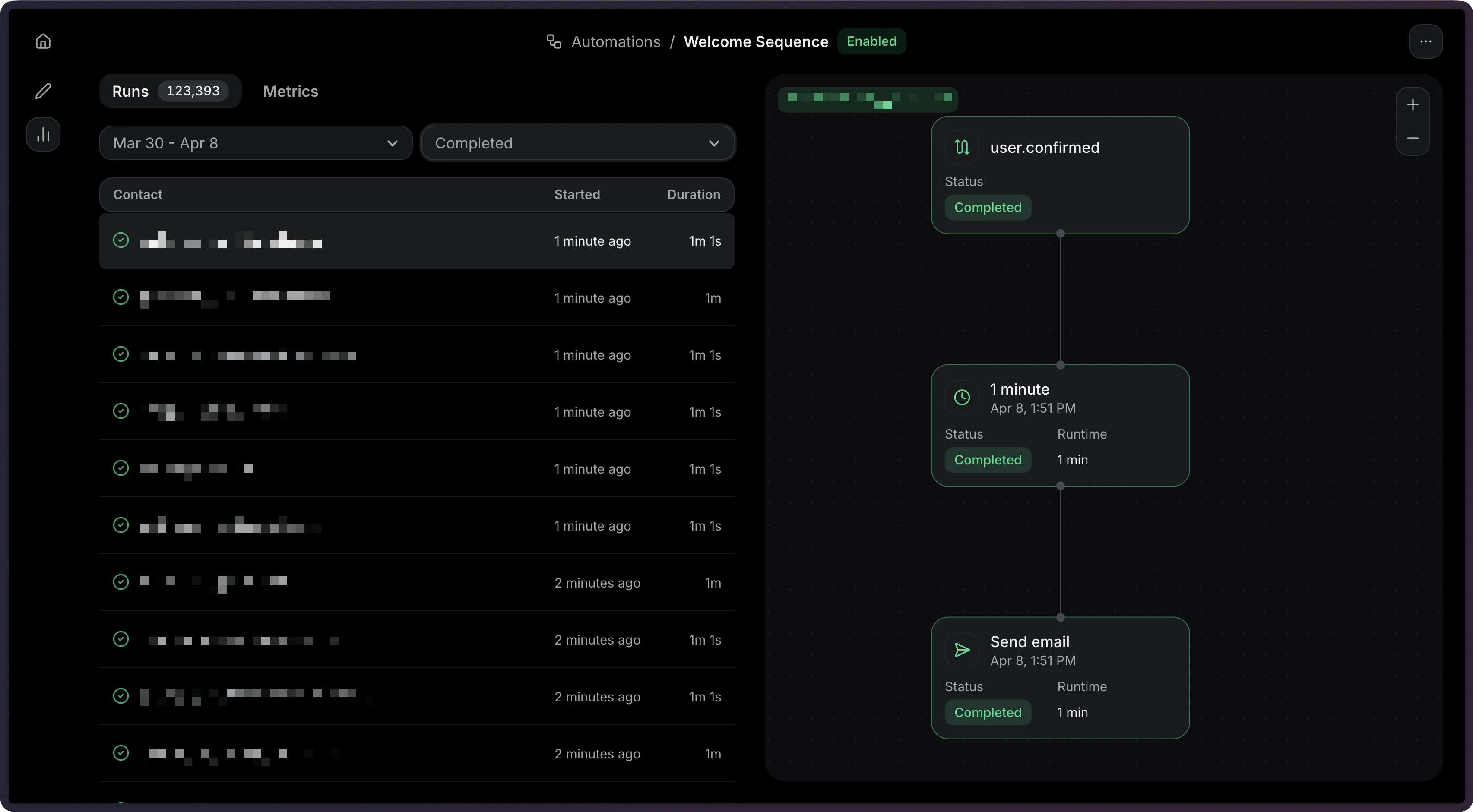 Each run shows:
* **Status** — Whether the run is `running`, `completed`, `failed`, `cancelled`, or `skipped`.
* **Started** — When the run began.
* **Duration** — When the run finished (if applicable).
List all runs for an Automation:
```ts Node.js theme={"theme":{"light":"github-light","dark":"vesper"}}
import { Resend } from 'resend';
const resend = new Resend('re_xxxxxxxxx');
const { data, error } = await resend.automations.runs.list({
automationId: 'c9b16d4f-ba6c-4e2e-b044-6bf4404e57fd',
});
```
```php PHP theme={"theme":{"light":"github-light","dark":"vesper"}}
$resend = Resend::client('re_xxxxxxxxx');
$resend->automations->runs->list('c9b16d4f-ba6c-4e2e-b044-6bf4404e57fd');
```
```python Python theme={"theme":{"light":"github-light","dark":"vesper"}}
import resend
resend.api_key = "re_xxxxxxxxx"
resend.Automations.Runs.list("c9b16d4f-ba6c-4e2e-b044-6bf4404e57fd")
```
```ruby Ruby theme={"theme":{"light":"github-light","dark":"vesper"}}
require "resend"
Resend.api_key = "re_xxxxxxxxx"
Resend::Automations::Runs.list("c9b16d4f-ba6c-4e2e-b044-6bf4404e57fd")
```
```go Go theme={"theme":{"light":"github-light","dark":"vesper"}}
package main
import "github.com/resend/resend-go/v3"
func main() {
client := resend.NewClient("re_xxxxxxxxx")
client.Automations.ListRuns("c9b16d4f-ba6c-4e2e-b044-6bf4404e57fd")
}
```
```rust Rust theme={"theme":{"light":"github-light","dark":"vesper"}}
use resend_rs::{list_opts::ListOptions, Resend, Result};
#[tokio::main]
async fn main() -> Result<()> {
let resend = Resend::new("re_xxxxxxxxx");
let _runs = resend
.automations
.list_runs(
"c9b16d4f-ba6c-4e2e-b044-6bf4404e57fd",
None,
ListOptions::default(),
)
.await?;
Ok(())
}
```
```java Java theme={"theme":{"light":"github-light","dark":"vesper"}}
import com.resend.*;
public class Main {
public static void main(String[] args) {
Resend resend = new Resend("re_xxxxxxxxx");
ListAutomationRunsResponse data = resend.automations().listRuns("c9b16d4f-ba6c-4e2e-b044-6bf4404e57fd");
}
}
```
```csharp .NET theme={"theme":{"light":"github-light","dark":"vesper"}}
using Resend;
IResend resend = ResendClient.Create( "re_xxxxxxxxx" );
var resp = await resend.AutomationRunListAsync( new Guid( "c9b16d4f-ba6c-4e2e-b044-6bf4404e57fd" ) );
Console.WriteLine( "Count={0}", resp.Content.Data.Count );
```
```bash cURL theme={"theme":{"light":"github-light","dark":"vesper"}}
curl -X GET 'https://api.resend.com/automations/c9b16d4f-ba6c-4e2e-b044-6bf4404e57fd/runs' \
-H 'Authorization: Bearer re_xxxxxxxxx'
```
```bash CLI theme={"theme":{"light":"github-light","dark":"vesper"}}
resend automations runs list c9b16d4f-ba6c-4e2e-b044-6bf4404e57fd
```
Response:
```json theme={"theme":{"light":"github-light","dark":"vesper"}}
{
"object": "list",
"has_more": false,
"data": [
{
"id": "a1b2c3d4-e5f6-7890-abcd-ef1234567890",
"status": "completed",
"started_at": "2026-10-01 12:00:00.000000+00",
"completed_at": "2026-10-01 12:05:00.000000+00",
"created_at": "2026-10-01 12:00:00.000000+00"
}
]
}
```
View the [List Automation Runs API reference](/api-reference/automations/list-automation-runs) for more details.
## Filtering runs by status
You can filter runs by status to find specific executions.
Each run shows:
* **Status** — Whether the run is `running`, `completed`, `failed`, `cancelled`, or `skipped`.
* **Started** — When the run began.
* **Duration** — When the run finished (if applicable).
List all runs for an Automation:
```ts Node.js theme={"theme":{"light":"github-light","dark":"vesper"}}
import { Resend } from 'resend';
const resend = new Resend('re_xxxxxxxxx');
const { data, error } = await resend.automations.runs.list({
automationId: 'c9b16d4f-ba6c-4e2e-b044-6bf4404e57fd',
});
```
```php PHP theme={"theme":{"light":"github-light","dark":"vesper"}}
$resend = Resend::client('re_xxxxxxxxx');
$resend->automations->runs->list('c9b16d4f-ba6c-4e2e-b044-6bf4404e57fd');
```
```python Python theme={"theme":{"light":"github-light","dark":"vesper"}}
import resend
resend.api_key = "re_xxxxxxxxx"
resend.Automations.Runs.list("c9b16d4f-ba6c-4e2e-b044-6bf4404e57fd")
```
```ruby Ruby theme={"theme":{"light":"github-light","dark":"vesper"}}
require "resend"
Resend.api_key = "re_xxxxxxxxx"
Resend::Automations::Runs.list("c9b16d4f-ba6c-4e2e-b044-6bf4404e57fd")
```
```go Go theme={"theme":{"light":"github-light","dark":"vesper"}}
package main
import "github.com/resend/resend-go/v3"
func main() {
client := resend.NewClient("re_xxxxxxxxx")
client.Automations.ListRuns("c9b16d4f-ba6c-4e2e-b044-6bf4404e57fd")
}
```
```rust Rust theme={"theme":{"light":"github-light","dark":"vesper"}}
use resend_rs::{list_opts::ListOptions, Resend, Result};
#[tokio::main]
async fn main() -> Result<()> {
let resend = Resend::new("re_xxxxxxxxx");
let _runs = resend
.automations
.list_runs(
"c9b16d4f-ba6c-4e2e-b044-6bf4404e57fd",
None,
ListOptions::default(),
)
.await?;
Ok(())
}
```
```java Java theme={"theme":{"light":"github-light","dark":"vesper"}}
import com.resend.*;
public class Main {
public static void main(String[] args) {
Resend resend = new Resend("re_xxxxxxxxx");
ListAutomationRunsResponse data = resend.automations().listRuns("c9b16d4f-ba6c-4e2e-b044-6bf4404e57fd");
}
}
```
```csharp .NET theme={"theme":{"light":"github-light","dark":"vesper"}}
using Resend;
IResend resend = ResendClient.Create( "re_xxxxxxxxx" );
var resp = await resend.AutomationRunListAsync( new Guid( "c9b16d4f-ba6c-4e2e-b044-6bf4404e57fd" ) );
Console.WriteLine( "Count={0}", resp.Content.Data.Count );
```
```bash cURL theme={"theme":{"light":"github-light","dark":"vesper"}}
curl -X GET 'https://api.resend.com/automations/c9b16d4f-ba6c-4e2e-b044-6bf4404e57fd/runs' \
-H 'Authorization: Bearer re_xxxxxxxxx'
```
```bash CLI theme={"theme":{"light":"github-light","dark":"vesper"}}
resend automations runs list c9b16d4f-ba6c-4e2e-b044-6bf4404e57fd
```
Response:
```json theme={"theme":{"light":"github-light","dark":"vesper"}}
{
"object": "list",
"has_more": false,
"data": [
{
"id": "a1b2c3d4-e5f6-7890-abcd-ef1234567890",
"status": "completed",
"started_at": "2026-10-01 12:00:00.000000+00",
"completed_at": "2026-10-01 12:05:00.000000+00",
"created_at": "2026-10-01 12:00:00.000000+00"
}
]
}
```
View the [List Automation Runs API reference](/api-reference/automations/list-automation-runs) for more details.
## Filtering runs by status
You can filter runs by status to find specific executions.
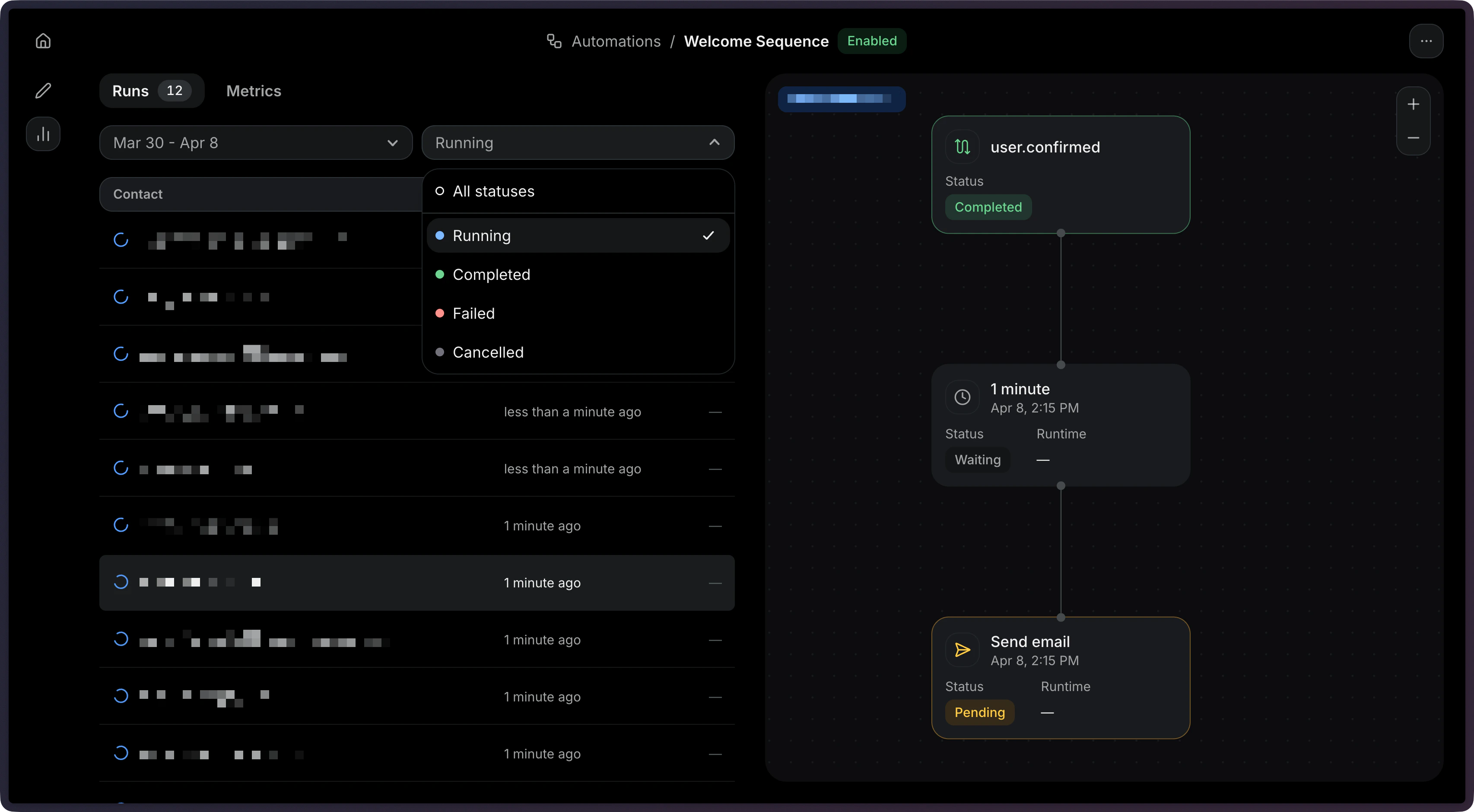 You can filter by multiple statuses using a comma-separated list.
```ts Node.js theme={"theme":{"light":"github-light","dark":"vesper"}}
const { data, error } = await resend.automations.runs.list({
automationId: 'c9b16d4f-ba6c-4e2e-b044-6bf4404e57fd',
status: ['running', 'completed'],
});
```
```php PHP theme={"theme":{"light":"github-light","dark":"vesper"}}
$resend = Resend::client('re_xxxxxxxxx');
$resend->automations->runs->list('c9b16d4f-ba6c-4e2e-b044-6bf4404e57fd', [
'status' => 'running,completed',
]);
```
```python Python theme={"theme":{"light":"github-light","dark":"vesper"}}
import resend
resend.api_key = "re_xxxxxxxxx"
resend.Automations.Runs.list(
"c9b16d4f-ba6c-4e2e-b044-6bf4404e57fd",
params={"status": "running,completed"},
)
```
```ruby Ruby theme={"theme":{"light":"github-light","dark":"vesper"}}
require "resend"
Resend.api_key = "re_xxxxxxxxx"
Resend::Automations::Runs.list(
"c9b16d4f-ba6c-4e2e-b044-6bf4404e57fd",
status: "running,completed",
)
```
```go Go theme={"theme":{"light":"github-light","dark":"vesper"}}
package main
import (
"context"
"github.com/resend/resend-go/v3"
)
func main() {
client := resend.NewClient("re_xxxxxxxxx")
client.Automations.ListRunsWithContext(
context.TODO(),
"c9b16d4f-ba6c-4e2e-b044-6bf4404e57fd",
&resend.ListAutomationRunsOptions{
Status: []resend.AutomationRunStatus{
resend.AutomationRunStatusRunning,
resend.AutomationRunStatusCompleted,
},
},
)
}
```
```rust Rust theme={"theme":{"light":"github-light","dark":"vesper"}}
use resend_rs::{list_opts::ListOptions, Resend, Result};
#[tokio::main]
async fn main() -> Result<()> {
let resend = Resend::new("re_xxxxxxxxx");
let _runs = resend
.automations
.list_runs(
"c9b16d4f-ba6c-4e2e-b044-6bf4404e57fd",
Some("running,completed".to_owned()),
ListOptions::default(),
)
.await?;
Ok(())
}
```
```java Java theme={"theme":{"light":"github-light","dark":"vesper"}}
import com.resend.*;
public class Main {
public static void main(String[] args) {
Resend resend = new Resend("re_xxxxxxxxx");
ListAutomationRunsParams params = ListAutomationRunsParams.builder()
.status(RunStatus.RUNNING, RunStatus.COMPLETED)
.build();
ListAutomationRunsResponseSuccess data = resend.automations().listRuns("c9b16d4f-ba6c-4e2e-b044-6bf4404e57fd", params);
}
}
```
```csharp .NET theme={"theme":{"light":"github-light","dark":"vesper"}}
var resp = await resend.AutomationRunListAsync(
new Guid( "c9b16d4f-ba6c-4e2e-b044-6bf4404e57fd" ),
new AutomationRunListQuery() { Status = "running,completed" }
);
```
```bash cURL theme={"theme":{"light":"github-light","dark":"vesper"}}
curl -X GET 'https://api.resend.com/automations/c9b16d4f-ba6c-4e2e-b044-6bf4404e57fd/runs?status=running,completed' \
-H 'Authorization: Bearer re_xxxxxxxxx'
```
```bash CLI theme={"theme":{"light":"github-light","dark":"vesper"}}
resend automations runs list c9b16d4f-ba6c-4e2e-b044-6bf4404e57fd
```
## Viewing a single run
Click on a run to view its details, and select the step you want to debug.
You can filter by multiple statuses using a comma-separated list.
```ts Node.js theme={"theme":{"light":"github-light","dark":"vesper"}}
const { data, error } = await resend.automations.runs.list({
automationId: 'c9b16d4f-ba6c-4e2e-b044-6bf4404e57fd',
status: ['running', 'completed'],
});
```
```php PHP theme={"theme":{"light":"github-light","dark":"vesper"}}
$resend = Resend::client('re_xxxxxxxxx');
$resend->automations->runs->list('c9b16d4f-ba6c-4e2e-b044-6bf4404e57fd', [
'status' => 'running,completed',
]);
```
```python Python theme={"theme":{"light":"github-light","dark":"vesper"}}
import resend
resend.api_key = "re_xxxxxxxxx"
resend.Automations.Runs.list(
"c9b16d4f-ba6c-4e2e-b044-6bf4404e57fd",
params={"status": "running,completed"},
)
```
```ruby Ruby theme={"theme":{"light":"github-light","dark":"vesper"}}
require "resend"
Resend.api_key = "re_xxxxxxxxx"
Resend::Automations::Runs.list(
"c9b16d4f-ba6c-4e2e-b044-6bf4404e57fd",
status: "running,completed",
)
```
```go Go theme={"theme":{"light":"github-light","dark":"vesper"}}
package main
import (
"context"
"github.com/resend/resend-go/v3"
)
func main() {
client := resend.NewClient("re_xxxxxxxxx")
client.Automations.ListRunsWithContext(
context.TODO(),
"c9b16d4f-ba6c-4e2e-b044-6bf4404e57fd",
&resend.ListAutomationRunsOptions{
Status: []resend.AutomationRunStatus{
resend.AutomationRunStatusRunning,
resend.AutomationRunStatusCompleted,
},
},
)
}
```
```rust Rust theme={"theme":{"light":"github-light","dark":"vesper"}}
use resend_rs::{list_opts::ListOptions, Resend, Result};
#[tokio::main]
async fn main() -> Result<()> {
let resend = Resend::new("re_xxxxxxxxx");
let _runs = resend
.automations
.list_runs(
"c9b16d4f-ba6c-4e2e-b044-6bf4404e57fd",
Some("running,completed".to_owned()),
ListOptions::default(),
)
.await?;
Ok(())
}
```
```java Java theme={"theme":{"light":"github-light","dark":"vesper"}}
import com.resend.*;
public class Main {
public static void main(String[] args) {
Resend resend = new Resend("re_xxxxxxxxx");
ListAutomationRunsParams params = ListAutomationRunsParams.builder()
.status(RunStatus.RUNNING, RunStatus.COMPLETED)
.build();
ListAutomationRunsResponseSuccess data = resend.automations().listRuns("c9b16d4f-ba6c-4e2e-b044-6bf4404e57fd", params);
}
}
```
```csharp .NET theme={"theme":{"light":"github-light","dark":"vesper"}}
var resp = await resend.AutomationRunListAsync(
new Guid( "c9b16d4f-ba6c-4e2e-b044-6bf4404e57fd" ),
new AutomationRunListQuery() { Status = "running,completed" }
);
```
```bash cURL theme={"theme":{"light":"github-light","dark":"vesper"}}
curl -X GET 'https://api.resend.com/automations/c9b16d4f-ba6c-4e2e-b044-6bf4404e57fd/runs?status=running,completed' \
-H 'Authorization: Bearer re_xxxxxxxxx'
```
```bash CLI theme={"theme":{"light":"github-light","dark":"vesper"}}
resend automations runs list c9b16d4f-ba6c-4e2e-b044-6bf4404e57fd
```
## Viewing a single run
Click on a run to view its details, and select the step you want to debug.
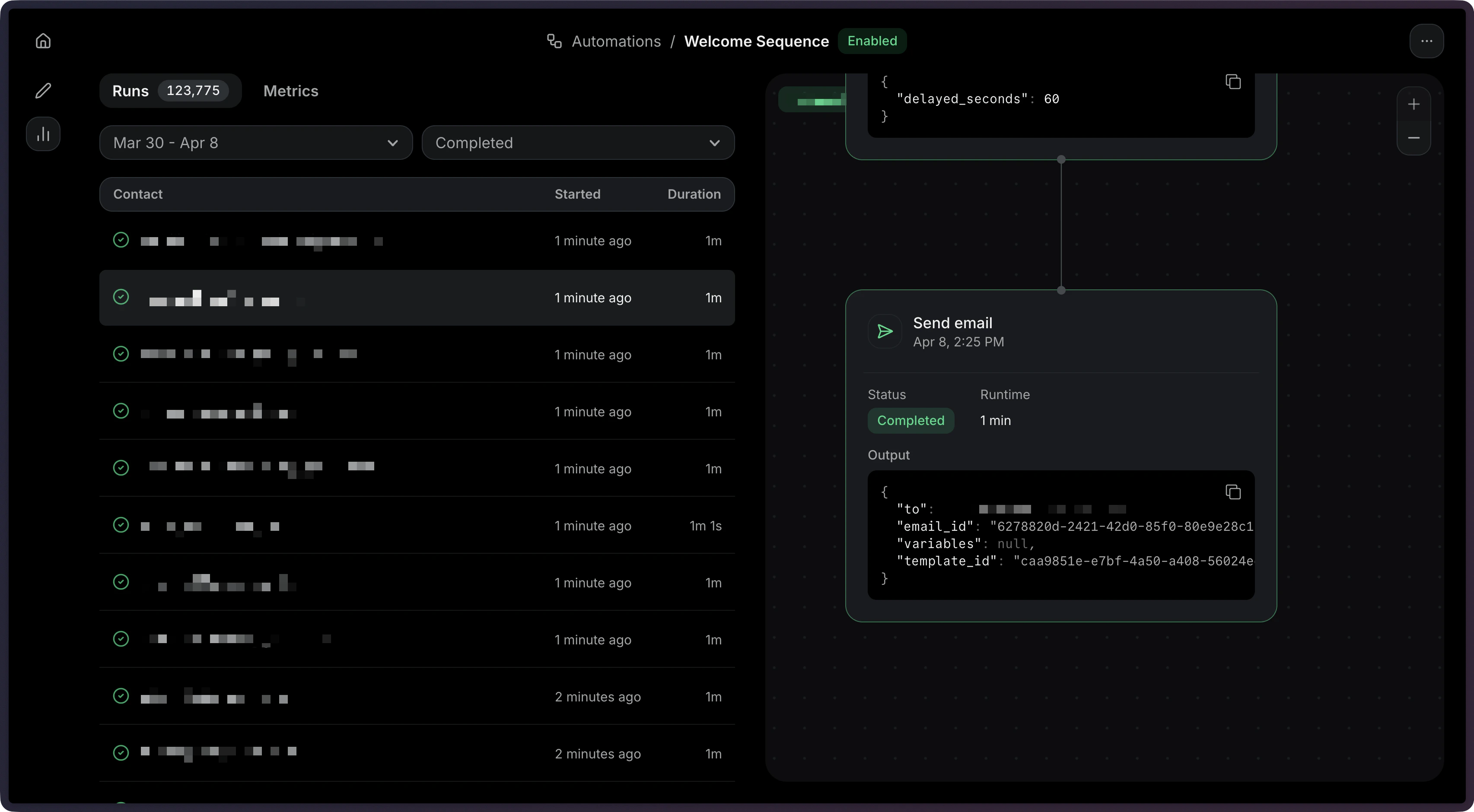 Get the details of a specific run:
```ts Node.js theme={"theme":{"light":"github-light","dark":"vesper"}}
const { data, error } = await resend.automations.runs.get({
automationId: 'c9b16d4f-ba6c-4e2e-b044-6bf4404e57fd',
runId: 'a1b2c3d4-e5f6-7890-abcd-ef1234567890',
});
```
```php PHP theme={"theme":{"light":"github-light","dark":"vesper"}}
$resend = Resend::client('re_xxxxxxxxx');
$resend->automations->runs->get(
'c9b16d4f-ba6c-4e2e-b044-6bf4404e57fd',
'a1b2c3d4-e5f6-7890-abcd-ef1234567890',
);
```
```python Python theme={"theme":{"light":"github-light","dark":"vesper"}}
import resend
resend.api_key = "re_xxxxxxxxx"
resend.Automations.Runs.get(
"c9b16d4f-ba6c-4e2e-b044-6bf4404e57fd",
"a1b2c3d4-e5f6-7890-abcd-ef1234567890",
)
```
```ruby Ruby theme={"theme":{"light":"github-light","dark":"vesper"}}
require "resend"
Resend.api_key = "re_xxxxxxxxx"
Resend::Automations::Runs.get(
"c9b16d4f-ba6c-4e2e-b044-6bf4404e57fd",
"a1b2c3d4-e5f6-7890-abcd-ef1234567890",
)
```
```go Go theme={"theme":{"light":"github-light","dark":"vesper"}}
package main
import "github.com/resend/resend-go/v3"
func main() {
client := resend.NewClient("re_xxxxxxxxx")
client.Automations.GetRun(
"c9b16d4f-ba6c-4e2e-b044-6bf4404e57fd",
"a1b2c3d4-e5f6-7890-abcd-ef1234567890",
)
}
```
```rust Rust theme={"theme":{"light":"github-light","dark":"vesper"}}
use resend_rs::{Resend, Result};
#[tokio::main]
async fn main() -> Result<()> {
let resend = Resend::new("re_xxxxxxxxx");
let _run = resend
.automations
.get_run(
"c9b16d4f-ba6c-4e2e-b044-6bf4404e57fd",
"a1b2c3d4-e5f6-7890-abcd-ef1234567890",
)
.await?;
Ok(())
}
```
```java Java theme={"theme":{"light":"github-light","dark":"vesper"}}
AutomationRun data = resend.automations().getRun(
GetAutomationRunOptions.builder()
.automationId("c9b16d4f-ba6c-4e2e-b044-6bf4404e57fd")
.runId("a1b2c3d4-e5f6-7890-abcd-ef1234567890")
.build()
);
```
```csharp .NET theme={"theme":{"light":"github-light","dark":"vesper"}}
var resp = await resend.AutomationRunRetrieveAsync(
new Guid( "c9b16d4f-ba6c-4e2e-b044-6bf4404e57fd" ),
new Guid( "a1b2c3d4-e5f6-7890-abcd-ef1234567890" )
);
Console.WriteLine( "Status={0}", resp.Content.Status );
```
```bash cURL theme={"theme":{"light":"github-light","dark":"vesper"}}
curl -X GET 'https://api.resend.com/automations/c9b16d4f-ba6c-4e2e-b044-6bf4404e57fd/runs/a1b2c3d4-e5f6-7890-abcd-ef1234567890' \
-H 'Authorization: Bearer re_xxxxxxxxx'
```
```bash CLI theme={"theme":{"light":"github-light","dark":"vesper"}}
resend automations runs get --automation-id c9b16d4f-ba6c-4e2e-b044-6bf4404e57fd --run-id a1b2c3d4-e5f6-7890-abcd-ef1234567890
```
Response:
```json theme={"theme":{"light":"github-light","dark":"vesper"}}
{
"object": "automation_run",
"id": "a1b2c3d4-e5f6-7890-abcd-ef1234567890",
"status": "completed",
"started_at": "2026-10-01 12:00:00.000000+00",
"completed_at": "2026-10-01 12:05:00.000000+00",
"created_at": "2026-10-01 12:00:00.000000+00",
"steps": [
{
"key": "start",
"type": "trigger",
"status": "completed",
"started_at": "2026-10-01 12:00:00.000000+00",
"completed_at": "2026-10-01 12:00:01.000000+00",
"output": null,
"error": null
},
{
"key": "welcome",
"type": "send_email",
"status": "completed",
"started_at": "2026-10-01 12:00:01.000000+00",
"completed_at": "2026-10-01 12:00:02.000000+00",
"output": {
"to": "user@example.com",
"email_id": "6278820d-2421-42d0-85f0-80e9e28c1c69",
"template": {
"id": "caa9851e-e7bf-4a50-a408-56024edc19c0",
"variables": null
}
},
"error": null
}
]
}
```
Each step in the response includes:
| Field | Description |
| -------------- | ------------------------------------------------------ |
| `key` | The unique key of the step in the automation graph |
| `type` | The step type (e.g., `trigger`, `send_email`, `delay`) |
| `status` | The step's execution status |
| `started_at` | When the step started executing |
| `completed_at` | When the step finished |
| `output` | Output data from the step (if any) |
| `error` | Error details if the step failed |
View the [Retrieve Automation Run API reference](/api-reference/automations/get-automation-run) for more details.
## Debugging failed runs
Go to the **Runs** tab and click on a run to view the details.
Get the details of a specific run:
```ts Node.js theme={"theme":{"light":"github-light","dark":"vesper"}}
const { data, error } = await resend.automations.runs.get({
automationId: 'c9b16d4f-ba6c-4e2e-b044-6bf4404e57fd',
runId: 'a1b2c3d4-e5f6-7890-abcd-ef1234567890',
});
```
```php PHP theme={"theme":{"light":"github-light","dark":"vesper"}}
$resend = Resend::client('re_xxxxxxxxx');
$resend->automations->runs->get(
'c9b16d4f-ba6c-4e2e-b044-6bf4404e57fd',
'a1b2c3d4-e5f6-7890-abcd-ef1234567890',
);
```
```python Python theme={"theme":{"light":"github-light","dark":"vesper"}}
import resend
resend.api_key = "re_xxxxxxxxx"
resend.Automations.Runs.get(
"c9b16d4f-ba6c-4e2e-b044-6bf4404e57fd",
"a1b2c3d4-e5f6-7890-abcd-ef1234567890",
)
```
```ruby Ruby theme={"theme":{"light":"github-light","dark":"vesper"}}
require "resend"
Resend.api_key = "re_xxxxxxxxx"
Resend::Automations::Runs.get(
"c9b16d4f-ba6c-4e2e-b044-6bf4404e57fd",
"a1b2c3d4-e5f6-7890-abcd-ef1234567890",
)
```
```go Go theme={"theme":{"light":"github-light","dark":"vesper"}}
package main
import "github.com/resend/resend-go/v3"
func main() {
client := resend.NewClient("re_xxxxxxxxx")
client.Automations.GetRun(
"c9b16d4f-ba6c-4e2e-b044-6bf4404e57fd",
"a1b2c3d4-e5f6-7890-abcd-ef1234567890",
)
}
```
```rust Rust theme={"theme":{"light":"github-light","dark":"vesper"}}
use resend_rs::{Resend, Result};
#[tokio::main]
async fn main() -> Result<()> {
let resend = Resend::new("re_xxxxxxxxx");
let _run = resend
.automations
.get_run(
"c9b16d4f-ba6c-4e2e-b044-6bf4404e57fd",
"a1b2c3d4-e5f6-7890-abcd-ef1234567890",
)
.await?;
Ok(())
}
```
```java Java theme={"theme":{"light":"github-light","dark":"vesper"}}
AutomationRun data = resend.automations().getRun(
GetAutomationRunOptions.builder()
.automationId("c9b16d4f-ba6c-4e2e-b044-6bf4404e57fd")
.runId("a1b2c3d4-e5f6-7890-abcd-ef1234567890")
.build()
);
```
```csharp .NET theme={"theme":{"light":"github-light","dark":"vesper"}}
var resp = await resend.AutomationRunRetrieveAsync(
new Guid( "c9b16d4f-ba6c-4e2e-b044-6bf4404e57fd" ),
new Guid( "a1b2c3d4-e5f6-7890-abcd-ef1234567890" )
);
Console.WriteLine( "Status={0}", resp.Content.Status );
```
```bash cURL theme={"theme":{"light":"github-light","dark":"vesper"}}
curl -X GET 'https://api.resend.com/automations/c9b16d4f-ba6c-4e2e-b044-6bf4404e57fd/runs/a1b2c3d4-e5f6-7890-abcd-ef1234567890' \
-H 'Authorization: Bearer re_xxxxxxxxx'
```
```bash CLI theme={"theme":{"light":"github-light","dark":"vesper"}}
resend automations runs get --automation-id c9b16d4f-ba6c-4e2e-b044-6bf4404e57fd --run-id a1b2c3d4-e5f6-7890-abcd-ef1234567890
```
Response:
```json theme={"theme":{"light":"github-light","dark":"vesper"}}
{
"object": "automation_run",
"id": "a1b2c3d4-e5f6-7890-abcd-ef1234567890",
"status": "completed",
"started_at": "2026-10-01 12:00:00.000000+00",
"completed_at": "2026-10-01 12:05:00.000000+00",
"created_at": "2026-10-01 12:00:00.000000+00",
"steps": [
{
"key": "start",
"type": "trigger",
"status": "completed",
"started_at": "2026-10-01 12:00:00.000000+00",
"completed_at": "2026-10-01 12:00:01.000000+00",
"output": null,
"error": null
},
{
"key": "welcome",
"type": "send_email",
"status": "completed",
"started_at": "2026-10-01 12:00:01.000000+00",
"completed_at": "2026-10-01 12:00:02.000000+00",
"output": {
"to": "user@example.com",
"email_id": "6278820d-2421-42d0-85f0-80e9e28c1c69",
"template": {
"id": "caa9851e-e7bf-4a50-a408-56024edc19c0",
"variables": null
}
},
"error": null
}
]
}
```
Each step in the response includes:
| Field | Description |
| -------------- | ------------------------------------------------------ |
| `key` | The unique key of the step in the automation graph |
| `type` | The step type (e.g., `trigger`, `send_email`, `delay`) |
| `status` | The step's execution status |
| `started_at` | When the step started executing |
| `completed_at` | When the step finished |
| `output` | Output data from the step (if any) |
| `error` | Error details if the step failed |
View the [Retrieve Automation Run API reference](/api-reference/automations/get-automation-run) for more details.
## Debugging failed runs
Go to the **Runs** tab and click on a run to view the details.
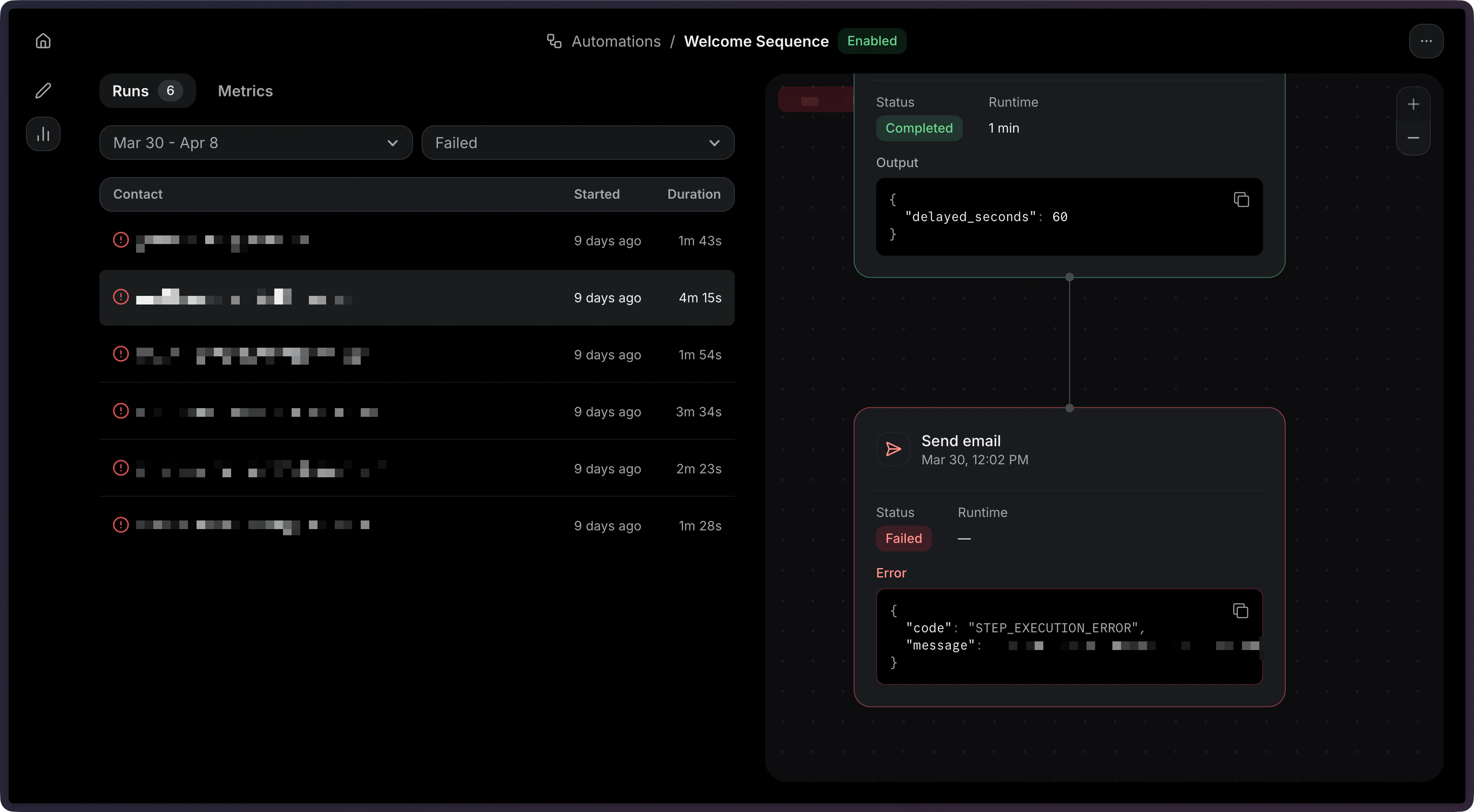 Get the details of a specific failed run:
```ts Node.js theme={"theme":{"light":"github-light","dark":"vesper"}}
const { data, error } = await resend.automations.runs.get({
automationId: 'c9b16d4f-ba6c-4e2e-b044-6bf4404e57fd',
runId: 'a1b2c3d4-e5f6-7890-abcd-ef1234567890',
});
```
```php PHP theme={"theme":{"light":"github-light","dark":"vesper"}}
$resend = Resend::client('re_xxxxxxxxx');
$resend->automations->runs->get(
'c9b16d4f-ba6c-4e2e-b044-6bf4404e57fd',
'a1b2c3d4-e5f6-7890-abcd-ef1234567890',
);
```
```python Python theme={"theme":{"light":"github-light","dark":"vesper"}}
import resend
resend.api_key = "re_xxxxxxxxx"
resend.Automations.Runs.get(
"c9b16d4f-ba6c-4e2e-b044-6bf4404e57fd",
"a1b2c3d4-e5f6-7890-abcd-ef1234567890",
)
```
```ruby Ruby theme={"theme":{"light":"github-light","dark":"vesper"}}
require "resend"
Resend.api_key = "re_xxxxxxxxx"
Resend::Automations::Runs.get(
"c9b16d4f-ba6c-4e2e-b044-6bf4404e57fd",
"a1b2c3d4-e5f6-7890-abcd-ef1234567890",
)
```
```go Go theme={"theme":{"light":"github-light","dark":"vesper"}}
package main
import "github.com/resend/resend-go/v3"
func main() {
client := resend.NewClient("re_xxxxxxxxx")
client.Automations.GetRun(
"c9b16d4f-ba6c-4e2e-b044-6bf4404e57fd",
"a1b2c3d4-e5f6-7890-abcd-ef1234567890",
)
}
```
```rust Rust theme={"theme":{"light":"github-light","dark":"vesper"}}
use resend_rs::{Resend, Result};
#[tokio::main]
async fn main() -> Result<()> {
let resend = Resend::new("re_xxxxxxxxx");
let _run = resend
.automations
.get_run(
"c9b16d4f-ba6c-4e2e-b044-6bf4404e57fd",
"a1b2c3d4-e5f6-7890-abcd-ef1234567890",
)
.await?;
Ok(())
}
```
```java Java theme={"theme":{"light":"github-light","dark":"vesper"}}
AutomationRun data = resend.automations().getRun(
GetAutomationRunOptions.builder()
.automationId("c9b16d4f-ba6c-4e2e-b044-6bf4404e57fd")
.runId("a1b2c3d4-e5f6-7890-abcd-ef1234567890")
.build()
);
```
```csharp .NET theme={"theme":{"light":"github-light","dark":"vesper"}}
var resp = await resend.AutomationRunRetrieveAsync(
new Guid( "c9b16d4f-ba6c-4e2e-b044-6bf4404e57fd" ),
new Guid( "a1b2c3d4-e5f6-7890-abcd-ef1234567890" )
);
Console.WriteLine( "Status={0}", resp.Content.Status );
```
```bash cURL theme={"theme":{"light":"github-light","dark":"vesper"}}
curl -X GET 'https://api.resend.com/automations/c9b16d4f-ba6c-4e2e-b044-6bf4404e57fd/runs/a1b2c3d4-e5f6-7890-abcd-ef1234567890' \
-H 'Authorization: Bearer re_xxxxxxxxx'
```
```bash CLI theme={"theme":{"light":"github-light","dark":"vesper"}}
resend automations runs get --automation-id c9b16d4f-ba6c-4e2e-b044-6bf4404e57fd --run-id a1b2c3d4-e5f6-7890-abcd-ef1234567890
```
When a run fails, use the step-level details to identify the issue:
1. **List failed runs:** Filter runs by `status=failed` to find problematic executions.
2. **Retrieve the run:** Get the full run details including the `steps` array.
3. **Find the failed step:** Look for the step with a `failed` status.
4. **Check the error:** The `error` field on the failed step contains details about what went wrong.
Common failure scenarios:
* **Condition error:** A referenced field may not exist in the event payload. See [Condition](/dashboard/automations/condition) for how conditions are evaluated.
* **Wait for event timeout:** The expected event was not received within the timeout window.
* **Send email failed:** The template may not be published, or the sender address may not be verified.
## Stopping an Automation
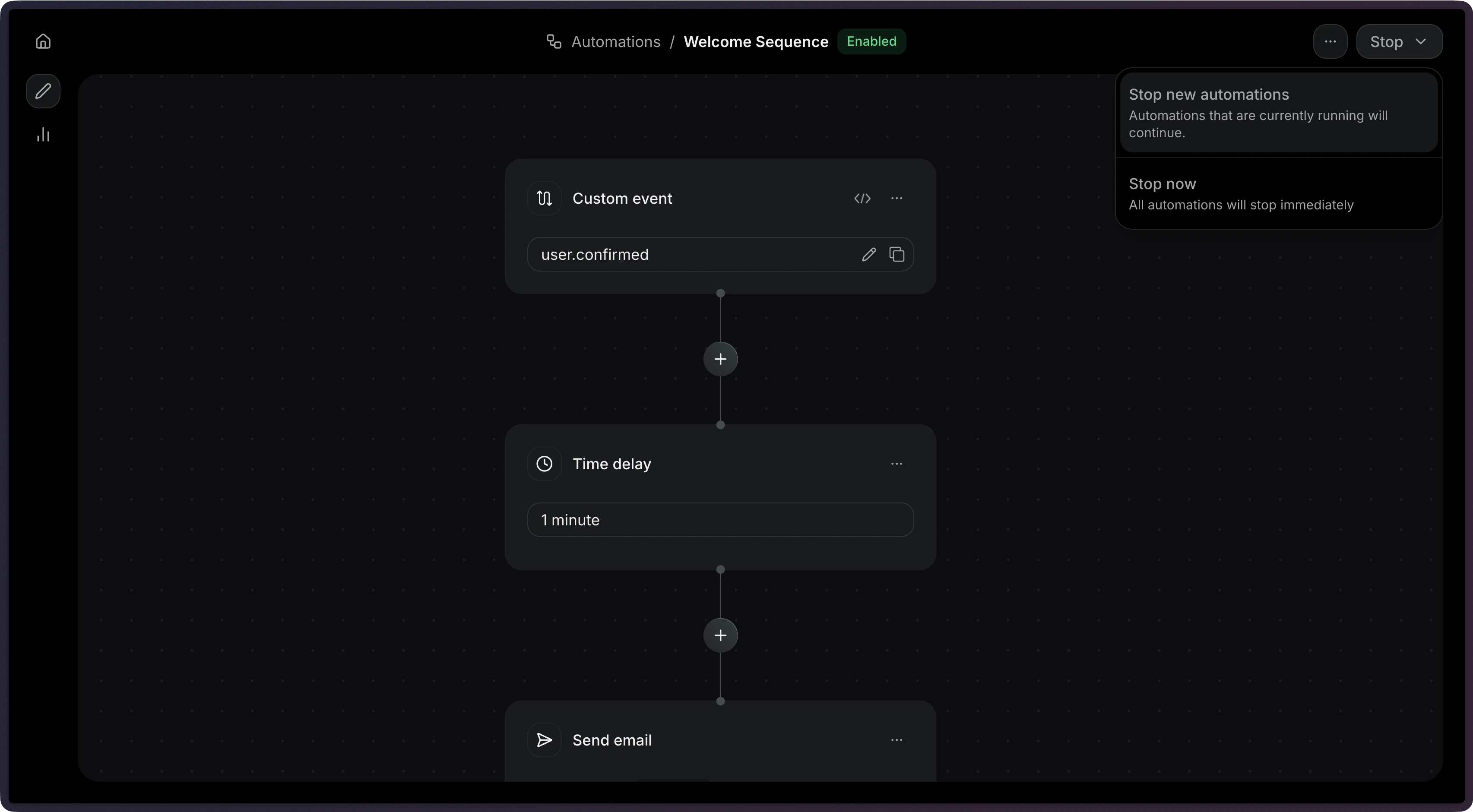
Click on the **Stop** button to stop an Automation.
Get the details of a specific failed run:
```ts Node.js theme={"theme":{"light":"github-light","dark":"vesper"}}
const { data, error } = await resend.automations.runs.get({
automationId: 'c9b16d4f-ba6c-4e2e-b044-6bf4404e57fd',
runId: 'a1b2c3d4-e5f6-7890-abcd-ef1234567890',
});
```
```php PHP theme={"theme":{"light":"github-light","dark":"vesper"}}
$resend = Resend::client('re_xxxxxxxxx');
$resend->automations->runs->get(
'c9b16d4f-ba6c-4e2e-b044-6bf4404e57fd',
'a1b2c3d4-e5f6-7890-abcd-ef1234567890',
);
```
```python Python theme={"theme":{"light":"github-light","dark":"vesper"}}
import resend
resend.api_key = "re_xxxxxxxxx"
resend.Automations.Runs.get(
"c9b16d4f-ba6c-4e2e-b044-6bf4404e57fd",
"a1b2c3d4-e5f6-7890-abcd-ef1234567890",
)
```
```ruby Ruby theme={"theme":{"light":"github-light","dark":"vesper"}}
require "resend"
Resend.api_key = "re_xxxxxxxxx"
Resend::Automations::Runs.get(
"c9b16d4f-ba6c-4e2e-b044-6bf4404e57fd",
"a1b2c3d4-e5f6-7890-abcd-ef1234567890",
)
```
```go Go theme={"theme":{"light":"github-light","dark":"vesper"}}
package main
import "github.com/resend/resend-go/v3"
func main() {
client := resend.NewClient("re_xxxxxxxxx")
client.Automations.GetRun(
"c9b16d4f-ba6c-4e2e-b044-6bf4404e57fd",
"a1b2c3d4-e5f6-7890-abcd-ef1234567890",
)
}
```
```rust Rust theme={"theme":{"light":"github-light","dark":"vesper"}}
use resend_rs::{Resend, Result};
#[tokio::main]
async fn main() -> Result<()> {
let resend = Resend::new("re_xxxxxxxxx");
let _run = resend
.automations
.get_run(
"c9b16d4f-ba6c-4e2e-b044-6bf4404e57fd",
"a1b2c3d4-e5f6-7890-abcd-ef1234567890",
)
.await?;
Ok(())
}
```
```java Java theme={"theme":{"light":"github-light","dark":"vesper"}}
AutomationRun data = resend.automations().getRun(
GetAutomationRunOptions.builder()
.automationId("c9b16d4f-ba6c-4e2e-b044-6bf4404e57fd")
.runId("a1b2c3d4-e5f6-7890-abcd-ef1234567890")
.build()
);
```
```csharp .NET theme={"theme":{"light":"github-light","dark":"vesper"}}
var resp = await resend.AutomationRunRetrieveAsync(
new Guid( "c9b16d4f-ba6c-4e2e-b044-6bf4404e57fd" ),
new Guid( "a1b2c3d4-e5f6-7890-abcd-ef1234567890" )
);
Console.WriteLine( "Status={0}", resp.Content.Status );
```
```bash cURL theme={"theme":{"light":"github-light","dark":"vesper"}}
curl -X GET 'https://api.resend.com/automations/c9b16d4f-ba6c-4e2e-b044-6bf4404e57fd/runs/a1b2c3d4-e5f6-7890-abcd-ef1234567890' \
-H 'Authorization: Bearer re_xxxxxxxxx'
```
```bash CLI theme={"theme":{"light":"github-light","dark":"vesper"}}
resend automations runs get --automation-id c9b16d4f-ba6c-4e2e-b044-6bf4404e57fd --run-id a1b2c3d4-e5f6-7890-abcd-ef1234567890
```
When a run fails, use the step-level details to identify the issue:
1. **List failed runs:** Filter runs by `status=failed` to find problematic executions.
2. **Retrieve the run:** Get the full run details including the `steps` array.
3. **Find the failed step:** Look for the step with a `failed` status.
4. **Check the error:** The `error` field on the failed step contains details about what went wrong.
Common failure scenarios:
* **Condition error:** A referenced field may not exist in the event payload. See [Condition](/dashboard/automations/condition) for how conditions are evaluated.
* **Wait for event timeout:** The expected event was not received within the timeout window.
* **Send email failed:** The template may not be published, or the sender address may not be verified.
## Stopping an Automation
Click on the **Stop** button to stop an Automation.
 Stop an Automation programmatically:
```ts Node.js theme={"theme":{"light":"github-light","dark":"vesper"}}
const { data, error } = await resend.automations.stop(
'c9b16d4f-ba6c-4e2e-b044-6bf4404e57fd',
);
```
```php PHP theme={"theme":{"light":"github-light","dark":"vesper"}}
$resend = Resend::client('re_xxxxxxxxx');
$resend->automations->stop('c9b16d4f-ba6c-4e2e-b044-6bf4404e57fd');
```
```python Python theme={"theme":{"light":"github-light","dark":"vesper"}}
import resend
resend.api_key = "re_xxxxxxxxx"
resend.Automations.stop("c9b16d4f-ba6c-4e2e-b044-6bf4404e57fd")
```
```ruby Ruby theme={"theme":{"light":"github-light","dark":"vesper"}}
require "resend"
Resend.api_key = "re_xxxxxxxxx"
Resend::Automations.stop("c9b16d4f-ba6c-4e2e-b044-6bf4404e57fd")
```
```go Go theme={"theme":{"light":"github-light","dark":"vesper"}}
package main
import "github.com/resend/resend-go/v3"
func main() {
client := resend.NewClient("re_xxxxxxxxx")
client.Automations.Stop("c9b16d4f-ba6c-4e2e-b044-6bf4404e57fd")
}
```
```rust Rust theme={"theme":{"light":"github-light","dark":"vesper"}}
use resend_rs::{Resend, Result};
#[tokio::main]
async fn main() -> Result<()> {
let resend = Resend::new("re_xxxxxxxxx");
let _automation = resend
.automations
.stop("c9b16d4f-ba6c-4e2e-b044-6bf4404e57fd")
.await?;
Ok(())
}
```
```java Java theme={"theme":{"light":"github-light","dark":"vesper"}}
StopAutomationResponse data = resend.automations().stop("c9b16d4f-ba6c-4e2e-b044-6bf4404e57fd");
```
```csharp .NET theme={"theme":{"light":"github-light","dark":"vesper"}}
var resp = await resend.AutomationStopAsync( new Guid( "c9b16d4f-ba6c-4e2e-b044-6bf4404e57fd" ) );
Console.WriteLine( "Status={0}", resp.Content.Status );
```
```bash cURL theme={"theme":{"light":"github-light","dark":"vesper"}}
curl -X POST 'https://api.resend.com/automations/c9b16d4f-ba6c-4e2e-b044-6bf4404e57fd/stop' \
-H 'Authorization: Bearer re_xxxxxxxxx'
```
```bash CLI theme={"theme":{"light":"github-light","dark":"vesper"}}
resend automations stop c9b16d4f-ba6c-4e2e-b044-6bf4404e57fd
```
Stopping an Automation prevents new runs from being created.
Existing in-progress runs will continue to completion.
View the [Stop Automation API reference](/api-reference/automations/stop-automation) for more details.
## Viewing Metrics
In the dashboard, you can view overall metrics for any Automation. In the **Observability** panel for any Automation, select **Metrics**.
Stop an Automation programmatically:
```ts Node.js theme={"theme":{"light":"github-light","dark":"vesper"}}
const { data, error } = await resend.automations.stop(
'c9b16d4f-ba6c-4e2e-b044-6bf4404e57fd',
);
```
```php PHP theme={"theme":{"light":"github-light","dark":"vesper"}}
$resend = Resend::client('re_xxxxxxxxx');
$resend->automations->stop('c9b16d4f-ba6c-4e2e-b044-6bf4404e57fd');
```
```python Python theme={"theme":{"light":"github-light","dark":"vesper"}}
import resend
resend.api_key = "re_xxxxxxxxx"
resend.Automations.stop("c9b16d4f-ba6c-4e2e-b044-6bf4404e57fd")
```
```ruby Ruby theme={"theme":{"light":"github-light","dark":"vesper"}}
require "resend"
Resend.api_key = "re_xxxxxxxxx"
Resend::Automations.stop("c9b16d4f-ba6c-4e2e-b044-6bf4404e57fd")
```
```go Go theme={"theme":{"light":"github-light","dark":"vesper"}}
package main
import "github.com/resend/resend-go/v3"
func main() {
client := resend.NewClient("re_xxxxxxxxx")
client.Automations.Stop("c9b16d4f-ba6c-4e2e-b044-6bf4404e57fd")
}
```
```rust Rust theme={"theme":{"light":"github-light","dark":"vesper"}}
use resend_rs::{Resend, Result};
#[tokio::main]
async fn main() -> Result<()> {
let resend = Resend::new("re_xxxxxxxxx");
let _automation = resend
.automations
.stop("c9b16d4f-ba6c-4e2e-b044-6bf4404e57fd")
.await?;
Ok(())
}
```
```java Java theme={"theme":{"light":"github-light","dark":"vesper"}}
StopAutomationResponse data = resend.automations().stop("c9b16d4f-ba6c-4e2e-b044-6bf4404e57fd");
```
```csharp .NET theme={"theme":{"light":"github-light","dark":"vesper"}}
var resp = await resend.AutomationStopAsync( new Guid( "c9b16d4f-ba6c-4e2e-b044-6bf4404e57fd" ) );
Console.WriteLine( "Status={0}", resp.Content.Status );
```
```bash cURL theme={"theme":{"light":"github-light","dark":"vesper"}}
curl -X POST 'https://api.resend.com/automations/c9b16d4f-ba6c-4e2e-b044-6bf4404e57fd/stop' \
-H 'Authorization: Bearer re_xxxxxxxxx'
```
```bash CLI theme={"theme":{"light":"github-light","dark":"vesper"}}
resend automations stop c9b16d4f-ba6c-4e2e-b044-6bf4404e57fd
```
Stopping an Automation prevents new runs from being created.
Existing in-progress runs will continue to completion.
View the [Stop Automation API reference](/api-reference/automations/stop-automation) for more details.
## Viewing Metrics
In the dashboard, you can view overall metrics for any Automation. In the **Observability** panel for any Automation, select **Metrics**.
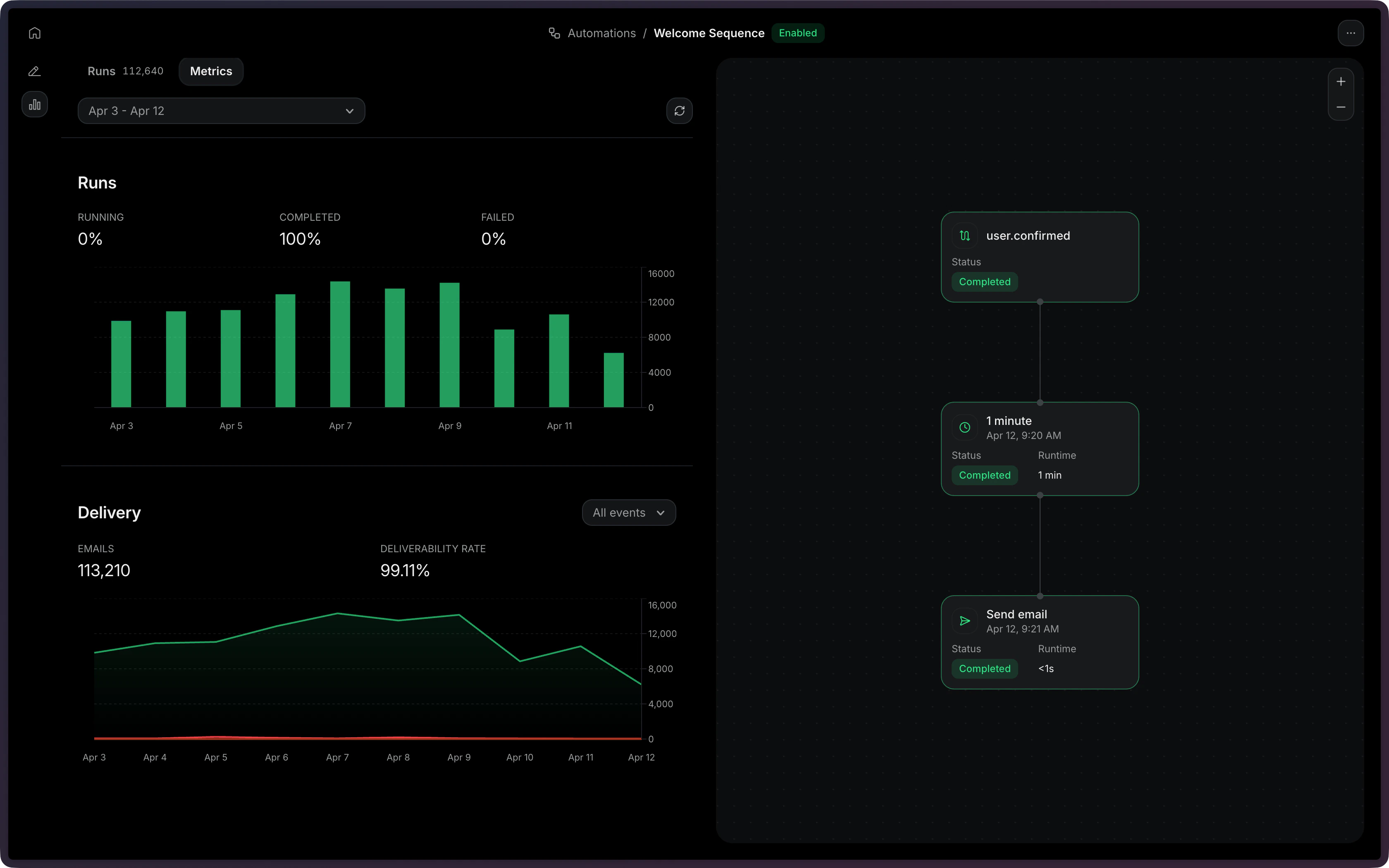 The API currently does not support fetching metrics for an Automation.