> ## Documentation Index
> Fetch the complete documentation index at: https://resend.com/docs/llms.txt
> Use this file to discover all available pages before exploring further.
# Using Automations
> Automate emails with custom events.
Automations allow you to **create email steps** based on custom events from your application.
You can use Automations for use cases like:
* Welcome emails
* Drip campaigns
* Payment recovery
* Abandoned cart
* Trial expiration
Automations support `{{{RESEND_UNSUBSCRIBE_URL}}}` for compliance with non-transactional product and marketing messaging. Read more about [when to use an unsubscribe link](/knowledge-base/should-i-add-an-unsubscribe-link).
## How it works
To start executing an Automation, you need to:
Outline the sequence of steps to be executed.
Define the event name that will trigger the Automation.
Configure the steps to be executed.
Trigger the Automation by sending an event from your application.
Track and debug your Automation executions using runs.
## 1. Create Automation
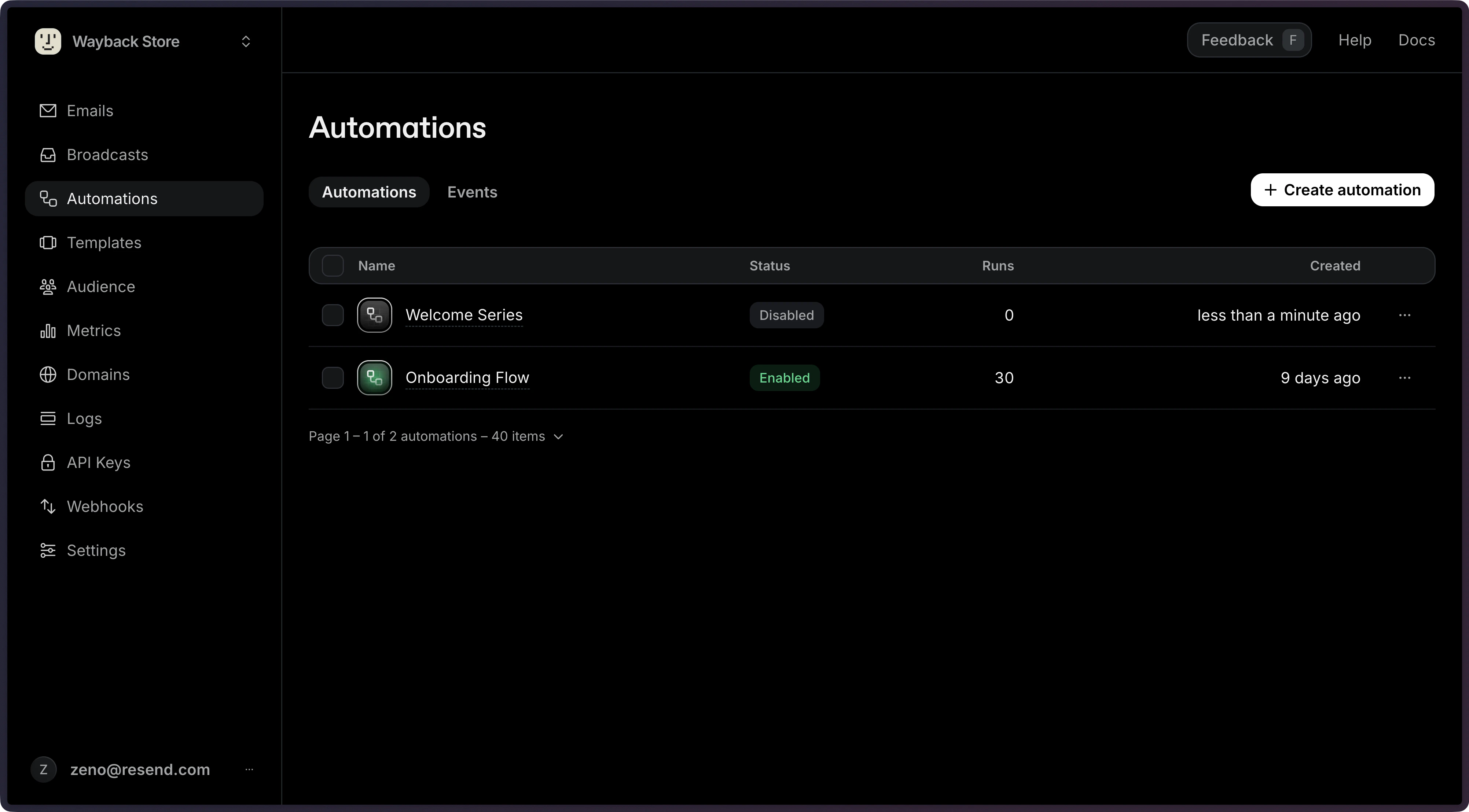
The [Automations page](https://resend.com/automations) shows all existing automations.
Click **Create automation** to start a new Automation.
 ## 2. Add Trigger
A trigger is the first step that will run when the Automation is executed. You can use a [custom event](/dashboard/automations/custom-events) like `user.created` or `onboarding.completed`, defining it inline or in the [Events page](https://resend.com/automations/events).
## 2. Add Trigger
A trigger is the first step that will run when the Automation is executed. You can use a [custom event](/dashboard/automations/custom-events) like `user.created` or `onboarding.completed`, defining it inline or in the [Events page](https://resend.com/automations/events).
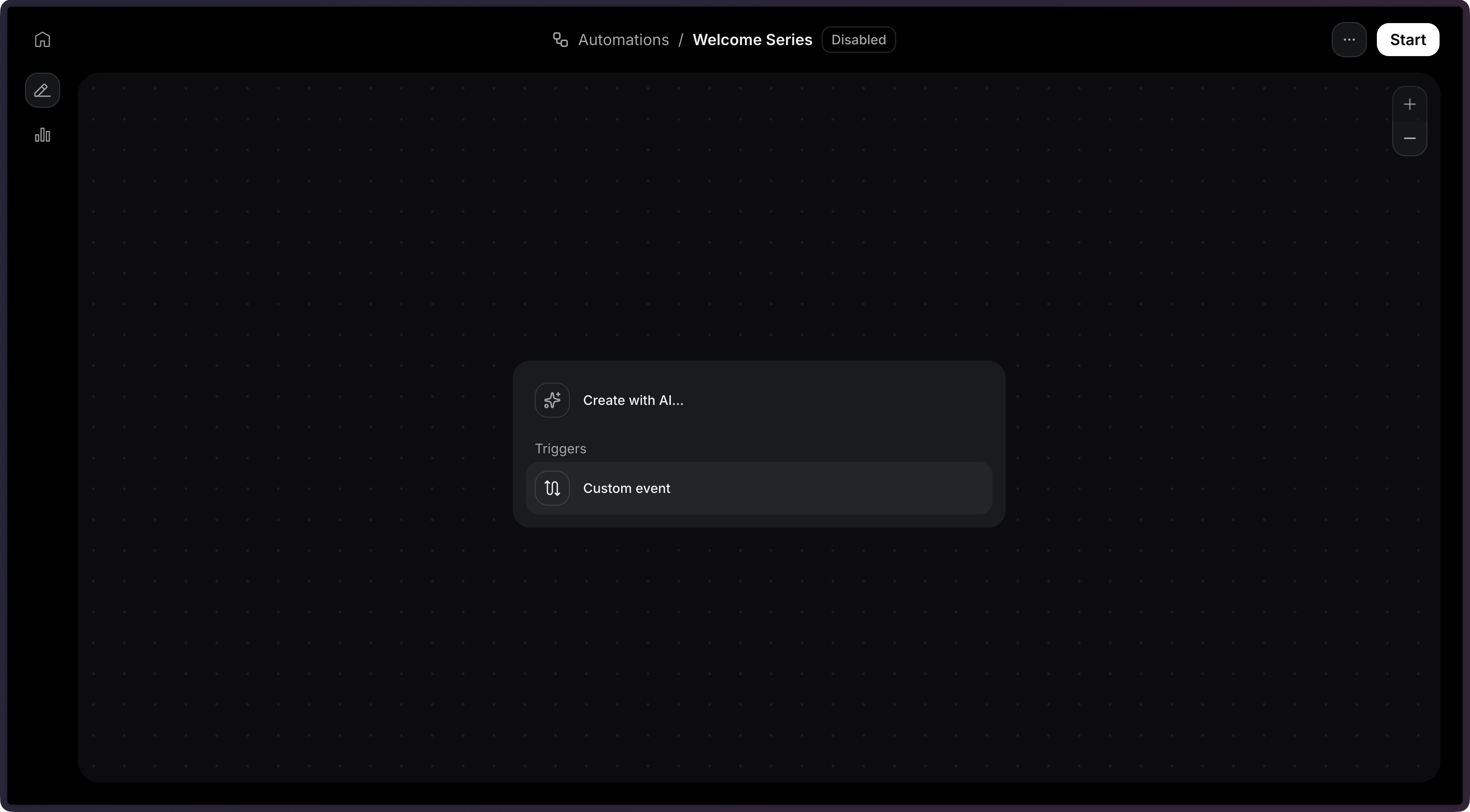 In this example, we will receive an event called `user.created` as a trigger.
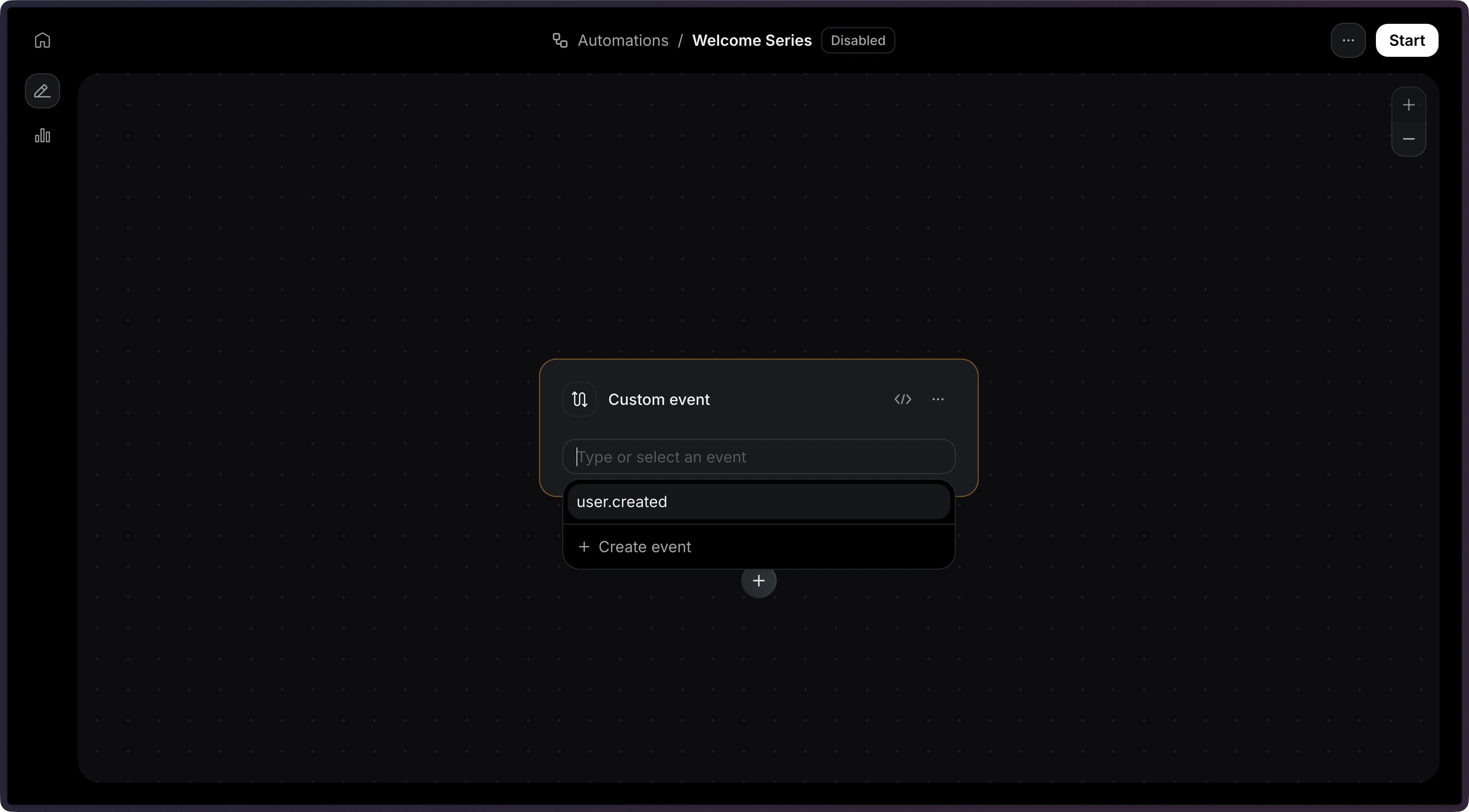 See the [Trigger documentation](/dashboard/automations/trigger) for more details.
## 3. Define Steps
Now, we need to define the [steps](/dashboard/automations/steps) that will be executed.
There are several step types you can add to your Automation:
| Step type | Description |
| ------------------------------------------------------- | --------------------------------------------------- |
| [Condition](/dashboard/automations/condition) | Branches the workflow based on rules |
| [Delay](/dashboard/automations/delay) | Pauses execution for a specified duration |
| [Wait for Event](/dashboard/automations/wait-for-event) | Pauses execution until a specific event is received |
| [Send Email](/dashboard/automations/send-email) | Sends an email using a template |
| [Contact Update](/dashboard/automations/contact-update) | Updates a contact's fields |
| [Contact Delete](/dashboard/automations/contact-delete) | Deletes the contact |
| [Add to Segment](/dashboard/automations/add-to-segment) | Adds the contact to a segment |
On this example, we will use the **Send Email** step.
See the [Trigger documentation](/dashboard/automations/trigger) for more details.
## 3. Define Steps
Now, we need to define the [steps](/dashboard/automations/steps) that will be executed.
There are several step types you can add to your Automation:
| Step type | Description |
| ------------------------------------------------------- | --------------------------------------------------- |
| [Condition](/dashboard/automations/condition) | Branches the workflow based on rules |
| [Delay](/dashboard/automations/delay) | Pauses execution for a specified duration |
| [Wait for Event](/dashboard/automations/wait-for-event) | Pauses execution until a specific event is received |
| [Send Email](/dashboard/automations/send-email) | Sends an email using a template |
| [Contact Update](/dashboard/automations/contact-update) | Updates a contact's fields |
| [Contact Delete](/dashboard/automations/contact-delete) | Deletes the contact |
| [Add to Segment](/dashboard/automations/add-to-segment) | Adds the contact to a segment |
On this example, we will use the **Send Email** step.
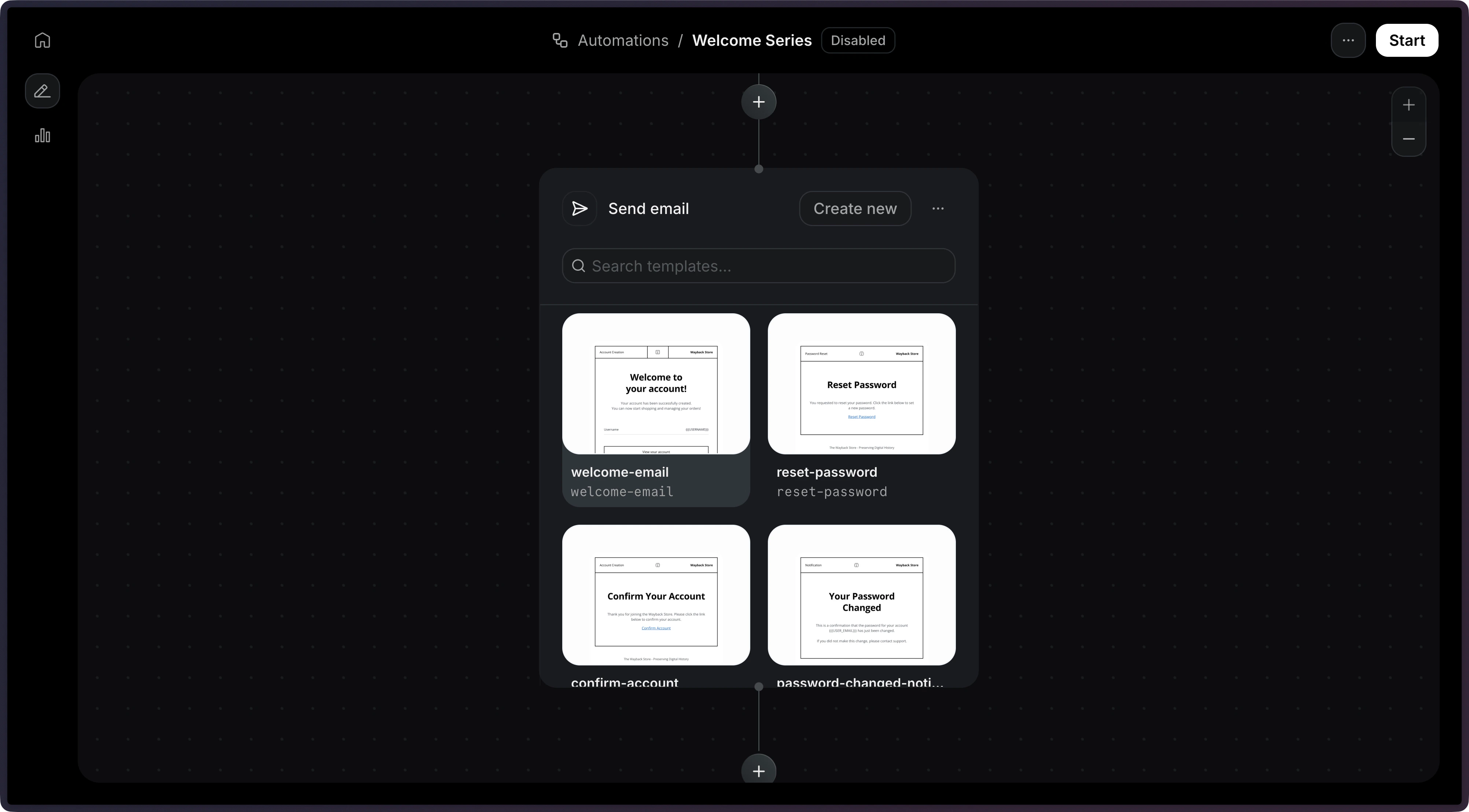
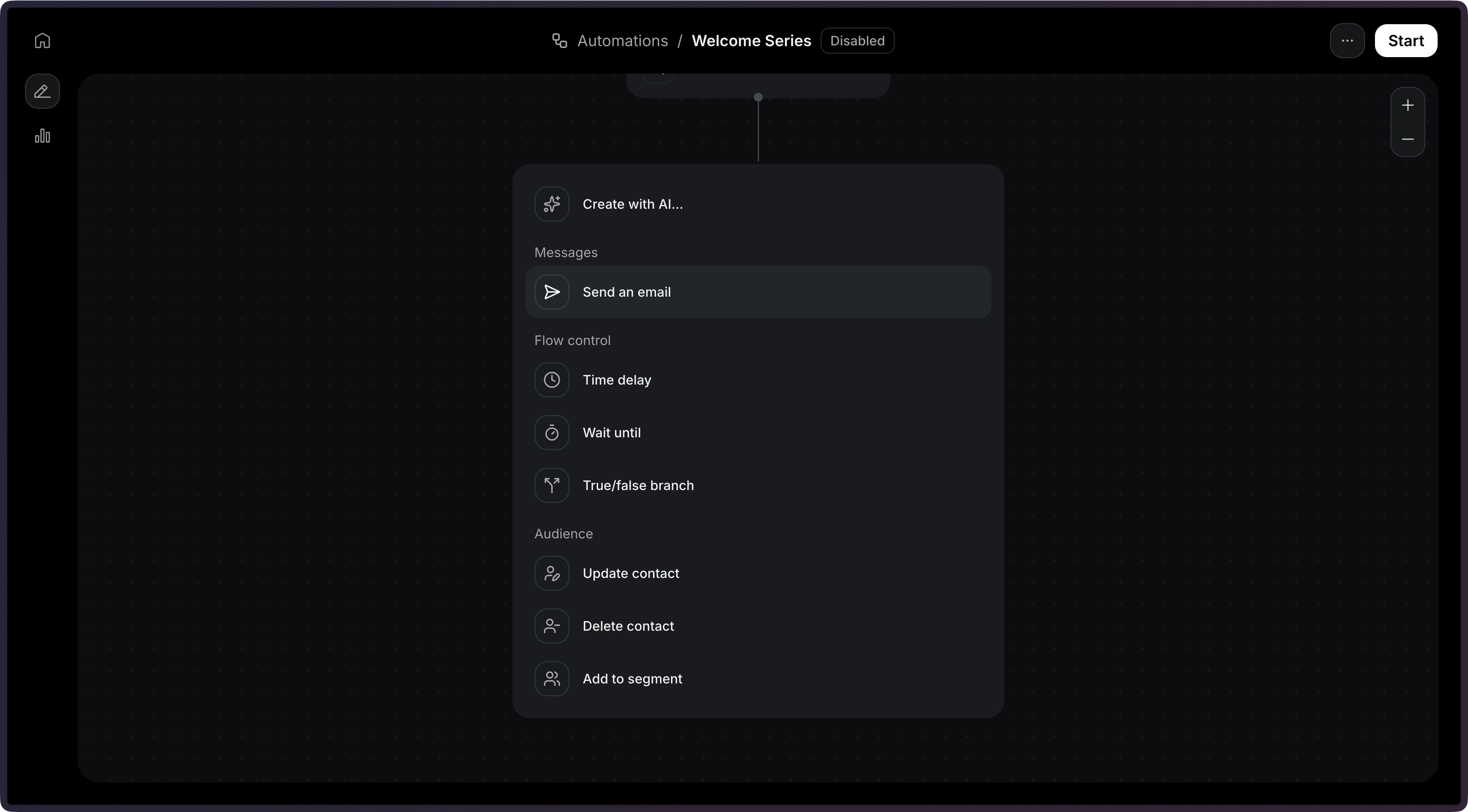 Once you select that step, you will be able to select an existing template.
Note: Only `published` templates are available to be used in an Automation.
Once you select that step, you will be able to select an existing template.
Note: Only `published` templates are available to be used in an Automation.
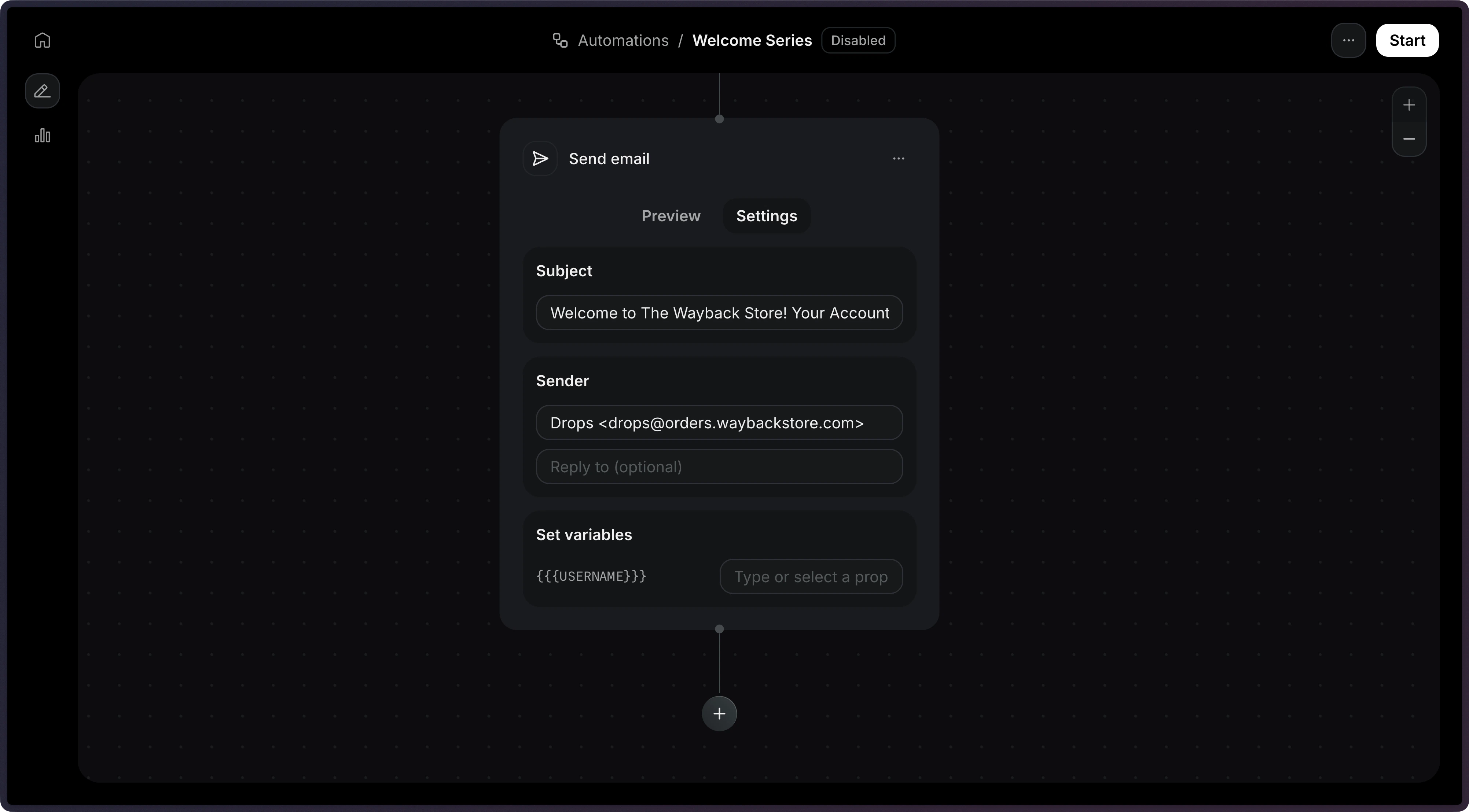
 With the template selected, you will be able to configure the email subject and sender address.
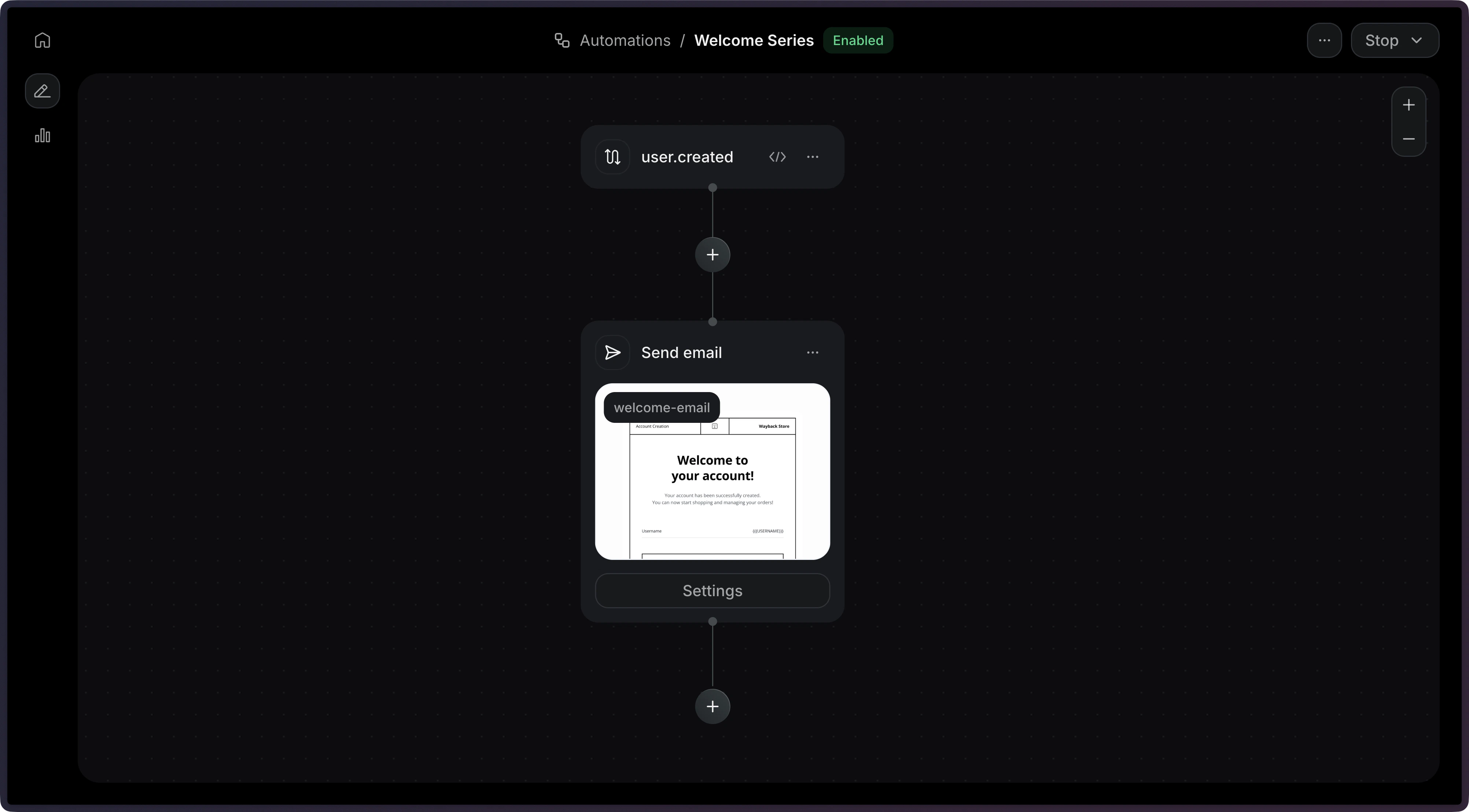
 Once you're done with the email, you can click on **Start** to enable the Automation.
 ## 4. Send an Event
Now, we're ready to send an event to trigger the Automation.
On your application, you can send an event to trigger the Automation by using the API.
```ts Node.js theme={"theme":{"light":"github-light","dark":"vesper"}}
import { Resend } from 'resend';
const resend = new Resend('re_xxxxxxxxx');
// Trigger with a contact ID
const { data, error } = await resend.events.send({
event: 'user.created',
contactId: '7f2e4a3b-dfbc-4e9a-8b2c-5f3a1d6e7c8b',
payload: {
plan: 'pro',
},
});
// Trigger with an email address
const { data, error } = await resend.events.send({
event: 'user.created',
email: 'steve.wozniak@gmail.com',
payload: {
plan: 'pro',
},
});
```
```php PHP {6,13} theme={"theme":{"light":"github-light","dark":"vesper"}}
$resend = Resend::client('re_xxxxxxxxx');
// Trigger with a contact ID
$resend->events->send([
'event' => 'user.created',
'contact_id' => '7f2e4a3b-dfbc-4e9a-8b2c-5f3a1d6e7c8b',
'payload' => ['plan' => 'pro'],
]);
// Trigger with an email address
$resend->events->send([
'event' => 'user.created',
'email' => 'steve.wozniak@gmail.com',
'payload' => ['plan' => 'pro'],
]);
```
```python Python {8,19} theme={"theme":{"light":"github-light","dark":"vesper"}}
import resend
resend.api_key = "re_xxxxxxxxx"
# Trigger with a contact ID
params: resend.Events.SendParams = {
"event": "user.created",
"contact_id": "7f2e4a3b-dfbc-4e9a-8b2c-5f3a1d6e7c8b",
"payload": {
"plan": "pro",
},
}
resend.Events.send(params)
# Trigger with an email address
params: resend.Events.SendParams = {
"event": "user.created",
"email": "steve.wozniak@gmail.com",
"payload": {
"plan": "pro",
},
}
resend.Events.send(params)
```
```ruby Ruby {8,17} theme={"theme":{"light":"github-light","dark":"vesper"}}
require "resend"
Resend.api_key = "re_xxxxxxxxx"
# Trigger with a contact ID
params = {
event: "user.created",
contact_id: "7f2e4a3b-dfbc-4e9a-8b2c-5f3a1d6e7c8b",
payload: {
plan: "pro",
},
}
Resend::Events.send(params)
# Trigger with an email address
params = {
event: "user.created",
email: "steve.wozniak@gmail.com",
payload: {
plan: "pro",
},
}
Resend::Events.send(params)
```
```go Go {11,20} theme={"theme":{"light":"github-light","dark":"vesper"}}
package main
import "github.com/resend/resend-go/v3"
func main() {
client := resend.NewClient("re_xxxxxxxxx")
// Trigger with a contact ID
client.Events.Send(&resend.SendEventRequest{
Event: "user.created",
ContactId: "7f2e4a3b-dfbc-4e9a-8b2c-5f3a1d6e7c8b",
Payload: map[string]any{
"plan": "pro",
},
})
// Trigger with an email address
client.Events.Send(&resend.SendEventRequest{
Event: "user.created",
Email: "steve.wozniak@gmail.com",
Payload: map[string]any{
"plan": "pro",
},
})
}
```
```rust Rust {10,19} theme={"theme":{"light":"github-light","dark":"vesper"}}
use resend_rs::{types::SendEventOptions, Resend, Result};
#[tokio::main]
async fn main() -> Result<()> {
let resend = Resend::new("re_xxxxxxxxx");
// Trigger with a contact ID
let _event = resend
.events
.send(SendEventOptions::new("user.created").contact_id(
"7f2e4a3b-dfbc-4e9a-8b2c-5f3a1d6e7c8b",
).payload(serde_json::json!({
"plan": "pro"
})))
.await?;
// Trigger with an email address
let _event = resend
.events
.send(SendEventOptions::new("user.created").email(
"steve.wozniak@gmail.com",
).payload(serde_json::json!({
"plan": "pro"
})))
.await?;
Ok(())
}
```
```java Java theme={"theme":{"light":"github-light","dark":"vesper"}}
import com.resend.*;
public class Main {
public static void main(String[] args) {
Resend resend = new Resend("re_xxxxxxxxx");
// Trigger with a contact ID
SendEventOptions params = SendEventOptions.builder()
.event("user.created")
.contactId("7f2e4a3b-dfbc-4e9a-8b2c-5f3a1d6e7c8b")
.addPayload("plan", "pro")
.build();
SendEventResponseSuccess data = resend.events().send(params);
// Trigger with an email address
SendEventOptions params2 = SendEventOptions.builder()
.event("user.created")
.email("steve.wozniak@gmail.com")
.addPayload("plan", "pro")
.build();
SendEventResponseSuccess data2 = resend.events().send(params2);
}
}
```
```csharp .NET theme={"theme":{"light":"github-light","dark":"vesper"}}
using Resend;
using System.Text.Json;
IResend resend = ResendClient.Create( "re_xxxxxxxxx" );
var payload = JsonSerializer.SerializeToElement( new { plan = "pro" } );
// Trigger with a contact ID
var resp = await resend.EventSendAsync( new EventSendData()
{
Event = "user.created",
ContactId = new Guid( "7f2e4a3b-dfbc-4e9a-8b2c-5f3a1d6e7c8b" ),
Payload = payload,
} );
Console.WriteLine( "Event={0}", resp.Content.Event );
// Trigger with an email address
await resend.EventSendAsync( new EventSendData()
{
Event = "user.created",
Email = "steve.wozniak@gmail.com",
Payload = payload,
} );
```
```bash cURL theme={"theme":{"light":"github-light","dark":"vesper"}}
# Trigger with a contact ID
curl -X POST 'https://api.resend.com/events/send' \
-H 'Authorization: Bearer re_xxxxxxxxx' \
-H 'Content-Type: application/json' \
-d '{
"event": "user.created",
"contact_id": "7f2e4a3b-dfbc-4e9a-8b2c-5f3a1d6e7c8b",
"payload": {
"plan": "pro"
}
}'
# Trigger with an email address
curl -X POST 'https://api.resend.com/events/send' \
-H 'Authorization: Bearer re_xxxxxxxxx' \
-H 'Content-Type: application/json' \
-d '{
"event": "user.created",
"email": "steve.wozniak@gmail.com",
"payload": {
"plan": "pro"
}
}'
```
```bash CLI theme={"theme":{"light":"github-light","dark":"vesper"}}
# Trigger with a contact ID
resend events send \
--event user.created \
--contact-id 7f2e4a3b-dfbc-4e9a-8b2c-5f3a1d6e7c8b \
--payload '{"plan":"pro"}'
# Trigger with an email address
resend events send \
--event user.created \
--email steve.wozniak@gmail.com \
--payload '{"plan":"pro"}'
```
View the [API reference](/api-reference/events/send-event) for more details.
## 5. Monitor Runs
After sending events, you can monitor your Automation executions through Runs. Each time an event triggers an Automation, a Run is created to track the execution.
## 4. Send an Event
Now, we're ready to send an event to trigger the Automation.
On your application, you can send an event to trigger the Automation by using the API.
```ts Node.js theme={"theme":{"light":"github-light","dark":"vesper"}}
import { Resend } from 'resend';
const resend = new Resend('re_xxxxxxxxx');
// Trigger with a contact ID
const { data, error } = await resend.events.send({
event: 'user.created',
contactId: '7f2e4a3b-dfbc-4e9a-8b2c-5f3a1d6e7c8b',
payload: {
plan: 'pro',
},
});
// Trigger with an email address
const { data, error } = await resend.events.send({
event: 'user.created',
email: 'steve.wozniak@gmail.com',
payload: {
plan: 'pro',
},
});
```
```php PHP {6,13} theme={"theme":{"light":"github-light","dark":"vesper"}}
$resend = Resend::client('re_xxxxxxxxx');
// Trigger with a contact ID
$resend->events->send([
'event' => 'user.created',
'contact_id' => '7f2e4a3b-dfbc-4e9a-8b2c-5f3a1d6e7c8b',
'payload' => ['plan' => 'pro'],
]);
// Trigger with an email address
$resend->events->send([
'event' => 'user.created',
'email' => 'steve.wozniak@gmail.com',
'payload' => ['plan' => 'pro'],
]);
```
```python Python {8,19} theme={"theme":{"light":"github-light","dark":"vesper"}}
import resend
resend.api_key = "re_xxxxxxxxx"
# Trigger with a contact ID
params: resend.Events.SendParams = {
"event": "user.created",
"contact_id": "7f2e4a3b-dfbc-4e9a-8b2c-5f3a1d6e7c8b",
"payload": {
"plan": "pro",
},
}
resend.Events.send(params)
# Trigger with an email address
params: resend.Events.SendParams = {
"event": "user.created",
"email": "steve.wozniak@gmail.com",
"payload": {
"plan": "pro",
},
}
resend.Events.send(params)
```
```ruby Ruby {8,17} theme={"theme":{"light":"github-light","dark":"vesper"}}
require "resend"
Resend.api_key = "re_xxxxxxxxx"
# Trigger with a contact ID
params = {
event: "user.created",
contact_id: "7f2e4a3b-dfbc-4e9a-8b2c-5f3a1d6e7c8b",
payload: {
plan: "pro",
},
}
Resend::Events.send(params)
# Trigger with an email address
params = {
event: "user.created",
email: "steve.wozniak@gmail.com",
payload: {
plan: "pro",
},
}
Resend::Events.send(params)
```
```go Go {11,20} theme={"theme":{"light":"github-light","dark":"vesper"}}
package main
import "github.com/resend/resend-go/v3"
func main() {
client := resend.NewClient("re_xxxxxxxxx")
// Trigger with a contact ID
client.Events.Send(&resend.SendEventRequest{
Event: "user.created",
ContactId: "7f2e4a3b-dfbc-4e9a-8b2c-5f3a1d6e7c8b",
Payload: map[string]any{
"plan": "pro",
},
})
// Trigger with an email address
client.Events.Send(&resend.SendEventRequest{
Event: "user.created",
Email: "steve.wozniak@gmail.com",
Payload: map[string]any{
"plan": "pro",
},
})
}
```
```rust Rust {10,19} theme={"theme":{"light":"github-light","dark":"vesper"}}
use resend_rs::{types::SendEventOptions, Resend, Result};
#[tokio::main]
async fn main() -> Result<()> {
let resend = Resend::new("re_xxxxxxxxx");
// Trigger with a contact ID
let _event = resend
.events
.send(SendEventOptions::new("user.created").contact_id(
"7f2e4a3b-dfbc-4e9a-8b2c-5f3a1d6e7c8b",
).payload(serde_json::json!({
"plan": "pro"
})))
.await?;
// Trigger with an email address
let _event = resend
.events
.send(SendEventOptions::new("user.created").email(
"steve.wozniak@gmail.com",
).payload(serde_json::json!({
"plan": "pro"
})))
.await?;
Ok(())
}
```
```java Java theme={"theme":{"light":"github-light","dark":"vesper"}}
import com.resend.*;
public class Main {
public static void main(String[] args) {
Resend resend = new Resend("re_xxxxxxxxx");
// Trigger with a contact ID
SendEventOptions params = SendEventOptions.builder()
.event("user.created")
.contactId("7f2e4a3b-dfbc-4e9a-8b2c-5f3a1d6e7c8b")
.addPayload("plan", "pro")
.build();
SendEventResponseSuccess data = resend.events().send(params);
// Trigger with an email address
SendEventOptions params2 = SendEventOptions.builder()
.event("user.created")
.email("steve.wozniak@gmail.com")
.addPayload("plan", "pro")
.build();
SendEventResponseSuccess data2 = resend.events().send(params2);
}
}
```
```csharp .NET theme={"theme":{"light":"github-light","dark":"vesper"}}
using Resend;
using System.Text.Json;
IResend resend = ResendClient.Create( "re_xxxxxxxxx" );
var payload = JsonSerializer.SerializeToElement( new { plan = "pro" } );
// Trigger with a contact ID
var resp = await resend.EventSendAsync( new EventSendData()
{
Event = "user.created",
ContactId = new Guid( "7f2e4a3b-dfbc-4e9a-8b2c-5f3a1d6e7c8b" ),
Payload = payload,
} );
Console.WriteLine( "Event={0}", resp.Content.Event );
// Trigger with an email address
await resend.EventSendAsync( new EventSendData()
{
Event = "user.created",
Email = "steve.wozniak@gmail.com",
Payload = payload,
} );
```
```bash cURL theme={"theme":{"light":"github-light","dark":"vesper"}}
# Trigger with a contact ID
curl -X POST 'https://api.resend.com/events/send' \
-H 'Authorization: Bearer re_xxxxxxxxx' \
-H 'Content-Type: application/json' \
-d '{
"event": "user.created",
"contact_id": "7f2e4a3b-dfbc-4e9a-8b2c-5f3a1d6e7c8b",
"payload": {
"plan": "pro"
}
}'
# Trigger with an email address
curl -X POST 'https://api.resend.com/events/send' \
-H 'Authorization: Bearer re_xxxxxxxxx' \
-H 'Content-Type: application/json' \
-d '{
"event": "user.created",
"email": "steve.wozniak@gmail.com",
"payload": {
"plan": "pro"
}
}'
```
```bash CLI theme={"theme":{"light":"github-light","dark":"vesper"}}
# Trigger with a contact ID
resend events send \
--event user.created \
--contact-id 7f2e4a3b-dfbc-4e9a-8b2c-5f3a1d6e7c8b \
--payload '{"plan":"pro"}'
# Trigger with an email address
resend events send \
--event user.created \
--email steve.wozniak@gmail.com \
--payload '{"plan":"pro"}'
```
View the [API reference](/api-reference/events/send-event) for more details.
## 5. Monitor Runs
After sending events, you can monitor your Automation executions through Runs. Each time an event triggers an Automation, a Run is created to track the execution.
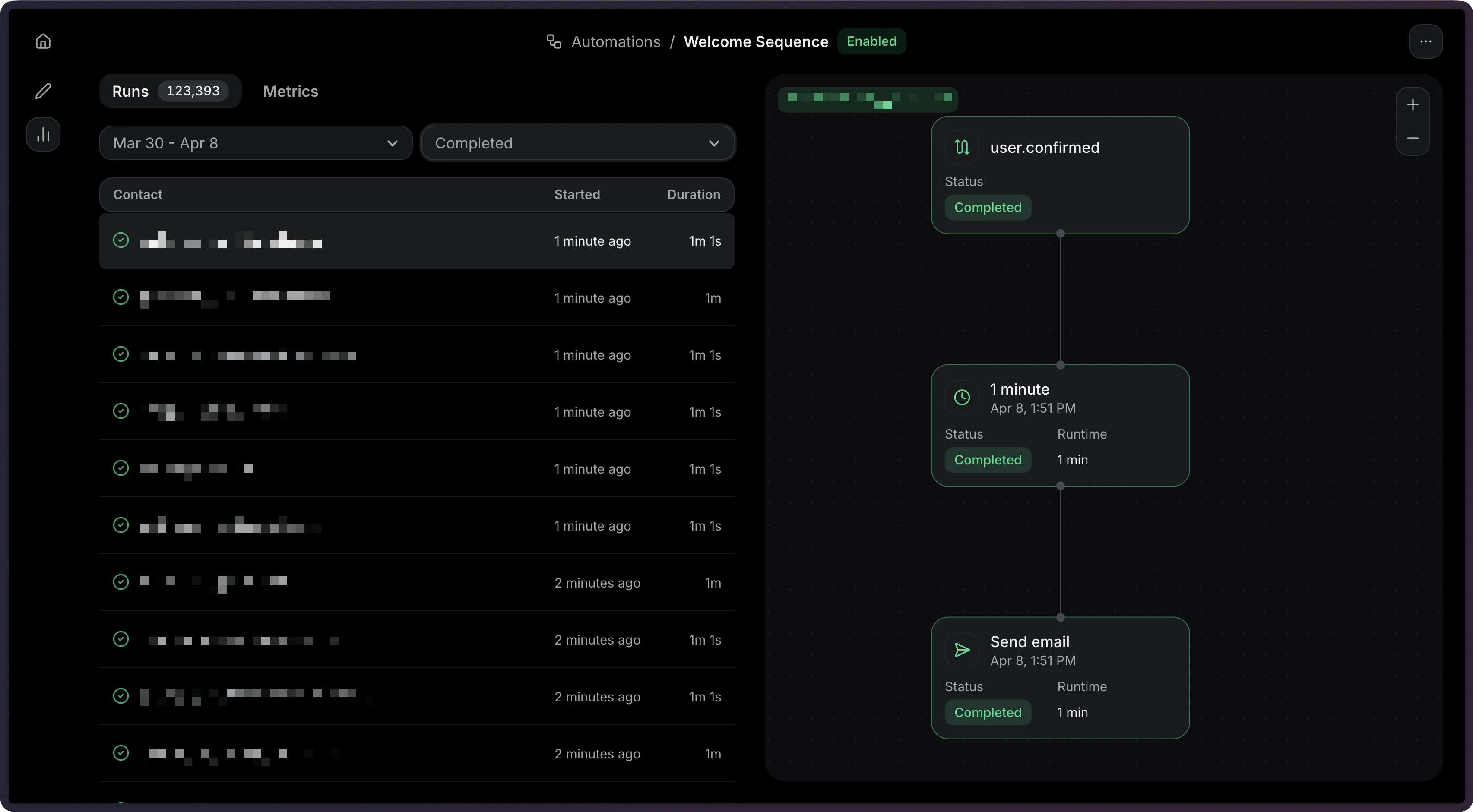 Learn how to:
* View Run statuses and execution details
* Filter Runs by status (`running`, `completed`, `failed`, `cancelled`)
* Debug failed Runs with step-level error information
* Stop Automation Runs when needed
See the [Runs documentation](/dashboard/automations/runs) for more details.
## 1. Create Automation
When creating an Automation via the API, you can create an entire Automation flow with a single request. It accepts four parameters (status is optional and defaults to `disabled`):
* `name`: The name of the Automation.
* `status`: The status of the Automation.
* `steps`: The [steps](/dashboard/automations/steps) that compose the Automation graph.
* `connections`: The [connections between steps](/dashboard/automations/connections) in the Automation graph.
```ts Node.js theme={"theme":{"light":"github-light","dark":"vesper"}}
import { Resend } from 'resend';
const resend = new Resend('re_xxxxxxxxx');
const { data, error } = await resend.automations.create({
name: 'Welcome series',
status: 'disabled',
steps: [
{
key: 'start',
type: 'trigger',
config: { eventName: 'user.created' },
},
{
key: 'welcome',
type: 'send_email',
config: {
template: { id: '34a080c9-b17d-4187-ad80-5af20266e535' },
},
},
],
connections: [{ from: 'start', to: 'welcome' }],
});
```
```php PHP theme={"theme":{"light":"github-light","dark":"vesper"}}
$resend = Resend::client('re_xxxxxxxxx');
$resend->automations->create([
'name' => 'Welcome series',
'status' => 'disabled',
'steps' => [
[
'key' => 'start',
'type' => 'trigger',
'config' => ['event_name' => 'user.created'],
],
[
'key' => 'welcome',
'type' => 'send_email',
'config' => [
'template' => ['id' => '34a080c9-b17d-4187-ad80-5af20266e535'],
],
],
],
'connections' => [['from' => 'start', 'to' => 'welcome']],
]);
```
```python Python theme={"theme":{"light":"github-light","dark":"vesper"}}
import resend
resend.api_key = "re_xxxxxxxxx"
params: resend.Automations.CreateParams = {
"name": "Welcome series",
"status": "disabled",
"steps": [
{
"key": "start",
"type": "trigger",
"config": {"event_name": "user.created"},
},
{
"key": "welcome",
"type": "send_email",
"config": {
"template": {"id": "34a080c9-b17d-4187-ad80-5af20266e535"},
},
},
],
"connections": [{"from": "start", "to": "welcome"}],
}
resend.Automations.create(params)
```
```ruby Ruby theme={"theme":{"light":"github-light","dark":"vesper"}}
require "resend"
Resend.api_key = "re_xxxxxxxxx"
params = {
name: "Welcome series",
status: "disabled",
steps: [
{
key: "start",
type: "trigger",
config: { event_name: "user.created" },
},
{
key: "welcome",
type: "send_email",
config: {
template: { id: "34a080c9-b17d-4187-ad80-5af20266e535" },
},
},
],
connections: [{ from: "start", to: "welcome" }],
}
Resend::Automations.create(params)
```
```go Go theme={"theme":{"light":"github-light","dark":"vesper"}}
package main
import "github.com/resend/resend-go/v3"
func main() {
client := resend.NewClient("re_xxxxxxxxx")
params := &resend.CreateAutomationRequest{
Name: "Welcome series",
Status: resend.AutomationStatusDisabled,
Steps: []resend.AutomationStep{
{
Key: "start",
Type: resend.AutomationStepTypeTrigger,
Config: map[string]any{
"event_name": "user.created",
},
},
{
Key: "welcome",
Type: resend.AutomationStepTypeSendEmail,
Config: map[string]any{
"template": map[string]any{
"id": "34a080c9-b17d-4187-ad80-5af20266e535",
},
},
},
},
Connections: []resend.AutomationConnection{
{From: "start", To: "welcome"},
},
}
client.Automations.Create(params)
}
```
```rust Rust theme={"theme":{"light":"github-light","dark":"vesper"}}
use resend_rs::{
types::{
AutomationStatus, AutomationTemplate, Connection, CreateAutomationOptions, SendEmailStepConfig,
Step, TriggerStepConfig,
},
Resend, Result,
};
#[tokio::main]
async fn main() -> Result<()> {
let resend = Resend::new("re_xxxxxxxxx");
let opts = CreateAutomationOptions {
name: "Welcome series".to_owned(),
status: AutomationStatus::Disabled,
steps: vec![
Step::Trigger {
key: "start".to_owned(),
config: TriggerStepConfig {
event_name: "user.created".to_owned(),
},
},
Step::SendEmail {
key: "welcome".to_owned(),
config: SendEmailStepConfig::new(AutomationTemplate::new(
"34a080c9-b17d-4187-ad80-5af20266e535",
)),
},
],
connections: vec![Connection::new("start", "welcome")],
};
let _automation = resend.automations.create(opts).await?;
Ok(())
}
```
```java Java theme={"theme":{"light":"github-light","dark":"vesper"}}
import com.resend.*;
public class Main {
public static void main(String[] args) {
Resend resend = new Resend("re_xxxxxxxxx");
CreateAutomationOptions options = CreateAutomationOptions.builder()
.name("Welcome series")
.status(AutomationStatus.DISABLED)
.steps(
AutomationStep.trigger("start")
.eventName("user.created")
.build(),
AutomationStep.sendEmail("welcome")
.template("34a080c9-b17d-4187-ad80-5af20266e535")
.build()
)
.connections(
AutomationConnection.builder()
.from("start")
.to("welcome")
.build()
)
.build();
CreateAutomationResponseSuccess response = resend.automations().create(options);
}
}
```
```csharp .NET theme={"theme":{"light":"github-light","dark":"vesper"}}
using Resend;
using System.Text.Json;
IResend resend = ResendClient.Create( "re_xxxxxxxxx" );
var startConfig = JsonSerializer.SerializeToElement( new { event_name = "user.created" } );
var welcomeConfig = JsonSerializer.SerializeToElement( new { template = new { id = "34a080c9-b17d-4187-ad80-5af20266e535" } } );
var resp = await resend.AutomationCreateAsync( new AutomationCreateData()
{
Name = "Welcome series",
Status = "disabled",
Steps = new List
{
new AutomationStepData { Ref = "start", Type = "trigger", Config = startConfig },
new AutomationStepData { Ref = "welcome", Type = "send_email", Config = welcomeConfig },
},
Connections = new List
{
new AutomationEdge { From = "start", To = "welcome" },
},
} );
Console.WriteLine( "AutomationId={0}", resp.Content );
```
```bash cURL theme={"theme":{"light":"github-light","dark":"vesper"}}
curl -X POST 'https://api.resend.com/automations' \
-H 'Authorization: Bearer re_xxxxxxxxx' \
-H 'Content-Type: application/json' \
-d '{
"name": "Welcome series",
"steps": [
{
"key": "start",
"type": "trigger",
"config": { "event_name": "user.created" }
},
{
"key": "welcome",
"type": "send_email",
"config": {
"template": { "id": "34a080c9-b17d-4187-ad80-5af20266e535" }
}
}
],
"connections": [
{ "from": "start", "to": "welcome" }
]
}'
```
```bash CLI theme={"theme":{"light":"github-light","dark":"vesper"}}
resend automations create --name "Welcome series" --file ./automation.json
```
The trigger is defined as the first item in the `steps` array with `type: 'trigger'`. It requires you've created a custom event like `user.created` or `onboarding.completed`.
For more help creating an Automation via the API, see the [Create Automation API reference](/api-reference/automations/create-automation).
## 2. Send an Event
Trigger the Automation by sending an event from your application.
```ts Node.js {8,17} theme={"theme":{"light":"github-light","dark":"vesper"}}
import { Resend } from 'resend';
const resend = new Resend('re_xxxxxxxxx');
// Trigger with a contact ID
const { data, error } = await resend.events.send({
event: 'user.created',
contactId: '7f2e4a3b-dfbc-4e9a-8b2c-5f3a1d6e7c8b',
payload: {
plan: 'pro',
},
});
// Trigger with an email address
const { data, error } = await resend.events.send({
event: 'user.created',
email: 'steve.wozniak@gmail.com',
payload: {
plan: 'pro',
},
});
```
```php PHP theme={"theme":{"light":"github-light","dark":"vesper"}}
$resend = Resend::client('re_xxxxxxxxx');
// Trigger with a contact ID
$resend->events->send([
'event' => 'user.created',
'contact_id' => '7f2e4a3b-dfbc-4e9a-8b2c-5f3a1d6e7c8b',
'payload' => ['plan' => 'pro'],
]);
// Trigger with an email address
$resend->events->send([
'event' => 'user.created',
'email' => 'steve.wozniak@gmail.com',
'payload' => ['plan' => 'pro'],
]);
```
```python Python theme={"theme":{"light":"github-light","dark":"vesper"}}
import resend
resend.api_key = "re_xxxxxxxxx"
# Trigger with a contact ID
params: resend.Events.SendParams = {
"event": "user.created",
"contact_id": "7f2e4a3b-dfbc-4e9a-8b2c-5f3a1d6e7c8b",
"payload": {
"plan": "pro",
},
}
resend.Events.send(params)
# Trigger with an email address
params: resend.Events.SendParams = {
"event": "user.created",
"email": "steve.wozniak@gmail.com",
"payload": {
"plan": "pro",
},
}
resend.Events.send(params)
```
```ruby Ruby theme={"theme":{"light":"github-light","dark":"vesper"}}
require "resend"
Resend.api_key = "re_xxxxxxxxx"
# Trigger with a contact ID
params = {
event: "user.created",
contact_id: "7f2e4a3b-dfbc-4e9a-8b2c-5f3a1d6e7c8b",
payload: {
plan: "pro",
},
}
Resend::Events.send(params)
# Trigger with an email address
params = {
event: "user.created",
email: "steve.wozniak@gmail.com",
payload: {
plan: "pro",
},
}
Resend::Events.send(params)
```
```go Go theme={"theme":{"light":"github-light","dark":"vesper"}}
package main
import "github.com/resend/resend-go/v3"
func main() {
client := resend.NewClient("re_xxxxxxxxx")
// Trigger with a contact ID
params := &resend.SendEventRequest{
Event: "user.created",
ContactId: "7f2e4a3b-dfbc-4e9a-8b2c-5f3a1d6e7c8b",
Payload: map[string]any{
"plan": "pro",
},
}
client.Events.Send(params)
// Trigger with an email address
params = &resend.SendEventRequest{
Event: "user.created",
Email: "steve.wozniak@gmail.com",
Payload: map[string]any{
"plan": "pro",
},
}
client.Events.Send(params)
}
```
```rust Rust theme={"theme":{"light":"github-light","dark":"vesper"}}
use resend_rs::{
json,
types::{ContactIdOrEmail, SendEventOptions},
Resend, Result,
};
#[tokio::main]
async fn main() -> Result<()> {
let resend = Resend::new("re_xxxxxxxxx");
let opts = SendEventOptions {
event: "user.created".to_owned(),
contact_id_or_email: ContactIdOrEmail::ContactId(
"7f2e4a3b-dfbc-4e9a-8b2c-5f3a1d6e7c8b".to_owned(),
),
payload: json!({
"plan": "pro"
}),
};
let opts = SendEventOptions {
event: "user.created".to_owned(),
contact_id_or_email: ContactIdOrEmail::Email("steve.wozniak@gmail.com".to_owned()),
payload: json!({
"plan": "pro"
}),
};
let _event = resend.events.send(opts).await?;
Ok(())
}
```
```java Java theme={"theme":{"light":"github-light","dark":"vesper"}}
import com.resend.*;
public class Main {
public static void main(String[] args) {
Resend resend = new Resend("re_xxxxxxxxx");
// Trigger with a contact ID
SendEventOptions params = SendEventOptions.builder()
.event("user.created")
.contactId("7f2e4a3b-dfbc-4e9a-8b2c-5f3a1d6e7c8b")
.addPayload("plan", "pro")
.build();
SendEventResponseSuccess data = resend.events().send(params);
// Trigger with an email address
SendEventOptions params = SendEventOptions.builder()
.event("user.created")
.email("steve.wozniak@gmail.com")
.addPayload("plan", "pro")
.build();
SendEventResponseSuccess data = resend.events().send(params);
}
}
```
```csharp .NET theme={"theme":{"light":"github-light","dark":"vesper"}}
using Resend;
using System.Text.Json;
IResend resend = ResendClient.Create( "re_xxxxxxxxx" );
var payload = JsonSerializer.SerializeToElement( new { plan = "pro" } );
// Trigger with a contact ID
var resp = await resend.EventSendAsync( new EventSendData()
{
Event = "user.created",
ContactId = new Guid( "7f2e4a3b-dfbc-4e9a-8b2c-5f3a1d6e7c8b" ),
Payload = payload,
} );
Console.WriteLine( "Event={0}", resp.Content.Event );
// Trigger with an email address
await resend.EventSendAsync( new EventSendData()
{
Event = "user.created",
Email = "steve.wozniak@gmail.com",
Payload = payload,
} );
```
```bash cURL {7,19} theme={"theme":{"light":"github-light","dark":"vesper"}}
# Trigger with a contact ID
curl -X POST 'https://api.resend.com/events/send' \
-H 'Authorization: Bearer re_xxxxxxxxx' \
-H 'Content-Type: application/json' \
-d '{
"event": "user.created",
"contact_id": "7f2e4a3b-dfbc-4e9a-8b2c-5f3a1d6e7c8b",
"payload": {
"plan": "pro"
}
}'
# Trigger with an email address
curl -X POST 'https://api.resend.com/events/send' \
-H 'Authorization: Bearer re_xxxxxxxxx' \
-H 'Content-Type: application/json' \
-d '{
"event": "user.created",
"email": "steve.wozniak@gmail.com",
"payload": {
"plan": "pro"
}
}'
```
```bash CLI theme={"theme":{"light":"github-light","dark":"vesper"}}
# Trigger with a contact ID
resend events send \
--event user.created \
--contact-id 7f2e4a3b-dfbc-4e9a-8b2c-5f3a1d6e7c8b \
--payload '{"plan":"pro"}'
# Trigger with an email address
resend events send \
--event user.created \
--email steve.wozniak@gmail.com \
--payload '{"plan":"pro"}'
```
View the [Send Event API reference](/api-reference/events/send-event) for more details.
## 3. Monitor Runs
After sending events, track your Automation executions through Runs.
```ts Node.js theme={"theme":{"light":"github-light","dark":"vesper"}}
import { Resend } from 'resend';
const resend = new Resend('re_xxxxxxxxx');
const { data, error } = await resend.automations.runs.list({
automationId: 'c9b16d4f-ba6c-4e2e-b044-6bf4404e57fd',
});
```
```php PHP theme={"theme":{"light":"github-light","dark":"vesper"}}
$resend = Resend::client('re_xxxxxxxxx');
$resend->automations->runs->list('c9b16d4f-ba6c-4e2e-b044-6bf4404e57fd');
```
```python Python theme={"theme":{"light":"github-light","dark":"vesper"}}
import resend
resend.api_key = "re_xxxxxxxxx"
resend.Automations.Runs.list("c9b16d4f-ba6c-4e2e-b044-6bf4404e57fd")
```
```ruby Ruby theme={"theme":{"light":"github-light","dark":"vesper"}}
require "resend"
Resend.api_key = "re_xxxxxxxxx"
Resend::Automations::Runs.list("c9b16d4f-ba6c-4e2e-b044-6bf4404e57fd")
```
```go Go theme={"theme":{"light":"github-light","dark":"vesper"}}
package main
import "github.com/resend/resend-go/v3"
func main() {
client := resend.NewClient("re_xxxxxxxxx")
client.Automations.ListRuns("c9b16d4f-ba6c-4e2e-b044-6bf4404e57fd")
}
```
```rust Rust theme={"theme":{"light":"github-light","dark":"vesper"}}
use resend_rs::{list_opts::ListOptions, Resend, Result};
#[tokio::main]
async fn main() -> Result<()> {
let resend = Resend::new("re_xxxxxxxxx");
let _automation = resend
.automations
.list_runs(
"c9b16d4f-ba6c-4e2e-b044-6bf4404e57fd",
None,
ListOptions::default(),
)
.await?;
Ok(())
}
```
```java Java theme={"theme":{"light":"github-light","dark":"vesper"}}
import com.resend.*;
public class Main {
public static void main(String[] args) {
Resend resend = new Resend("re_xxxxxxxxx");
ListAutomationRunsResponseSuccess data = resend.automations().listRuns("c9b16d4f-ba6c-4e2e-b044-6bf4404e57fd");
}
}
```
```csharp .NET theme={"theme":{"light":"github-light","dark":"vesper"}}
using Resend;
IResend resend = ResendClient.Create( "re_xxxxxxxxx" );
var resp = await resend.AutomationRunListAsync( new Guid( "c9b16d4f-ba6c-4e2e-b044-6bf4404e57fd" ) );
Console.WriteLine( "Count={0}", resp.Content.Data.Count );
```
```bash cURL theme={"theme":{"light":"github-light","dark":"vesper"}}
curl -X GET 'https://api.resend.com/automations/c9b16d4f-ba6c-4e2e-b044-6bf4404e57fd/runs' \
-H 'Authorization: Bearer re_xxxxxxxxx'
```
```bash CLI theme={"theme":{"light":"github-light","dark":"vesper"}}
resend automations runs list c9b16d4f-ba6c-4e2e-b044-6bf4404e57fd
```
You can filter Runs by status (`running`, `completed`, `failed`, `cancelled`).
See the [Runs documentation](/dashboard/automations/runs) and [List Runs API reference](/api-reference/automations/list-automation-runs) for more details.
Learn how to:
* View Run statuses and execution details
* Filter Runs by status (`running`, `completed`, `failed`, `cancelled`)
* Debug failed Runs with step-level error information
* Stop Automation Runs when needed
See the [Runs documentation](/dashboard/automations/runs) for more details.
## 1. Create Automation
When creating an Automation via the API, you can create an entire Automation flow with a single request. It accepts four parameters (status is optional and defaults to `disabled`):
* `name`: The name of the Automation.
* `status`: The status of the Automation.
* `steps`: The [steps](/dashboard/automations/steps) that compose the Automation graph.
* `connections`: The [connections between steps](/dashboard/automations/connections) in the Automation graph.
```ts Node.js theme={"theme":{"light":"github-light","dark":"vesper"}}
import { Resend } from 'resend';
const resend = new Resend('re_xxxxxxxxx');
const { data, error } = await resend.automations.create({
name: 'Welcome series',
status: 'disabled',
steps: [
{
key: 'start',
type: 'trigger',
config: { eventName: 'user.created' },
},
{
key: 'welcome',
type: 'send_email',
config: {
template: { id: '34a080c9-b17d-4187-ad80-5af20266e535' },
},
},
],
connections: [{ from: 'start', to: 'welcome' }],
});
```
```php PHP theme={"theme":{"light":"github-light","dark":"vesper"}}
$resend = Resend::client('re_xxxxxxxxx');
$resend->automations->create([
'name' => 'Welcome series',
'status' => 'disabled',
'steps' => [
[
'key' => 'start',
'type' => 'trigger',
'config' => ['event_name' => 'user.created'],
],
[
'key' => 'welcome',
'type' => 'send_email',
'config' => [
'template' => ['id' => '34a080c9-b17d-4187-ad80-5af20266e535'],
],
],
],
'connections' => [['from' => 'start', 'to' => 'welcome']],
]);
```
```python Python theme={"theme":{"light":"github-light","dark":"vesper"}}
import resend
resend.api_key = "re_xxxxxxxxx"
params: resend.Automations.CreateParams = {
"name": "Welcome series",
"status": "disabled",
"steps": [
{
"key": "start",
"type": "trigger",
"config": {"event_name": "user.created"},
},
{
"key": "welcome",
"type": "send_email",
"config": {
"template": {"id": "34a080c9-b17d-4187-ad80-5af20266e535"},
},
},
],
"connections": [{"from": "start", "to": "welcome"}],
}
resend.Automations.create(params)
```
```ruby Ruby theme={"theme":{"light":"github-light","dark":"vesper"}}
require "resend"
Resend.api_key = "re_xxxxxxxxx"
params = {
name: "Welcome series",
status: "disabled",
steps: [
{
key: "start",
type: "trigger",
config: { event_name: "user.created" },
},
{
key: "welcome",
type: "send_email",
config: {
template: { id: "34a080c9-b17d-4187-ad80-5af20266e535" },
},
},
],
connections: [{ from: "start", to: "welcome" }],
}
Resend::Automations.create(params)
```
```go Go theme={"theme":{"light":"github-light","dark":"vesper"}}
package main
import "github.com/resend/resend-go/v3"
func main() {
client := resend.NewClient("re_xxxxxxxxx")
params := &resend.CreateAutomationRequest{
Name: "Welcome series",
Status: resend.AutomationStatusDisabled,
Steps: []resend.AutomationStep{
{
Key: "start",
Type: resend.AutomationStepTypeTrigger,
Config: map[string]any{
"event_name": "user.created",
},
},
{
Key: "welcome",
Type: resend.AutomationStepTypeSendEmail,
Config: map[string]any{
"template": map[string]any{
"id": "34a080c9-b17d-4187-ad80-5af20266e535",
},
},
},
},
Connections: []resend.AutomationConnection{
{From: "start", To: "welcome"},
},
}
client.Automations.Create(params)
}
```
```rust Rust theme={"theme":{"light":"github-light","dark":"vesper"}}
use resend_rs::{
types::{
AutomationStatus, AutomationTemplate, Connection, CreateAutomationOptions, SendEmailStepConfig,
Step, TriggerStepConfig,
},
Resend, Result,
};
#[tokio::main]
async fn main() -> Result<()> {
let resend = Resend::new("re_xxxxxxxxx");
let opts = CreateAutomationOptions {
name: "Welcome series".to_owned(),
status: AutomationStatus::Disabled,
steps: vec![
Step::Trigger {
key: "start".to_owned(),
config: TriggerStepConfig {
event_name: "user.created".to_owned(),
},
},
Step::SendEmail {
key: "welcome".to_owned(),
config: SendEmailStepConfig::new(AutomationTemplate::new(
"34a080c9-b17d-4187-ad80-5af20266e535",
)),
},
],
connections: vec![Connection::new("start", "welcome")],
};
let _automation = resend.automations.create(opts).await?;
Ok(())
}
```
```java Java theme={"theme":{"light":"github-light","dark":"vesper"}}
import com.resend.*;
public class Main {
public static void main(String[] args) {
Resend resend = new Resend("re_xxxxxxxxx");
CreateAutomationOptions options = CreateAutomationOptions.builder()
.name("Welcome series")
.status(AutomationStatus.DISABLED)
.steps(
AutomationStep.trigger("start")
.eventName("user.created")
.build(),
AutomationStep.sendEmail("welcome")
.template("34a080c9-b17d-4187-ad80-5af20266e535")
.build()
)
.connections(
AutomationConnection.builder()
.from("start")
.to("welcome")
.build()
)
.build();
CreateAutomationResponseSuccess response = resend.automations().create(options);
}
}
```
```csharp .NET theme={"theme":{"light":"github-light","dark":"vesper"}}
using Resend;
using System.Text.Json;
IResend resend = ResendClient.Create( "re_xxxxxxxxx" );
var startConfig = JsonSerializer.SerializeToElement( new { event_name = "user.created" } );
var welcomeConfig = JsonSerializer.SerializeToElement( new { template = new { id = "34a080c9-b17d-4187-ad80-5af20266e535" } } );
var resp = await resend.AutomationCreateAsync( new AutomationCreateData()
{
Name = "Welcome series",
Status = "disabled",
Steps = new List
{
new AutomationStepData { Ref = "start", Type = "trigger", Config = startConfig },
new AutomationStepData { Ref = "welcome", Type = "send_email", Config = welcomeConfig },
},
Connections = new List
{
new AutomationEdge { From = "start", To = "welcome" },
},
} );
Console.WriteLine( "AutomationId={0}", resp.Content );
```
```bash cURL theme={"theme":{"light":"github-light","dark":"vesper"}}
curl -X POST 'https://api.resend.com/automations' \
-H 'Authorization: Bearer re_xxxxxxxxx' \
-H 'Content-Type: application/json' \
-d '{
"name": "Welcome series",
"steps": [
{
"key": "start",
"type": "trigger",
"config": { "event_name": "user.created" }
},
{
"key": "welcome",
"type": "send_email",
"config": {
"template": { "id": "34a080c9-b17d-4187-ad80-5af20266e535" }
}
}
],
"connections": [
{ "from": "start", "to": "welcome" }
]
}'
```
```bash CLI theme={"theme":{"light":"github-light","dark":"vesper"}}
resend automations create --name "Welcome series" --file ./automation.json
```
The trigger is defined as the first item in the `steps` array with `type: 'trigger'`. It requires you've created a custom event like `user.created` or `onboarding.completed`.
For more help creating an Automation via the API, see the [Create Automation API reference](/api-reference/automations/create-automation).
## 2. Send an Event
Trigger the Automation by sending an event from your application.
```ts Node.js {8,17} theme={"theme":{"light":"github-light","dark":"vesper"}}
import { Resend } from 'resend';
const resend = new Resend('re_xxxxxxxxx');
// Trigger with a contact ID
const { data, error } = await resend.events.send({
event: 'user.created',
contactId: '7f2e4a3b-dfbc-4e9a-8b2c-5f3a1d6e7c8b',
payload: {
plan: 'pro',
},
});
// Trigger with an email address
const { data, error } = await resend.events.send({
event: 'user.created',
email: 'steve.wozniak@gmail.com',
payload: {
plan: 'pro',
},
});
```
```php PHP theme={"theme":{"light":"github-light","dark":"vesper"}}
$resend = Resend::client('re_xxxxxxxxx');
// Trigger with a contact ID
$resend->events->send([
'event' => 'user.created',
'contact_id' => '7f2e4a3b-dfbc-4e9a-8b2c-5f3a1d6e7c8b',
'payload' => ['plan' => 'pro'],
]);
// Trigger with an email address
$resend->events->send([
'event' => 'user.created',
'email' => 'steve.wozniak@gmail.com',
'payload' => ['plan' => 'pro'],
]);
```
```python Python theme={"theme":{"light":"github-light","dark":"vesper"}}
import resend
resend.api_key = "re_xxxxxxxxx"
# Trigger with a contact ID
params: resend.Events.SendParams = {
"event": "user.created",
"contact_id": "7f2e4a3b-dfbc-4e9a-8b2c-5f3a1d6e7c8b",
"payload": {
"plan": "pro",
},
}
resend.Events.send(params)
# Trigger with an email address
params: resend.Events.SendParams = {
"event": "user.created",
"email": "steve.wozniak@gmail.com",
"payload": {
"plan": "pro",
},
}
resend.Events.send(params)
```
```ruby Ruby theme={"theme":{"light":"github-light","dark":"vesper"}}
require "resend"
Resend.api_key = "re_xxxxxxxxx"
# Trigger with a contact ID
params = {
event: "user.created",
contact_id: "7f2e4a3b-dfbc-4e9a-8b2c-5f3a1d6e7c8b",
payload: {
plan: "pro",
},
}
Resend::Events.send(params)
# Trigger with an email address
params = {
event: "user.created",
email: "steve.wozniak@gmail.com",
payload: {
plan: "pro",
},
}
Resend::Events.send(params)
```
```go Go theme={"theme":{"light":"github-light","dark":"vesper"}}
package main
import "github.com/resend/resend-go/v3"
func main() {
client := resend.NewClient("re_xxxxxxxxx")
// Trigger with a contact ID
params := &resend.SendEventRequest{
Event: "user.created",
ContactId: "7f2e4a3b-dfbc-4e9a-8b2c-5f3a1d6e7c8b",
Payload: map[string]any{
"plan": "pro",
},
}
client.Events.Send(params)
// Trigger with an email address
params = &resend.SendEventRequest{
Event: "user.created",
Email: "steve.wozniak@gmail.com",
Payload: map[string]any{
"plan": "pro",
},
}
client.Events.Send(params)
}
```
```rust Rust theme={"theme":{"light":"github-light","dark":"vesper"}}
use resend_rs::{
json,
types::{ContactIdOrEmail, SendEventOptions},
Resend, Result,
};
#[tokio::main]
async fn main() -> Result<()> {
let resend = Resend::new("re_xxxxxxxxx");
let opts = SendEventOptions {
event: "user.created".to_owned(),
contact_id_or_email: ContactIdOrEmail::ContactId(
"7f2e4a3b-dfbc-4e9a-8b2c-5f3a1d6e7c8b".to_owned(),
),
payload: json!({
"plan": "pro"
}),
};
let opts = SendEventOptions {
event: "user.created".to_owned(),
contact_id_or_email: ContactIdOrEmail::Email("steve.wozniak@gmail.com".to_owned()),
payload: json!({
"plan": "pro"
}),
};
let _event = resend.events.send(opts).await?;
Ok(())
}
```
```java Java theme={"theme":{"light":"github-light","dark":"vesper"}}
import com.resend.*;
public class Main {
public static void main(String[] args) {
Resend resend = new Resend("re_xxxxxxxxx");
// Trigger with a contact ID
SendEventOptions params = SendEventOptions.builder()
.event("user.created")
.contactId("7f2e4a3b-dfbc-4e9a-8b2c-5f3a1d6e7c8b")
.addPayload("plan", "pro")
.build();
SendEventResponseSuccess data = resend.events().send(params);
// Trigger with an email address
SendEventOptions params = SendEventOptions.builder()
.event("user.created")
.email("steve.wozniak@gmail.com")
.addPayload("plan", "pro")
.build();
SendEventResponseSuccess data = resend.events().send(params);
}
}
```
```csharp .NET theme={"theme":{"light":"github-light","dark":"vesper"}}
using Resend;
using System.Text.Json;
IResend resend = ResendClient.Create( "re_xxxxxxxxx" );
var payload = JsonSerializer.SerializeToElement( new { plan = "pro" } );
// Trigger with a contact ID
var resp = await resend.EventSendAsync( new EventSendData()
{
Event = "user.created",
ContactId = new Guid( "7f2e4a3b-dfbc-4e9a-8b2c-5f3a1d6e7c8b" ),
Payload = payload,
} );
Console.WriteLine( "Event={0}", resp.Content.Event );
// Trigger with an email address
await resend.EventSendAsync( new EventSendData()
{
Event = "user.created",
Email = "steve.wozniak@gmail.com",
Payload = payload,
} );
```
```bash cURL {7,19} theme={"theme":{"light":"github-light","dark":"vesper"}}
# Trigger with a contact ID
curl -X POST 'https://api.resend.com/events/send' \
-H 'Authorization: Bearer re_xxxxxxxxx' \
-H 'Content-Type: application/json' \
-d '{
"event": "user.created",
"contact_id": "7f2e4a3b-dfbc-4e9a-8b2c-5f3a1d6e7c8b",
"payload": {
"plan": "pro"
}
}'
# Trigger with an email address
curl -X POST 'https://api.resend.com/events/send' \
-H 'Authorization: Bearer re_xxxxxxxxx' \
-H 'Content-Type: application/json' \
-d '{
"event": "user.created",
"email": "steve.wozniak@gmail.com",
"payload": {
"plan": "pro"
}
}'
```
```bash CLI theme={"theme":{"light":"github-light","dark":"vesper"}}
# Trigger with a contact ID
resend events send \
--event user.created \
--contact-id 7f2e4a3b-dfbc-4e9a-8b2c-5f3a1d6e7c8b \
--payload '{"plan":"pro"}'
# Trigger with an email address
resend events send \
--event user.created \
--email steve.wozniak@gmail.com \
--payload '{"plan":"pro"}'
```
View the [Send Event API reference](/api-reference/events/send-event) for more details.
## 3. Monitor Runs
After sending events, track your Automation executions through Runs.
```ts Node.js theme={"theme":{"light":"github-light","dark":"vesper"}}
import { Resend } from 'resend';
const resend = new Resend('re_xxxxxxxxx');
const { data, error } = await resend.automations.runs.list({
automationId: 'c9b16d4f-ba6c-4e2e-b044-6bf4404e57fd',
});
```
```php PHP theme={"theme":{"light":"github-light","dark":"vesper"}}
$resend = Resend::client('re_xxxxxxxxx');
$resend->automations->runs->list('c9b16d4f-ba6c-4e2e-b044-6bf4404e57fd');
```
```python Python theme={"theme":{"light":"github-light","dark":"vesper"}}
import resend
resend.api_key = "re_xxxxxxxxx"
resend.Automations.Runs.list("c9b16d4f-ba6c-4e2e-b044-6bf4404e57fd")
```
```ruby Ruby theme={"theme":{"light":"github-light","dark":"vesper"}}
require "resend"
Resend.api_key = "re_xxxxxxxxx"
Resend::Automations::Runs.list("c9b16d4f-ba6c-4e2e-b044-6bf4404e57fd")
```
```go Go theme={"theme":{"light":"github-light","dark":"vesper"}}
package main
import "github.com/resend/resend-go/v3"
func main() {
client := resend.NewClient("re_xxxxxxxxx")
client.Automations.ListRuns("c9b16d4f-ba6c-4e2e-b044-6bf4404e57fd")
}
```
```rust Rust theme={"theme":{"light":"github-light","dark":"vesper"}}
use resend_rs::{list_opts::ListOptions, Resend, Result};
#[tokio::main]
async fn main() -> Result<()> {
let resend = Resend::new("re_xxxxxxxxx");
let _automation = resend
.automations
.list_runs(
"c9b16d4f-ba6c-4e2e-b044-6bf4404e57fd",
None,
ListOptions::default(),
)
.await?;
Ok(())
}
```
```java Java theme={"theme":{"light":"github-light","dark":"vesper"}}
import com.resend.*;
public class Main {
public static void main(String[] args) {
Resend resend = new Resend("re_xxxxxxxxx");
ListAutomationRunsResponseSuccess data = resend.automations().listRuns("c9b16d4f-ba6c-4e2e-b044-6bf4404e57fd");
}
}
```
```csharp .NET theme={"theme":{"light":"github-light","dark":"vesper"}}
using Resend;
IResend resend = ResendClient.Create( "re_xxxxxxxxx" );
var resp = await resend.AutomationRunListAsync( new Guid( "c9b16d4f-ba6c-4e2e-b044-6bf4404e57fd" ) );
Console.WriteLine( "Count={0}", resp.Content.Data.Count );
```
```bash cURL theme={"theme":{"light":"github-light","dark":"vesper"}}
curl -X GET 'https://api.resend.com/automations/c9b16d4f-ba6c-4e2e-b044-6bf4404e57fd/runs' \
-H 'Authorization: Bearer re_xxxxxxxxx'
```
```bash CLI theme={"theme":{"light":"github-light","dark":"vesper"}}
resend automations runs list c9b16d4f-ba6c-4e2e-b044-6bf4404e57fd
```
You can filter Runs by status (`running`, `completed`, `failed`, `cancelled`).
See the [Runs documentation](/dashboard/automations/runs) and [List Runs API reference](/api-reference/automations/list-automation-runs) for more details.