> ## Documentation Index
> Fetch the complete documentation index at: https://resend.com/docs/llms.txt
> Use this file to discover all available pages before exploring further.
# Managing Contacts
> Learn how to work with Contacts with Resend.
Contacts in Resend are global entities linked to a specific email address. After adding Contacts, send [Broadcasts](/dashboard/broadcasts/introduction) to groups of Contacts.
If you previously used our Audience model, learn how to [migrate to the new
Contacts model](/dashboard/segments/migrating-from-audiences-to-segments).
## Add Contacts
You can add a Contact in three different ways: via API, CSV upload, or manually.
### 1. Add Contacts programmatically via API
You can add contacts programmatically using the [contacts](/api-reference/contacts/create-contact) endpoint.
```ts Node.js theme={"theme":{"light":"github-light","dark":"vesper"}}
import { Resend } from 'resend';
const resend = new Resend('re_xxxxxxxxx');
resend.contacts.create({
email: 'steve.wozniak@gmail.com',
firstName: 'Steve',
lastName: 'Wozniak',
});
```
```php PHP theme={"theme":{"light":"github-light","dark":"vesper"}}
$resend = Resend::client('re_xxxxxxxxx');
$resend->contacts->create(
parameters: [
'email' => 'steve.wozniak@gmail.com',
'first_name' => 'Steve',
'last_name' => 'Wozniak',
]
);
```
```python Python theme={"theme":{"light":"github-light","dark":"vesper"}}
import resend
resend.api_key = "re_xxxxxxxxx"
params: resend.Contacts.CreateParams = {
"email": "steve.wozniak@gmail.com",
"first_name": "Steve",
"last_name": "Wozniak",
}
resend.Contacts.create(params)
```
```ruby Ruby theme={"theme":{"light":"github-light","dark":"vesper"}}
require "resend"
Resend.api_key = "re_xxxxxxxxx"
params = {
"email": "steve.wozniak@gmail.com",
"first_name": "Steve",
"last_name": "Wozniak",
}
Resend::Contacts.create(params)
```
```go Go theme={"theme":{"light":"github-light","dark":"vesper"}}
package main
import "github.com/resend/resend-go/v3"
func main() {
client := resend.NewClient("re_xxxxxxxxx")
params := &resend.CreateContactRequest{
Email: "steve.wozniak@gmail.com",
FirstName: "Steve",
LastName: "Wozniak",
Unsubscribed: false,
}
client.Contacts.Create(params)
}
```
```rust Rust theme={"theme":{"light":"github-light","dark":"vesper"}}
use resend_rs::{types::ContactData, Resend, Result};
#[tokio::main]
async fn main() -> Result<()> {
let resend = Resend::new("re_xxxxxxxxx");
let contact = ContactData::new("steve.wozniak@gmail.com")
.with_first_name("Steve")
.with_last_name("Wozniak");
let _contact = resend
.contacts
.create(contact)
.await?;
Ok(())
}
```
```java Java theme={"theme":{"light":"github-light","dark":"vesper"}}
import com.resend.*;
public class Main {
public static void main(String[] args) {
Resend resend = new Resend("re_xxxxxxxxx");
CreateContactOptions params = CreateContactOptions.builder()
.email("steve.wozniak@gmail.com")
.firstName("Steve")
.lastName("Wozniak")
.build();
CreateContactResponseSuccess data = resend.contacts().create(params);
}
}
```
```bash cURL theme={"theme":{"light":"github-light","dark":"vesper"}}
curl -X POST 'https://api.resend.com/contacts' \
-H 'Authorization: Bearer re_xxxxxxxxx' \
-H 'Content-Type: application/json' \
-d $'{
"email": "steve.wozniak@gmail.com",
"first_name": "Steve",
"last_name": "Wozniak"
}'
```
When creating a Contact, you can optionally set the following properties:
* `first_name`: The first name of the contact.
* `last_name`: The last name of the contact.
* `unsubscribed`: Whether the contact is unsubscribed from all Broadcasts.
* `properties`: A map of custom property keys and values to create (learn more about [custom properties](/dashboard/audiences/properties)).
Once a Contact is created, you can update it using the [update contact](/api-reference/contacts/update-contact) endpoint or [add the contact to a Segment](/api-reference/contacts/add-contact-to-segment).
### 2. Add Contacts by uploading a .csv
You can also add Contacts by uploading a .csv file. This is a convenient way to add multiple Contacts at once.
1. Go to the [Contacts](https://resend.com/audience) page, and select **Add Contacts**.
2. Select **Import CSV**.
3. Upload your CSV file from your computer.
4. Map the fields you want to use. You can map the fields to: `email`, `first_name`, `last_name`, and `unsubscribed`, or any Contact properties you've already created.
5. Optionally add the contacts to an existing Segment.
6. Select **Continue**, review the contacts, and finish the upload.
### 3. Add Contacts manually
1. Go to the [Contacts](https://resend.com/audience) page, and select **Add Contacts**.
2. Select **Add Manually**.
3. Add the email address of the contact in the text field (separated by commas or new lines for multiple contacts).
4. Optionally add the contact to an existing Segment.
5. Confirm and click **Add**.
Contacts are also created automatically when an
[Automation](/dashboard/automations/introduction) runs for an email address
that doesn't yet exist in your Audience.
## Contact Properties
Contact Properties can be used to store additional information about your Contacts and then personalize your Broadcasts.
Resend includes a few default properties:
* `first_name`: The first name of the contact.
* `last_name`: The last name of the contact.
* `unsubscribed`: Whether the contact is unsubscribed from all Broadcasts.
* `email`: The email address of the contact.
You can create additional custom Contact Properties for your Contacts to store additional information. These properties can be used to personalize your Broadcasts across all Segments.
Learn more about [Contact Properties](/dashboard/audiences/properties).
## View Contacts
You can view your Contacts in the [Contacts](https://resend.com/audience) page.
1. Go to the [Contacts](https://resend.com/audience) page.
2. Click on the Contact you want to view.
3. View the Contact details.
Each Contact includes the metadata associated with the contact, as well as a full history of all marketing interactions with the Contact.
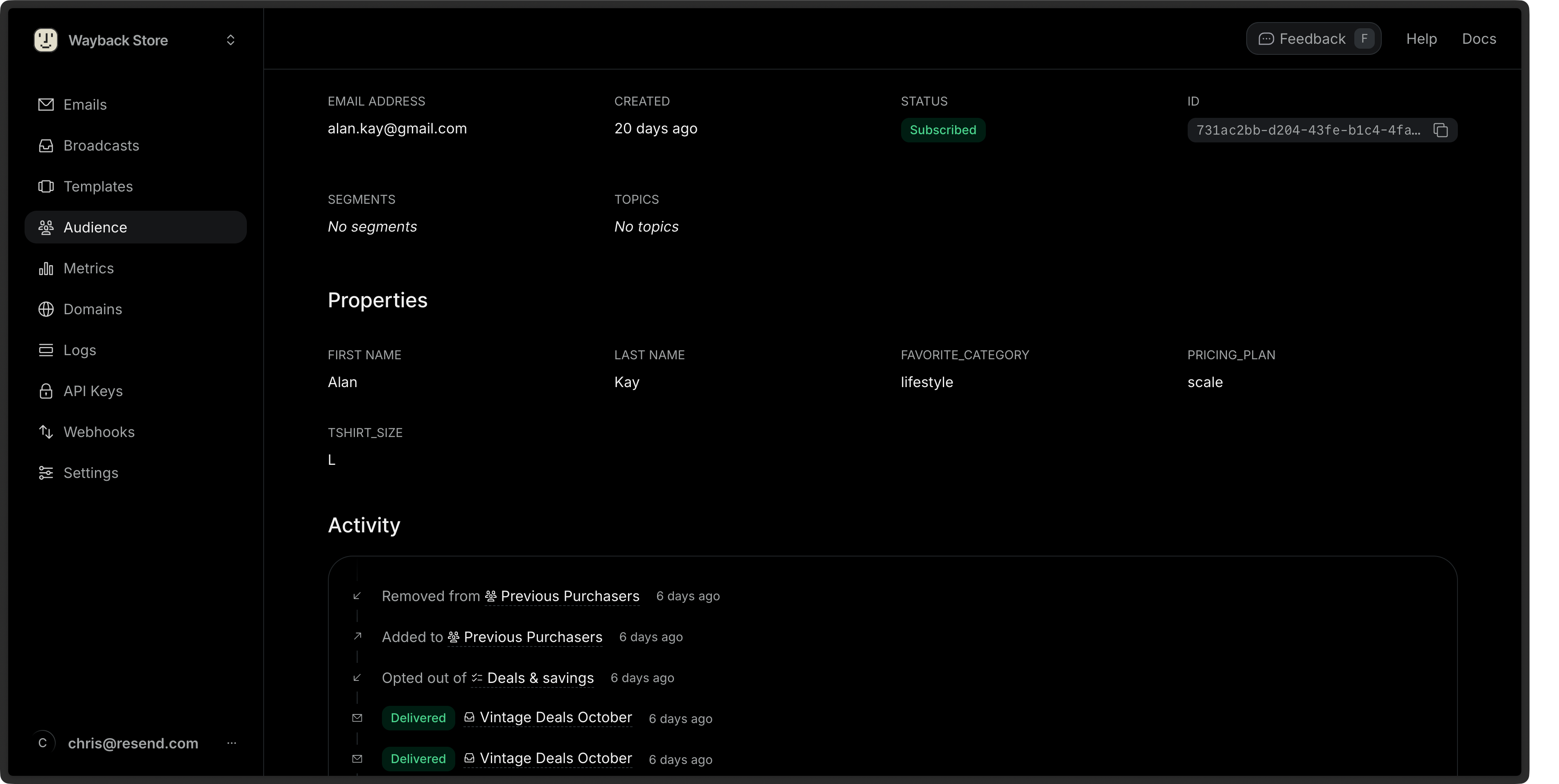 You can also retrieve a [single Contact](/api-reference/contacts/get-contact) or [list all Contacts](/api-reference/contacts/list-contacts) via the API or SDKs.
## Edit Contacts
1. Go to the [Contacts](https://resend.com/audience) page.
2. Click on the **More options** button and then **Edit Contact**.
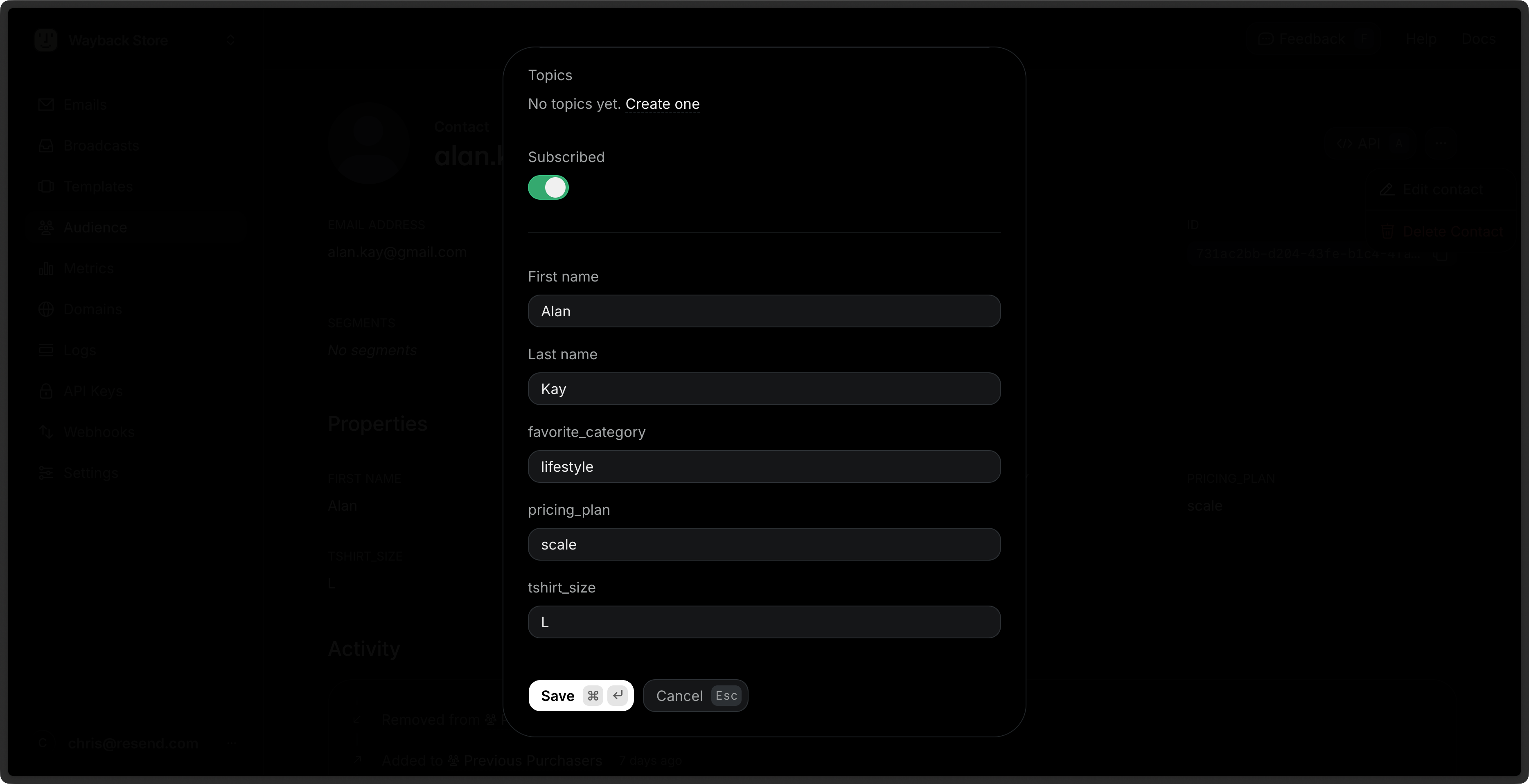
3. Edit the Contact details and choose **Save**.
You can edit any Contact property (excluding the email address), assign
the Contact to a [Segment](/dashboard/segments/introduction) or [Topic](/dashboard/topics/introduction), or unsubscribe the Contact from all Broadcasts.
You can also [update a Contact](/api-reference/contacts/update-contact) via the API or SDKs using the `id` or `email` of the Contact.
```ts Node.js theme={"theme":{"light":"github-light","dark":"vesper"}}
import { Resend } from 'resend';
const resend = new Resend('re_xxxxxxxxx');
// Update by contact id
const { data, error } = await resend.contacts.update({
id: 'e169aa45-1ecf-4183-9955-b1499d5701d3',
unsubscribed: true,
});
// Update by contact email
const { data, error } = await resend.contacts.update({
email: 'acme@example.com',
unsubscribed: true,
});
```
```php PHP theme={"theme":{"light":"github-light","dark":"vesper"}}
$resend = Resend::client('re_xxxxxxxxx');
// Update by contact id
$resend->contacts->update(
id: 'e169aa45-1ecf-4183-9955-b1499d5701d3',
parameters: [
'unsubscribed' => true
]
);
// Update by contact email
$resend->contacts->update(
email: 'acme@example.com',
parameters: [
'unsubscribed' => true
]
);
```
```python Python theme={"theme":{"light":"github-light","dark":"vesper"}}
import resend
resend.api_key = "re_xxxxxxxxx"
# Update by contact id
params: resend.Contacts.UpdateParams = {
"id": "e169aa45-1ecf-4183-9955-b1499d5701d3",
"unsubscribed": True,
}
resend.Contacts.update(params)
# Update by contact email
params: resend.Contacts.UpdateParams = {
"email": "acme@example.com",
"unsubscribed": True,
}
resend.Contacts.update(params)
```
```ruby Ruby theme={"theme":{"light":"github-light","dark":"vesper"}}
require "resend"
Resend.api_key = "re_xxxxxxxxx"
# Update by contact id
params = {
"id": "e169aa45-1ecf-4183-9955-b1499d5701d3",
"unsubscribed": true,
}
Resend::Contacts.update(params)
# Update by contact email
params = {
"email": "acme@example.com",
"unsubscribed": true,
}
Resend::Contacts.update(params)
```
```go Go theme={"theme":{"light":"github-light","dark":"vesper"}}
import "github.com/resend/resend-go/v3"
client := resend.NewClient("re_xxxxxxxxx")
// Update by contact id
params := &resend.UpdateContactRequest{
Id: "e169aa45-1ecf-4183-9955-b1499d5701d3",
Unsubscribed: true,
}
params.SetUnsubscribed(true)
contact, err := client.Contacts.Update(params)
// Update by contact email
params = &resend.UpdateContactRequest{
Email: "acme@example.com",
Unsubscribed: true,
}
params.SetUnsubscribed(true)
contact, err := client.Contacts.Update(params)
```
```rust Rust theme={"theme":{"light":"github-light","dark":"vesper"}}
use resend_rs::{types::ContactChanges, Resend, Result};
#[tokio::main]
async fn main() -> Result<()> {
let resend = Resend::new("re_xxxxxxxxx");
let changes = ContactChanges::new().with_unsubscribed(true);
// Update by contact id
let _contact = resend
.contacts
.update("e169aa45-1ecf-4183-9955-b1499d5701d3", changes.clone())
.await?;
// Update by contact email
let _contact = resend
.contacts
.update("acme@example.com", changes)
.await?;
Ok(())
}
```
```java Java theme={"theme":{"light":"github-light","dark":"vesper"}}
import com.resend.*;
public class Main {
public static void main(String[] args) {
Resend resend = new Resend("re_xxxxxxxxx");
// Update by contact id
UpdateContactOptions params = UpdateContactOptions.builder()
.id("e169aa45-1ecf-4183-9955-b1499d5701d3")
.unsubscribed(true)
.build();
// Update by contact email
UpdateContactOptions params = UpdateContactOptions.builder()
.email("acme@example.com")
.unsubscribed(true)
.build();
UpdateContactResponseSuccess data = resend.contacts().update(params);
}
}
```
```csharp .NET theme={"theme":{"light":"github-light","dark":"vesper"}}
using Resend;
IResend resend = ResendClient.Create( "re_xxxxxxxxx" ); // Or from DI
// By Id
await resend.ContactUpdateAsync(
contactId: new Guid( "e169aa45-1ecf-4183-9955-b1499d5701d3" ),
new ContactData()
{
FirstName = "Stevie",
LastName = "Wozniaks",
IsUnsubscribed = true,
}
);
// By Email
await resend.ContactUpdateByEmailAsync(
"acme@example.com",
new ContactData()
{
FirstName = "Stevie",
LastName = "Wozniaks",
IsUnsubscribed = true,
}
);
```
```bash cURL theme={"theme":{"light":"github-light","dark":"vesper"}}
# Update by contact id
curl -X PATCH 'https://api.resend.com/contacts/520784e2-887d-4c25-b53c-4ad46ad38100' \
-H 'Authorization: Bearer re_xxxxxxxxx' \
-H 'Content-Type: application/json' \
-d $'{
"unsubscribed": true
}'
# Update by contact email
curl -X PATCH 'https://api.resend.com/contacts/acme@example.com' \
-H 'Authorization: Bearer re_xxxxxxxxx' \
-H 'Content-Type: application/json' \
-d $'{
"unsubscribed": true
}'
```
## Bulk Actions
You can perform actions on multiple Contacts at once by selecting them from the [Contacts](https://resend.com/audience) page.
1. Go to the [Contacts](https://resend.com/audience) page.
2. Select multiple Contacts by clicking the checkbox next to each Contact.
3. Click the **Edit** button in the bulk actions bar.
4. Choose an action:
* **Add to segments**: Add the selected Contacts to one or more Segments.
* **Subscribe to topics**: Subscribe the selected Contacts to one or more Topics.
You can also delete multiple Contacts at once by clicking the **Delete** button in the bulk actions bar.
## Delete Contacts
1. Go to the [Contacts](https://resend.com/audience) page.
2. Click on the **More options** button and then **Delete Contact**.
3. Confirm the deletion.
You can also [delete a Contact](/api-reference/contacts/delete-contact) via the API or SDKs.
```ts Node.js theme={"theme":{"light":"github-light","dark":"vesper"}}
import { Resend } from 'resend';
const resend = new Resend('re_xxxxxxxxx');
// Delete by contact id
const { data, error } = await resend.contacts.remove({
id: '520784e2-887d-4c25-b53c-4ad46ad38100',
});
// Delete by contact email
const { data, error } = await resend.contacts.remove({
email: 'acme@example.com',
});
```
```php PHP theme={"theme":{"light":"github-light","dark":"vesper"}}
$resend = Resend::client('re_xxxxxxxxx');
// Delete by contact id
$resend->contacts->remove(
id: '520784e2-887d-4c25-b53c-4ad46ad38100'
);
// Delete by contact email
$resend->contacts->remove(
email: 'acme@example.com'
);
```
```python Python theme={"theme":{"light":"github-light","dark":"vesper"}}
import resend
resend.api_key = "re_xxxxxxxxx"
# Delete by contact id
resend.Contacts.remove(
id="520784e2-887d-4c25-b53c-4ad46ad38100"
)
# Delete by contact email
resend.Contacts.remove(
email="acme@example.com"
)
```
```ruby Ruby theme={"theme":{"light":"github-light","dark":"vesper"}}
require "resend"
Resend.api_key = "re_xxxxxxxxx"
# Delete by contact id
Resend::Contacts.remove(
"520784e2-887d-4c25-b53c-4ad46ad38100"
)
# Delete by contact email
Resend::Contacts.remove(
email: "acme@example.com",
)
```
```go Go theme={"theme":{"light":"github-light","dark":"vesper"}}
import "github.com/resend/resend-go/v3"
client := resend.NewClient("re_xxxxxxxxx")
// Delete by contact id
removed, err := client.Contacts.Remove(
"520784e2-887d-4c25-b53c-4ad46ad38100"
)
// Delete by contact email
removed, err := client.Contacts.Remove(
"acme@example.com"
)
```
```rust Rust theme={"theme":{"light":"github-light","dark":"vesper"}}
use resend_rs::{Resend, Result};
#[tokio::main]
async fn main() -> Result<()> {
let resend = Resend::new("re_xxxxxxxxx");
// Delete by contact id
let _deleted = resend
.contacts
.delete("520784e2-887d-4c25-b53c-4ad46ad38100")
.await?;
// Delete by contact email
let _deleted = resend
.contacts
.delete("acme@example.com")
.await?;
Ok(())
}
```
```java Java theme={"theme":{"light":"github-light","dark":"vesper"}}
import com.resend.*;
public class Main {
public static void main(String[] args) {
Resend resend = new Resend("re_xxxxxxxxx");
// Delete by contact id
resend.contacts().remove(ContactRequestOptions.builder()
.id("520784e2-887d-4c25-b53c-4ad46ad38100")
.build());
// Delete by contact email
resend.contacts().remove(ContactRequestOptions.builder()
.email("acme@example.com")
.build());
}
}
```
```csharp .NET theme={"theme":{"light":"github-light","dark":"vesper"}}
using Resend;
IResend resend = ResendClient.Create( "re_xxxxxxxxx" ); // Or from DI
// By Id
await resend.ContactDeleteAsync(
contactId: new Guid( "520784e2-887d-4c25-b53c-4ad46ad38100" )
);
// By Email
await resend.ContactDeleteByEmailAsync(
"acme@example.com"
);
```
```bash cURL theme={"theme":{"light":"github-light","dark":"vesper"}}
# Delete by contact id
curl -X DELETE 'https://api.resend.com/contacts/520784e2-887d-4c25-b53c-4ad46ad38100' \
-H 'Authorization: Bearer re_xxxxxxxxx'
# Deleted by contact email
curl -X DELETE 'https://api.resend.com/contacts/acme@example.com' \
-H 'Authorization: Bearer re_xxxxxxxxx'
```
You can also retrieve a [single Contact](/api-reference/contacts/get-contact) or [list all Contacts](/api-reference/contacts/list-contacts) via the API or SDKs.
## Edit Contacts
1. Go to the [Contacts](https://resend.com/audience) page.
2. Click on the **More options** button and then **Edit Contact**.
3. Edit the Contact details and choose **Save**.
You can edit any Contact property (excluding the email address), assign
the Contact to a [Segment](/dashboard/segments/introduction) or [Topic](/dashboard/topics/introduction), or unsubscribe the Contact from all Broadcasts.
You can also [update a Contact](/api-reference/contacts/update-contact) via the API or SDKs using the `id` or `email` of the Contact.
```ts Node.js theme={"theme":{"light":"github-light","dark":"vesper"}}
import { Resend } from 'resend';
const resend = new Resend('re_xxxxxxxxx');
// Update by contact id
const { data, error } = await resend.contacts.update({
id: 'e169aa45-1ecf-4183-9955-b1499d5701d3',
unsubscribed: true,
});
// Update by contact email
const { data, error } = await resend.contacts.update({
email: 'acme@example.com',
unsubscribed: true,
});
```
```php PHP theme={"theme":{"light":"github-light","dark":"vesper"}}
$resend = Resend::client('re_xxxxxxxxx');
// Update by contact id
$resend->contacts->update(
id: 'e169aa45-1ecf-4183-9955-b1499d5701d3',
parameters: [
'unsubscribed' => true
]
);
// Update by contact email
$resend->contacts->update(
email: 'acme@example.com',
parameters: [
'unsubscribed' => true
]
);
```
```python Python theme={"theme":{"light":"github-light","dark":"vesper"}}
import resend
resend.api_key = "re_xxxxxxxxx"
# Update by contact id
params: resend.Contacts.UpdateParams = {
"id": "e169aa45-1ecf-4183-9955-b1499d5701d3",
"unsubscribed": True,
}
resend.Contacts.update(params)
# Update by contact email
params: resend.Contacts.UpdateParams = {
"email": "acme@example.com",
"unsubscribed": True,
}
resend.Contacts.update(params)
```
```ruby Ruby theme={"theme":{"light":"github-light","dark":"vesper"}}
require "resend"
Resend.api_key = "re_xxxxxxxxx"
# Update by contact id
params = {
"id": "e169aa45-1ecf-4183-9955-b1499d5701d3",
"unsubscribed": true,
}
Resend::Contacts.update(params)
# Update by contact email
params = {
"email": "acme@example.com",
"unsubscribed": true,
}
Resend::Contacts.update(params)
```
```go Go theme={"theme":{"light":"github-light","dark":"vesper"}}
import "github.com/resend/resend-go/v3"
client := resend.NewClient("re_xxxxxxxxx")
// Update by contact id
params := &resend.UpdateContactRequest{
Id: "e169aa45-1ecf-4183-9955-b1499d5701d3",
Unsubscribed: true,
}
params.SetUnsubscribed(true)
contact, err := client.Contacts.Update(params)
// Update by contact email
params = &resend.UpdateContactRequest{
Email: "acme@example.com",
Unsubscribed: true,
}
params.SetUnsubscribed(true)
contact, err := client.Contacts.Update(params)
```
```rust Rust theme={"theme":{"light":"github-light","dark":"vesper"}}
use resend_rs::{types::ContactChanges, Resend, Result};
#[tokio::main]
async fn main() -> Result<()> {
let resend = Resend::new("re_xxxxxxxxx");
let changes = ContactChanges::new().with_unsubscribed(true);
// Update by contact id
let _contact = resend
.contacts
.update("e169aa45-1ecf-4183-9955-b1499d5701d3", changes.clone())
.await?;
// Update by contact email
let _contact = resend
.contacts
.update("acme@example.com", changes)
.await?;
Ok(())
}
```
```java Java theme={"theme":{"light":"github-light","dark":"vesper"}}
import com.resend.*;
public class Main {
public static void main(String[] args) {
Resend resend = new Resend("re_xxxxxxxxx");
// Update by contact id
UpdateContactOptions params = UpdateContactOptions.builder()
.id("e169aa45-1ecf-4183-9955-b1499d5701d3")
.unsubscribed(true)
.build();
// Update by contact email
UpdateContactOptions params = UpdateContactOptions.builder()
.email("acme@example.com")
.unsubscribed(true)
.build();
UpdateContactResponseSuccess data = resend.contacts().update(params);
}
}
```
```csharp .NET theme={"theme":{"light":"github-light","dark":"vesper"}}
using Resend;
IResend resend = ResendClient.Create( "re_xxxxxxxxx" ); // Or from DI
// By Id
await resend.ContactUpdateAsync(
contactId: new Guid( "e169aa45-1ecf-4183-9955-b1499d5701d3" ),
new ContactData()
{
FirstName = "Stevie",
LastName = "Wozniaks",
IsUnsubscribed = true,
}
);
// By Email
await resend.ContactUpdateByEmailAsync(
"acme@example.com",
new ContactData()
{
FirstName = "Stevie",
LastName = "Wozniaks",
IsUnsubscribed = true,
}
);
```
```bash cURL theme={"theme":{"light":"github-light","dark":"vesper"}}
# Update by contact id
curl -X PATCH 'https://api.resend.com/contacts/520784e2-887d-4c25-b53c-4ad46ad38100' \
-H 'Authorization: Bearer re_xxxxxxxxx' \
-H 'Content-Type: application/json' \
-d $'{
"unsubscribed": true
}'
# Update by contact email
curl -X PATCH 'https://api.resend.com/contacts/acme@example.com' \
-H 'Authorization: Bearer re_xxxxxxxxx' \
-H 'Content-Type: application/json' \
-d $'{
"unsubscribed": true
}'
```
## Bulk Actions
You can perform actions on multiple Contacts at once by selecting them from the [Contacts](https://resend.com/audience) page.
1. Go to the [Contacts](https://resend.com/audience) page.
2. Select multiple Contacts by clicking the checkbox next to each Contact.
3. Click the **Edit** button in the bulk actions bar.
4. Choose an action:
* **Add to segments**: Add the selected Contacts to one or more Segments.
* **Subscribe to topics**: Subscribe the selected Contacts to one or more Topics.
You can also delete multiple Contacts at once by clicking the **Delete** button in the bulk actions bar.
## Delete Contacts
1. Go to the [Contacts](https://resend.com/audience) page.
2. Click on the **More options** button and then **Delete Contact**.
3. Confirm the deletion.
You can also [delete a Contact](/api-reference/contacts/delete-contact) via the API or SDKs.
```ts Node.js theme={"theme":{"light":"github-light","dark":"vesper"}}
import { Resend } from 'resend';
const resend = new Resend('re_xxxxxxxxx');
// Delete by contact id
const { data, error } = await resend.contacts.remove({
id: '520784e2-887d-4c25-b53c-4ad46ad38100',
});
// Delete by contact email
const { data, error } = await resend.contacts.remove({
email: 'acme@example.com',
});
```
```php PHP theme={"theme":{"light":"github-light","dark":"vesper"}}
$resend = Resend::client('re_xxxxxxxxx');
// Delete by contact id
$resend->contacts->remove(
id: '520784e2-887d-4c25-b53c-4ad46ad38100'
);
// Delete by contact email
$resend->contacts->remove(
email: 'acme@example.com'
);
```
```python Python theme={"theme":{"light":"github-light","dark":"vesper"}}
import resend
resend.api_key = "re_xxxxxxxxx"
# Delete by contact id
resend.Contacts.remove(
id="520784e2-887d-4c25-b53c-4ad46ad38100"
)
# Delete by contact email
resend.Contacts.remove(
email="acme@example.com"
)
```
```ruby Ruby theme={"theme":{"light":"github-light","dark":"vesper"}}
require "resend"
Resend.api_key = "re_xxxxxxxxx"
# Delete by contact id
Resend::Contacts.remove(
"520784e2-887d-4c25-b53c-4ad46ad38100"
)
# Delete by contact email
Resend::Contacts.remove(
email: "acme@example.com",
)
```
```go Go theme={"theme":{"light":"github-light","dark":"vesper"}}
import "github.com/resend/resend-go/v3"
client := resend.NewClient("re_xxxxxxxxx")
// Delete by contact id
removed, err := client.Contacts.Remove(
"520784e2-887d-4c25-b53c-4ad46ad38100"
)
// Delete by contact email
removed, err := client.Contacts.Remove(
"acme@example.com"
)
```
```rust Rust theme={"theme":{"light":"github-light","dark":"vesper"}}
use resend_rs::{Resend, Result};
#[tokio::main]
async fn main() -> Result<()> {
let resend = Resend::new("re_xxxxxxxxx");
// Delete by contact id
let _deleted = resend
.contacts
.delete("520784e2-887d-4c25-b53c-4ad46ad38100")
.await?;
// Delete by contact email
let _deleted = resend
.contacts
.delete("acme@example.com")
.await?;
Ok(())
}
```
```java Java theme={"theme":{"light":"github-light","dark":"vesper"}}
import com.resend.*;
public class Main {
public static void main(String[] args) {
Resend resend = new Resend("re_xxxxxxxxx");
// Delete by contact id
resend.contacts().remove(ContactRequestOptions.builder()
.id("520784e2-887d-4c25-b53c-4ad46ad38100")
.build());
// Delete by contact email
resend.contacts().remove(ContactRequestOptions.builder()
.email("acme@example.com")
.build());
}
}
```
```csharp .NET theme={"theme":{"light":"github-light","dark":"vesper"}}
using Resend;
IResend resend = ResendClient.Create( "re_xxxxxxxxx" ); // Or from DI
// By Id
await resend.ContactDeleteAsync(
contactId: new Guid( "520784e2-887d-4c25-b53c-4ad46ad38100" )
);
// By Email
await resend.ContactDeleteByEmailAsync(
"acme@example.com"
);
```
```bash cURL theme={"theme":{"light":"github-light","dark":"vesper"}}
# Delete by contact id
curl -X DELETE 'https://api.resend.com/contacts/520784e2-887d-4c25-b53c-4ad46ad38100' \
-H 'Authorization: Bearer re_xxxxxxxxx'
# Deleted by contact email
curl -X DELETE 'https://api.resend.com/contacts/acme@example.com' \
-H 'Authorization: Bearer re_xxxxxxxxx'
```
 Resend includes a few default properties:
* `first_name`: The first name of the contact.
* `last_name`: The last name of the contact.
* `unsubscribed`: Whether the contact is unsubscribed from all Broadcasts.
* `email`: The email address of the contact.
You can create additional custom Contact Properties for your Contacts to store additional information. These properties can be used to personalize your Broadcasts across all Segments.
Learn more about [Contact Properties](/dashboard/audiences/properties).
## View Contacts
You can view your Contacts in the [Contacts](https://resend.com/audience) page.
1. Go to the [Contacts](https://resend.com/audience) page.
2. Click on the Contact you want to view.
3. View the Contact details.
Each Contact includes the metadata associated with the contact, as well as a full history of all marketing interactions with the Contact.
Resend includes a few default properties:
* `first_name`: The first name of the contact.
* `last_name`: The last name of the contact.
* `unsubscribed`: Whether the contact is unsubscribed from all Broadcasts.
* `email`: The email address of the contact.
You can create additional custom Contact Properties for your Contacts to store additional information. These properties can be used to personalize your Broadcasts across all Segments.
Learn more about [Contact Properties](/dashboard/audiences/properties).
## View Contacts
You can view your Contacts in the [Contacts](https://resend.com/audience) page.
1. Go to the [Contacts](https://resend.com/audience) page.
2. Click on the Contact you want to view.
3. View the Contact details.
Each Contact includes the metadata associated with the contact, as well as a full history of all marketing interactions with the Contact.