---
title: "Email Metrics API"
slug: email-metrics-api
description: "Get deliverability and engagement metrics through the new Email Metrics API."
created_at: "2026-08-27"
updated_at: "2026-08-27"
image: https://cdn.resend.com/posts/email-metrics-api.jpg
humans: ["diel-duarte"]
---
Today we are releasing the new [Email Metrics API](https://resend.com/docs/api-reference/emails/get-metrics).
Get data about your emails, from the send volume to unsubscribe rate, grouped or filtered by the period, domain, broadcast, or email.
This data enables you to build:
* **custom dashboards** showing your deliverability and reputation metrics
* **reports** that summarize campaign performance
* **alerts** to notify you if bounce or complaint rates spike
Try hooking your agent up to the [Resend MCP server](/docs/mcp-server) and asking:
```plaintext copy wrap
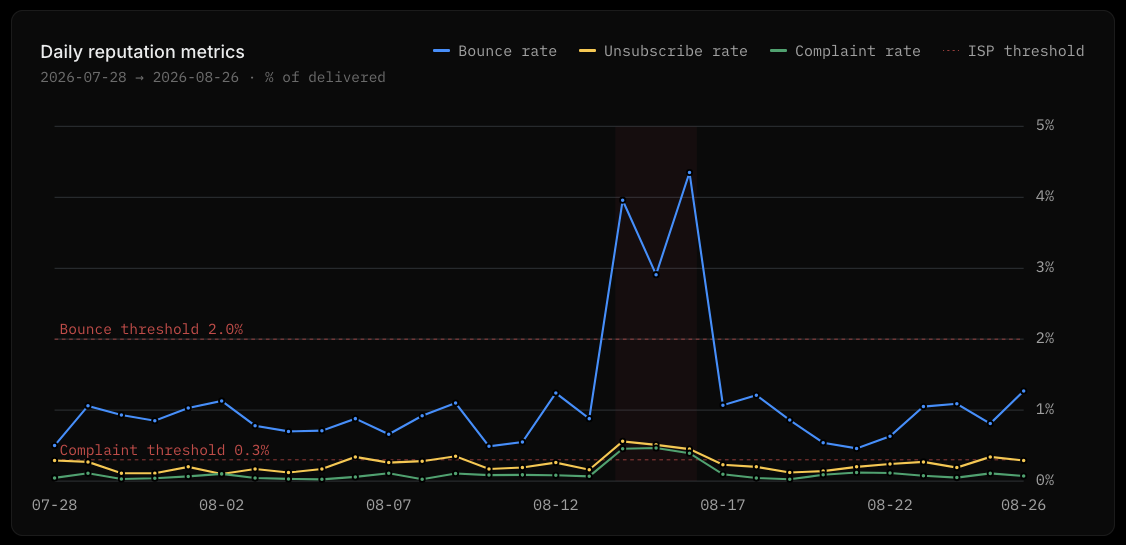
Chart our sender reputation risk over the last 30 days: bounce rate, unsubscribe rate, and complaint rate as percentages of delivered. Flag if any metric crossed the Gmail/Yahoo thresholds.
```
Your agent will build out a custom dashboard showing you those deliverability metrics plotted against industry thresholds.
 ## How it works
A new API endpoint is available: `/emails/metrics`.
Making a request with no parameters returns all metrics for all of your emails over the past 7 days.
```nodejs
import { Resend } from 'resend';
const resend = new Resend('re_xxxxxxxxx');
const { data } = await resend.emails.metrics()
```
```php
$resend = Resend::client('re_xxxxxxxxx');
$metrics = $resend->emails->metrics();
```
```python
import resend
resend.api_key = "re_xxxxxxxxx"
metrics = resend.Emails.metrics()
```
```ruby
require "resend"
Resend.api_key = "re_xxxxxxxxx"
metrics = Resend::Emails.metrics
```
```go
import "github.com/resend/resend-go/v3"
func main() {
client := resend.NewClient("re_xxxxxxxxx")
metrics, _ := client.Emails.Metrics()
}
```
```rust
use resend_rs::{Resend, Result};
#[tokio::main]
async fn main() -> Result<()> {
let resend = Resend::new("re_xxxxxxxxx");
let _metrics = resend.emails.metrics().await?;
Ok(())
}
```
```java
Resend resend = new Resend("re_xxxxxxxxx");
EmailsMetricsResponse data = resend.emails().metrics();
```
```dotnet
using Resend;
IResend resend = ResendClient.Create( "re_xxxxxxxxx" );
await resend.EmailMetricsAsync();
```
```curl
curl -X GET 'https://api.resend.com/emails/metrics' \
-H 'Authorization: Bearer re_xxxxxxxxx'
```
```cli
resend emails metrics
```
The response will look like this, with the totals for each metric over the period.
```json wrap
{
"object": "metrics",
"start_date": "2026-08-20T06:30:00.000Z",
"end_date": "2026-08-26T06:30:00.000Z",
"metrics": ["received", "delivered", "complained", "suppressed", "bounced", "bounced_transient", "bounced_permanent", "bounced_undetermined", "opened", "clicked", "unsubscribed", "delivery_delayed", "failed", "sent", "unique_opened", "unique_clicked", "delivery_rate", "open_rate", "click_rate", "bounce_rate", "complaint_rate", "unsubscribe_rate"
],
"dimensions": [],
"granularity": "daily",
"totals": {
"received": 0,
"delivered": 0,
"complained": 0,
"suppressed": 0,
"bounced": 0,
"bounced_transient": 0,
"bounced_permanent": 0,
"bounced_undetermined": 0,
"opened": 0,
"clicked": 0,
"unsubscribed": 0,
"delivery_delayed": 0,
"failed": 0,
"sent": 0,
"unique_opened": 0,
"unique_clicked": 0,
"delivery_rate": 0,
"open_rate": 0,
"click_rate": 0,
"bounce_rate": 0,
"complaint_rate": 0,
"unsubscribe_rate": 0
}
}
```
## Filtering and grouping
There are three components to the metrics API:
* **filters** (`start_date`, `end_date`, `timezone`): these help you restrict the time period over which the metrics are returned. The `start_date` can go back as far as your account retains data.
* **metrics**: these are **the numbers you want to see**. By default the API returns all the metrics available, but you can restrict the metrics returned. For example, to retrieve the open and click rate only, pass `metrics=opened,clicked`.
* **dimensions**: these are ways to **group the metrics**. For example, you can group by period, then set the granularity to "hourly" and you would see a group of metrics for each hour in the period.
Read more about the available parameters in the [Email Metrics API documentation](/docs/api-reference/emails/get-metrics#query-parameters).
To list the sent and delivered metrics for each domain over the last day, broken down by hour like this, make a request like:
```nodejs
import { Resend } from 'resend';
const resend = new Resend('re_xxxxxxxxx');
const { data } = await resend.emails.metrics({
startDate: '2026-08-25',
endDate: '2026-08-26',
granularity: 'hourly',
metrics: ['sent', 'delivered'],
dimensions: ['period', 'domain'],
})
```
```php
$resend = Resend::client('re_xxxxxxxxx');
$metrics = $resend->emails->metrics([
'start_date' => '2026-08-25',
'end_date' => '2026-08-26',
'granularity' => 'hourly',
'metrics' => ['sent', 'delivered'],
'dimensions' => ['period', 'domain'],
]);
```
```python
import resend
resend.api_key = "re_xxxxxxxxx"
params: resend.Emails.MetricsParams = {
"start_date": "2026-08-25",
"end_date": "2026-08-26",
"granularity": "hourly",
"metrics": ["sent", "delivered"],
"dimensions": ["period", "domain"],
}
metrics = resend.Emails.metrics(params)
```
```ruby
require "resend"
Resend.api_key = "re_xxxxxxxxx"
params = {
start_date: "2026-08-25",
end_date: "2026-08-26",
granularity: "hourly",
metrics: ["sent", "delivered"],
dimensions: ["period", "domain"]
}
metrics = Resend::Emails.metrics(params)
```
```go
import (
"context"
"github.com/resend/resend-go/v3"
)
func main() {
ctx := context.TODO()
client := resend.NewClient("re_xxxxxxxxx")
startDate := "2026-08-25"
endDate := "2026-08-26"
metrics, _ := client.Emails.MetricsWithOptions(ctx, &resend.MetricsOptions{
StartDate: &startDate,
EndDate: &endDate,
Granularity: resend.MetricsGranularityHourly,
Metrics: []resend.Metric{
resend.MetricSent,
resend.MetricDelivered,
},
Dimensions: []resend.MetricsDimension{
resend.MetricsDimensionPeriod,
resend.MetricsDimensionDomain,
},
})
}
```
```rust
use resend_rs::types::{GetEmailMetricsOptions, Metric, MetricsGranularity};
use resend_rs::{Resend, Result};
#[tokio::main]
async fn main() -> Result<()> {
let resend = Resend::new("re_xxxxxxxxx");
let options = GetEmailMetricsOptions::default()
.with_start_date("2026-08-25")
.with_end_date("2026-08-26")
.with_granularity(MetricsGranularity::Hourly)
.with_metrics([Metric::Sent, Metric::Delivered])
.with_period_dimension()
.with_domain_dimension();
let _metrics = resend.emails.metrics(options).await?;
Ok(())
}
```
```java
Resend resend = new Resend("re_xxxxxxxxx");
GetEmailsMetricsOptions options = GetEmailsMetricsOptions.builder()
.startDate("2026-08-25")
.endDate("2026-08-26")
.granularity(MetricsGranularity.HOURLY)
.metrics(MetricName.SENT, MetricName.DELIVERED)
.dimensions(MetricsDimension.PERIOD, MetricsDimension.DOMAIN)
.build();
EmailsMetricsResponse data = resend.emails().metrics(options);
```
```dotnet
using Resend;
IResend resend = ResendClient.Create( "re_xxxxxxxxx" );
await resend.EmailMetricsAsync( new EmailMetricsQuery()
{
StartDate = new DateTime( 2026, 8, 25 ),
EndDate = new DateTime( 2026, 8, 26 ),
Granularity = MetricsGranularity.Hourly,
Metrics = new List { MetricType.Sent, MetricType.Delivered },
Dimensions = new List { MetricDimension.Period, MetricDimension.Domain },
} );
```
```curl
curl -X GET 'https://api.resend.com/emails/metrics?start_date=2026-08-25&end_date=2026-08-26&granularity=hourly&metrics=sent,delivered&dimensions=period,domain' \
-H 'Authorization: Bearer re_xxxxxxxxx'
```
```cli
resend emails metrics --start-date 2026-08-25 --end-date 2026-08-26 --granularity hourly --metrics sent,delivered --dimensions period,domain
```
When you choose dimensions to partition the data, the data array shows each group. For instance, in the example response below the data is grouped by both `domain` and `hour` because the dimensions "period" and "domain" were selected and the granularity was set to "hourly".
```json
{
"object": "metrics",
"start_date": "2026-08-25T06:30:00.000Z",
"end_date": "2026-08-26T06:30:00.000Z",
"metrics": [
"sent",
"delivered"
],
"dimensions": [
"period",
"domain"
],
"granularity": "hourly",
"totals": {
"sent": 10,
"delivered": 10
},
"data": [
{
"period": "2026-08-25T06:00:00.000Z",
"domain_id": "2a3a2d12-cfbf-4179-b2bd-802975ead309",
"domain_name": "example.com",
"sent": 10,
"delivered": 10
}
]
}
```
These metrics APIs are part of a larger move to bring the full functionality of the dashboard into the API, CLI, and MCP, so you can build how you want or experience the data through your agent.
## How it works
A new API endpoint is available: `/emails/metrics`.
Making a request with no parameters returns all metrics for all of your emails over the past 7 days.
```nodejs
import { Resend } from 'resend';
const resend = new Resend('re_xxxxxxxxx');
const { data } = await resend.emails.metrics()
```
```php
$resend = Resend::client('re_xxxxxxxxx');
$metrics = $resend->emails->metrics();
```
```python
import resend
resend.api_key = "re_xxxxxxxxx"
metrics = resend.Emails.metrics()
```
```ruby
require "resend"
Resend.api_key = "re_xxxxxxxxx"
metrics = Resend::Emails.metrics
```
```go
import "github.com/resend/resend-go/v3"
func main() {
client := resend.NewClient("re_xxxxxxxxx")
metrics, _ := client.Emails.Metrics()
}
```
```rust
use resend_rs::{Resend, Result};
#[tokio::main]
async fn main() -> Result<()> {
let resend = Resend::new("re_xxxxxxxxx");
let _metrics = resend.emails.metrics().await?;
Ok(())
}
```
```java
Resend resend = new Resend("re_xxxxxxxxx");
EmailsMetricsResponse data = resend.emails().metrics();
```
```dotnet
using Resend;
IResend resend = ResendClient.Create( "re_xxxxxxxxx" );
await resend.EmailMetricsAsync();
```
```curl
curl -X GET 'https://api.resend.com/emails/metrics' \
-H 'Authorization: Bearer re_xxxxxxxxx'
```
```cli
resend emails metrics
```
The response will look like this, with the totals for each metric over the period.
```json wrap
{
"object": "metrics",
"start_date": "2026-08-20T06:30:00.000Z",
"end_date": "2026-08-26T06:30:00.000Z",
"metrics": ["received", "delivered", "complained", "suppressed", "bounced", "bounced_transient", "bounced_permanent", "bounced_undetermined", "opened", "clicked", "unsubscribed", "delivery_delayed", "failed", "sent", "unique_opened", "unique_clicked", "delivery_rate", "open_rate", "click_rate", "bounce_rate", "complaint_rate", "unsubscribe_rate"
],
"dimensions": [],
"granularity": "daily",
"totals": {
"received": 0,
"delivered": 0,
"complained": 0,
"suppressed": 0,
"bounced": 0,
"bounced_transient": 0,
"bounced_permanent": 0,
"bounced_undetermined": 0,
"opened": 0,
"clicked": 0,
"unsubscribed": 0,
"delivery_delayed": 0,
"failed": 0,
"sent": 0,
"unique_opened": 0,
"unique_clicked": 0,
"delivery_rate": 0,
"open_rate": 0,
"click_rate": 0,
"bounce_rate": 0,
"complaint_rate": 0,
"unsubscribe_rate": 0
}
}
```
## Filtering and grouping
There are three components to the metrics API:
* **filters** (`start_date`, `end_date`, `timezone`): these help you restrict the time period over which the metrics are returned. The `start_date` can go back as far as your account retains data.
* **metrics**: these are **the numbers you want to see**. By default the API returns all the metrics available, but you can restrict the metrics returned. For example, to retrieve the open and click rate only, pass `metrics=opened,clicked`.
* **dimensions**: these are ways to **group the metrics**. For example, you can group by period, then set the granularity to "hourly" and you would see a group of metrics for each hour in the period.
Read more about the available parameters in the [Email Metrics API documentation](/docs/api-reference/emails/get-metrics#query-parameters).
To list the sent and delivered metrics for each domain over the last day, broken down by hour like this, make a request like:
```nodejs
import { Resend } from 'resend';
const resend = new Resend('re_xxxxxxxxx');
const { data } = await resend.emails.metrics({
startDate: '2026-08-25',
endDate: '2026-08-26',
granularity: 'hourly',
metrics: ['sent', 'delivered'],
dimensions: ['period', 'domain'],
})
```
```php
$resend = Resend::client('re_xxxxxxxxx');
$metrics = $resend->emails->metrics([
'start_date' => '2026-08-25',
'end_date' => '2026-08-26',
'granularity' => 'hourly',
'metrics' => ['sent', 'delivered'],
'dimensions' => ['period', 'domain'],
]);
```
```python
import resend
resend.api_key = "re_xxxxxxxxx"
params: resend.Emails.MetricsParams = {
"start_date": "2026-08-25",
"end_date": "2026-08-26",
"granularity": "hourly",
"metrics": ["sent", "delivered"],
"dimensions": ["period", "domain"],
}
metrics = resend.Emails.metrics(params)
```
```ruby
require "resend"
Resend.api_key = "re_xxxxxxxxx"
params = {
start_date: "2026-08-25",
end_date: "2026-08-26",
granularity: "hourly",
metrics: ["sent", "delivered"],
dimensions: ["period", "domain"]
}
metrics = Resend::Emails.metrics(params)
```
```go
import (
"context"
"github.com/resend/resend-go/v3"
)
func main() {
ctx := context.TODO()
client := resend.NewClient("re_xxxxxxxxx")
startDate := "2026-08-25"
endDate := "2026-08-26"
metrics, _ := client.Emails.MetricsWithOptions(ctx, &resend.MetricsOptions{
StartDate: &startDate,
EndDate: &endDate,
Granularity: resend.MetricsGranularityHourly,
Metrics: []resend.Metric{
resend.MetricSent,
resend.MetricDelivered,
},
Dimensions: []resend.MetricsDimension{
resend.MetricsDimensionPeriod,
resend.MetricsDimensionDomain,
},
})
}
```
```rust
use resend_rs::types::{GetEmailMetricsOptions, Metric, MetricsGranularity};
use resend_rs::{Resend, Result};
#[tokio::main]
async fn main() -> Result<()> {
let resend = Resend::new("re_xxxxxxxxx");
let options = GetEmailMetricsOptions::default()
.with_start_date("2026-08-25")
.with_end_date("2026-08-26")
.with_granularity(MetricsGranularity::Hourly)
.with_metrics([Metric::Sent, Metric::Delivered])
.with_period_dimension()
.with_domain_dimension();
let _metrics = resend.emails.metrics(options).await?;
Ok(())
}
```
```java
Resend resend = new Resend("re_xxxxxxxxx");
GetEmailsMetricsOptions options = GetEmailsMetricsOptions.builder()
.startDate("2026-08-25")
.endDate("2026-08-26")
.granularity(MetricsGranularity.HOURLY)
.metrics(MetricName.SENT, MetricName.DELIVERED)
.dimensions(MetricsDimension.PERIOD, MetricsDimension.DOMAIN)
.build();
EmailsMetricsResponse data = resend.emails().metrics(options);
```
```dotnet
using Resend;
IResend resend = ResendClient.Create( "re_xxxxxxxxx" );
await resend.EmailMetricsAsync( new EmailMetricsQuery()
{
StartDate = new DateTime( 2026, 8, 25 ),
EndDate = new DateTime( 2026, 8, 26 ),
Granularity = MetricsGranularity.Hourly,
Metrics = new List { MetricType.Sent, MetricType.Delivered },
Dimensions = new List { MetricDimension.Period, MetricDimension.Domain },
} );
```
```curl
curl -X GET 'https://api.resend.com/emails/metrics?start_date=2026-08-25&end_date=2026-08-26&granularity=hourly&metrics=sent,delivered&dimensions=period,domain' \
-H 'Authorization: Bearer re_xxxxxxxxx'
```
```cli
resend emails metrics --start-date 2026-08-25 --end-date 2026-08-26 --granularity hourly --metrics sent,delivered --dimensions period,domain
```
When you choose dimensions to partition the data, the data array shows each group. For instance, in the example response below the data is grouped by both `domain` and `hour` because the dimensions "period" and "domain" were selected and the granularity was set to "hourly".
```json
{
"object": "metrics",
"start_date": "2026-08-25T06:30:00.000Z",
"end_date": "2026-08-26T06:30:00.000Z",
"metrics": [
"sent",
"delivered"
],
"dimensions": [
"period",
"domain"
],
"granularity": "hourly",
"totals": {
"sent": 10,
"delivered": 10
},
"data": [
{
"period": "2026-08-25T06:00:00.000Z",
"domain_id": "2a3a2d12-cfbf-4179-b2bd-802975ead309",
"domain_name": "example.com",
"sent": 10,
"delivered": 10
}
]
}
```
These metrics APIs are part of a larger move to bring the full functionality of the dashboard into the API, CLI, and MCP, so you can build how you want or experience the data through your agent.